
Done recording and editing your podcast episode? Perfect! Now, it’s time for the next step because the work is never really done unless you’ve shared your show with your audiences.
This guide will walk you through the full process of how to upload a podcast in 2026, from Spotify to Apple Podcasts, YouTube, and more.
Whether you’re just about to start a podcast or ready to grow your audience, you’ll learn the easiest ways to get your voice heard.
Let’s dive right in and get your podcast live for listeners everywhere.
How to Upload Your Podcast (Overview)
Before jumping into the details of each platform, here’s a quick comparison table showing what you’ll need to upload your podcast to popular platforms.
This helps you understand differences in supported formats, metadata requirements, and the hosting needed.
| Platform | Required file format | Metadata needed | RSS feed hosting? | Notes |
| Spotify | MP3, WAV, M4A | Title, description, cover art, tags | With RSS feed | Uses Spotify for Podcasters as a dashboard |
| Apple Podcasts | MP3, WAV | Show title, category, tags | Yes (via RSS feed) | Must submit your podcast for approval |
| YouTube | MP4, MOV | Title, description, thumbnail | No | Popular for uploading video podcasts |
| Amazon Music | MP3, MP4 | Title, description, cover art | Yes (via RSS feed) | Submit feed to Amazon Music |
| Castbox | MP3 | Title, description, cover art | Yes (via RSS feed) | Accepts manual or distributed feeds |
| SoundCloud | MP3, WAV | Title, description, tags | Hosting on SoundCloud | Hosting and a directory in one |
| Jiosaavn | MP3 | Title, description, cover art | Yes (via RSS feed) | Have to go through the submission process |
| Buzzsprout | MP3, WAV | Title, description, cover art | Hosting on Buzzsprout | All-in-one hosting and publishing platform |
| PodBean | MP3, WAV | Title, description, cover art | Hosting on PodBean | Hosting and publishing platform |
Most platforms rely on a podcast hosting platform to generate your RSS feed, which is essential for sharing your podcast episodes with directories like Apple Podcasts and Spotify.
How to Upload a Podcast In Spotify
If there’s one platform creators prioritize, it’s Spotify. It’s one of the top podcast directories that makes it easy to upload and publish a podcast on Spotify.
Whether you want to start a podcast on Spotify or publish a new episode, this guide on how to upload to Spotify has everything you need to know.
How to upload your podcast on Spotify
Uploading a podcast to Spotify begins with creating an account and submitting your podcast RSS feed URL.
Here’s how to upload your podcast to Spotify:
- Sign up for a podcast on Spotify for Creators using your Spotify account.
- Click “Submit your show” to start the process.
- Paste your show’s RSS feed from your podcast hosting platform.
- Verify your email and podcast details.
- Select your language, country, and category.
- Click “Submit” to finalize your request.
- Once you’ve submitted your podcast, Spotify will review it.
- Wait for confirmation that your podcast is live.
How to upload a podcast episode to Spotify for Creators
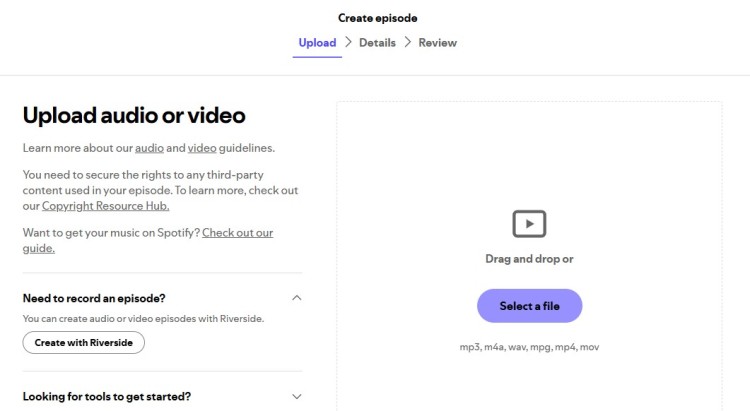
Spotify doesn’t let you upload episodes directly. New episodes are added through your podcast hosting platform, like Spotify for Creators. Learn how to upload your show with these steps:
- Log in to Spotify for Creators.
- Go to your show dashboard.
- Click “Upload your audio” or import from your hosting provider.
- Add your podcast episode title, description, and artwork.
- Schedule or publish immediately.
- Hit “Publish your episode.”
How to add a podcast on Spotify
If you’re launching a new show or adding a different podcast under your account, this is what you’ll do:
- Log in to Spotify for Creators.
- Go to “Your Podcasts” and select “Add New Show.”
- Paste your RSS feed URL or upload manually.
- Fill out podcast details and categories.
- Submit and wait for approval.
How to upload an audio podcast on Spotify
Uploading an audio podcast involves submitting your RSS feed from your hosting service. Here’s how:
- Make sure your audio file is an MP3 or M4A.
- Upload your episode to your podcast hosting company dashboard.
- The hosting platform updates your RSS feed URL.
- Submit the feed URL on Spotify for Creators.
- Spotify pulls your latest episodes automatically.
Meanwhile, for video podcasts (that Spotify now supports):
- Create an MP4 video format file.
- Upload the video file directly to your Sportify for Creators dashboard.
- Add metadata needed, like episode title, descriptions and cover art.
- Schedule or publish the episode.
- Wait for your new upload to reflect in the platform.
Learn more about video podcast platforms to handle this format properly.
How to upload a podcast on Spotify for free
Spotify offers a free platform for podcasters, meaning:
- No fees to list your show and reach a global audience.
- Access to analytics for tracking listeners.
- Ability to manage your podcast profile.
- Easy submission to other podcast directories.
The catch: You still need a podcast hosting platform to store and distribute your files, which may have costs.
How to Upload a Podcast to Multiple Platforms
Want to show up on major platforms like YouTube, Apple Podcasts, or Google Podcasts?
You can upload your podcast directly to each platform or make your life easier by using podcast distributors or a podcast hosting service.
They syndicate your podcast feed automatically to platforms so you can publish your show across multiple directories all at once.
Let’s explore each process so you can decide what’s best for your show.
How to upload a podcast to Apple Podcasts
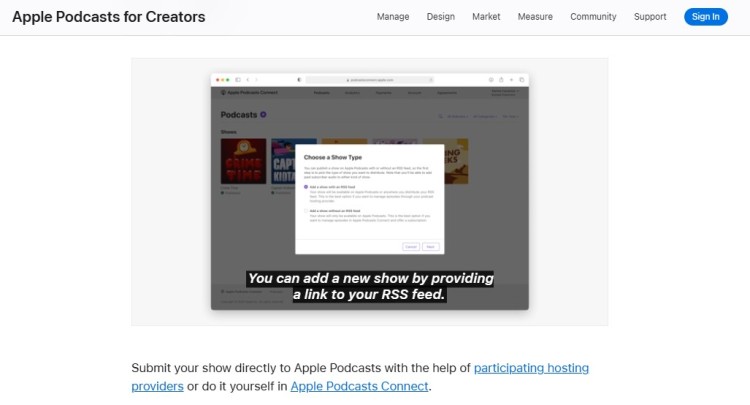
Apple Podcasts is one of the biggest directories, and submission is free but requires careful setup:
- Create an Apple ID if you don’t have one.
- Log in to Apple Podcasts Connect.
- Submit your podcast RSS feed URL from your host.
- Review your show info and submit for approval.
- Wait for Apple to review and approve. This can take a few days.
- Once approved, your podcast will appear for millions of listeners.
How to upload a podcast to iTunes
iTunes has been renamed as Apple Podcasts, but the process is identical.
- Submit via Apple Podcasts Connect.
- Your RSS feed powers Apple Podcasts listings.
- Keep your feed updated with new episodes.
How to upload a podcast to YouTube
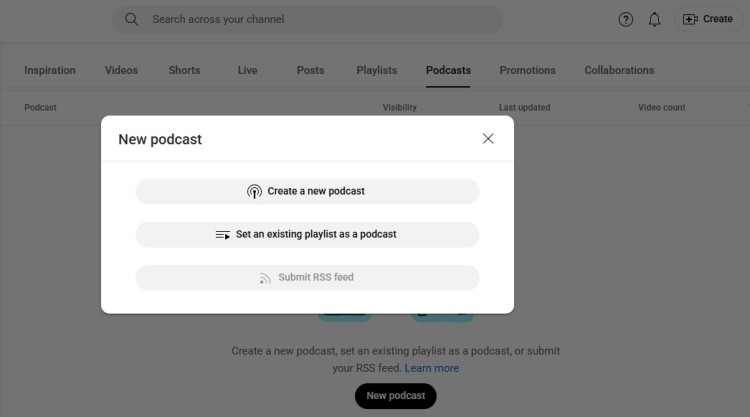
YouTube doesn’t automatically support RSS feeds, so you upload episodes manually for your new podcast. Here’s how you can host your podcast on YouTube:
- Log in to YouTube and open YouTube Studio.
- Click “Create” then “Upload your show.”
- Upload your video file.
- Add cards or next video or playlist prompts at the end credits.
- Add your podcast title, description, and thumbnail.
- Create a podcast playlist to group episodes.
- Add tags to boost discoverability.
- Publish or schedule your new episode.
How to upload a podcast to Amazon Music
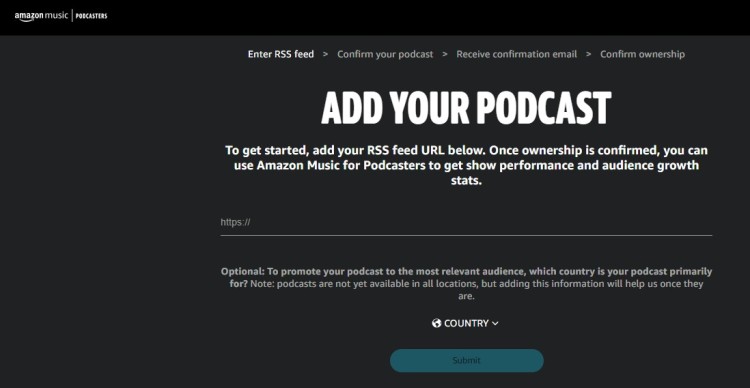
Amazon Music requires submitting your podcast RSS feed:
- Go to the Amazon Music for Podcasters portal.
- Sign in with your Amazon account.
- Submit your RSS feed URL.
- Verify ownership for your show.
- Confirm details and submit.
- Wait until your podcast is reviewed and goes live on Amazon Music.
How to upload a podcast on Castbox
Castbox allows you to upload by submitting your RSS feed:
- Sign up at Castbox for Podcasters.
- Add your RSS feed URL in the dashboard.
- Verify your ownership.
- Publish your show on Castbox’s app and directory.
How to upload a podcast to SoundCloud
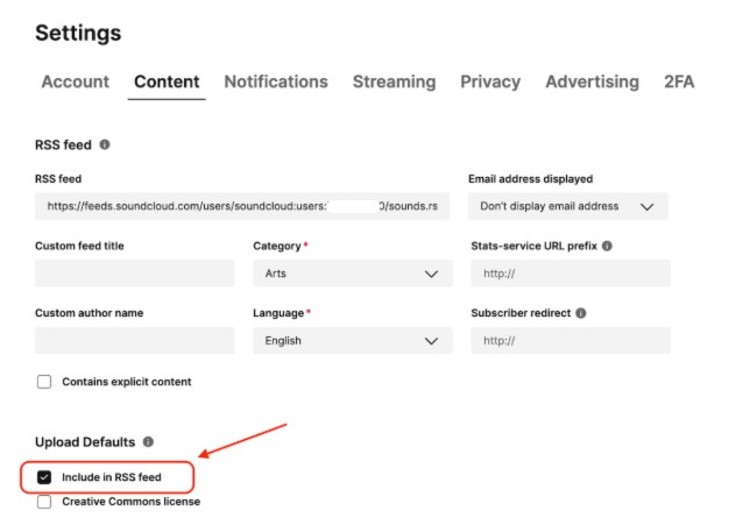
SoundCloud acts as both a host and a directory:
- Create a SoundCloud account.
- Select “Upload” from the menu.
- Upload your podcast audio file (MP3, WAV).
- Add episode details: title, description, artwork.
- Publish your episode.
- Enable RSS in settings to distribute.
- Share your SoundCloud podcast link to other platforms.
How to upload a podcast on JioSaavn
JioSaavn is an Indian music and audio streaming platform that also supports podcasts. Here’s how you can submit to JioSaavn:
- Contact Jiosaavn’s podcast team or use their podcast submission form.
- Provide your podcast details and RSS feed URL.
- Wait for approval.
- After approval, your podcast can be streamed on Jiosaavn.
How to upload a podcast to Buzzsprout
Buzzsprout is a popular podcast hosting service that also distributes. Here’s how you can upload and get listed:
- Sign up or log in to Buzzsprout.
- Upload your audio files.
- Add episode details.
- Get a Buzzsprout-provided podcast RSS feed.
- Use Buzzsprout to submit your podcast to Spotify, Apple Podcasts, and others.
- Publish and schedule episodes in your Buzzsprout dashboard.
How to publish a podcast on Podbean
Podbean handles hosting and publishing in one place:
- Create a Podbean account.
- Upload your audio podcast files.
- Add metadata like episode title and show notes.
- Podbean generates your RSS feed.
- Use Podbean to submit your podcast to other platforms.
- Publish your episodes via the Podbean dashboard.
How to Add a Podcast to Your LinkedIn Profile
Adding your podcast to LinkedIn helps you showcase your expertise and attract new listeners. Here’s how:
- Open your LinkedIn profile.
- Scroll down to the “Featured” section and click the + icon.
- Choose “Add a link.”
- Paste your podcast episode or show URL (Spotify, Apple Podcasts, or your website).
- Edit the title and description for clarity.
- Save and publish to your profile.
How to add a podcast to WordPress
Adding a podcast to your WordPress site can keep visitors more engaged for longer. Here’s how you can embed a podcast in WordPress:
- Log in to your WordPress dashboard.
- Install a podcast plugin like Seriously Simple Podcasting or PowerPress.
- Enter your podcast RSS feed URL in the plugin settings.
- The plugin will import your podcast episodes automatically.
- Embed podcast players into your pages or posts.
- Publish your podcast episodes alongside blog content.
How to Upload a Podcast to Instagram
Instagram isn’t built for full episodes, but it is perfect for clips to drive engagement.
- Keep it short and simple: Post short 30-60 second audio or video clips with captions.
- Make it accessible: Use subtitles for sound-off watching.
- Use Instagram tools: Leverage Stories and Reels for bite-sized podcast highlights.
- Attract attention immediately: Use engaging cover images or animations related to your episode.
- Influence your audience: Add call-to-actions linking to your podcast website or profiles.
How to upload a podcast to Facebook
You can upload your full podcast episodes on Facebook:
- Upload your video file or just a video with a static image as the audio plays.
- Add your title, description, and a thumbnail.
- Add each video episode to a playlist.
- Schedule or publish your post.
You can also create Facebook posts with links to your podcast hosting service if you don’t want to reupload your media files on Facebook.
How to post a podcast on Facebook
Posting clips increases your reach and even the traffic to your podcast. Here are some tips to make the most of posting clips on Facebook:
- Build the hype: Share teaser clips as short video posts.
- Hook your audience: Add engaging titles and descriptions.
- Use pinned post feature: Pin clip posts to the top of your page to maximize exposure.
- Encourage engagement: Ask a question or post a controversial take as a podcast clip to drive shares, comments, and reactions.
How to post podcast clips on TikTok
TikTok’s short-form format is perfect for podcast highlights. Here are some tips for posting clips on TikTok:
- Highlight attention-grabbing clips: Extract 15-60 second engaging moments from your episodes.
- Use TikTok features: Add captions and creative stickers.
- Follow trends: Use trending sounds or music to boost visibility.
- Have a posting schedule: Post consistently to build a following.
- Add a call-to-action: Direct viewers to the link in your bio or to your podcast directory.
Where should I upload my podcast?
There’s no single best podcast hosting choice. The right hosting platform depends on your goals.
Do you want wide distribution, ease of use, detailed analytics, or a free option?
When you’re just starting, I suggest you upload to all platforms to reach as many people as possible.
If you want to publish your podcast on multiple directories at once, a hosting provider that syndicates your podcast feed is ideal. If you prefer control, upload manually.
Where to publish a podcast
Consider these factors when choosing a podcast hosting platform or directory:
- Your budget: Can you afford premium hosting (with more storage and perks) or would free plans work?
- Ease of use: Are the dashboards easy to navigate for uploading and managing episodes?
- Automated distribution: Does it provide instant publishing to top podcast directories?
- Listener analytics: Does it give you a view of your show performance metrics and audience demographics?
- Storage limits and bandwidth: Does it have enough storage for your episode? Does the threshold refresh every month?
- Media formats: Can it host both video and audio files?
- Integration: Can you embed or post about it on your website and social media profiles?
Where to upload a podcast for free
Here are some popular free options for uploading podcasts:
- Spotify for Creators: Free hosting and automatic distribution.
- YouTube: Ideal for video podcast content.
- Buzzsprout (free tier): Limited hours but automatic syndication.
- Podbean (free plan): Limited storage and bandwidth.
- SoundCloud (free tier): Limited uploads per month.
Where to post a podcast for free
You can promote your podcast for free with the right strategy. Here are some suggestions:
- Social media platforms: Post clips from your podcast episode on Facebook, Instagram, TikTok, and LinkedIn.
- Podcast communities and forums: Share your podcast show with audiences already engaged by and interested in podcasts.
- Your own podcast website or blog: Include a section on your site about your podcast so your clients can easily view it.
- Podcast directories: There are directories like Podchaser that allow self-promotion.
How to Publish a Podcast for Free
You can publish your podcast without spending a cent. Many podcast hosting companies offer free plans to help you start a podcast and distribute it widely.
If you save on publishing upfront costs, you can invest in other aspects of your podcast, like your podcast recording equipment and studio.
Can you upload podcasts for free?
Yes, many platforms offer free hosting and publishing with some limits. They allow you to:
- Upload your podcast episodes.
- Get distributed to directories like Spotify and Apple Podcasts.
- Use basic analytics to track listeners.
- Publish your show with minimal setup.
How to Record and Upload a Podcast
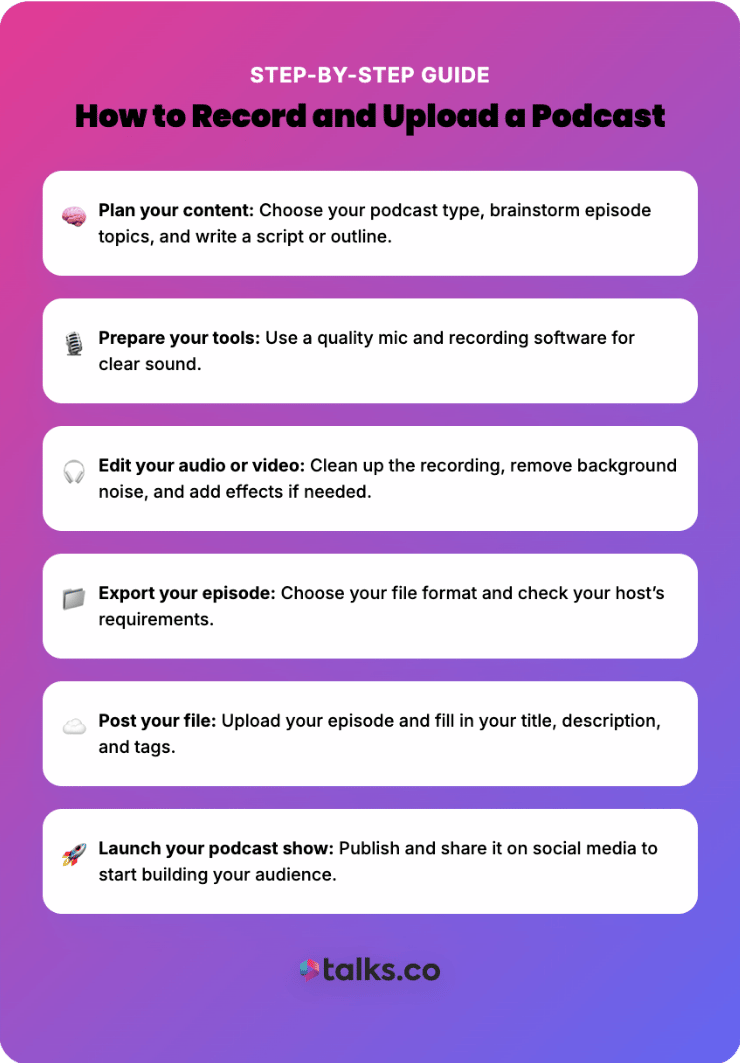
Recording and uploading are both important steps in launching your own podcast show. Here’s a simple step-by-step guide to get you started:
- Plan your content: Choose among the many types of podcasts, brainstorm episode topics, and write a script or outline to guide your flow.
- Prepare your tools: Use a good microphone and recording software.
- Edit your audio or video: Polish your recording by removing background noise and adding sound effects.
- Export your episode: Choose your preferred file format. Check the requirements of your podcast hosting platform.
- Post your file: Upload your final episode file and fill in episode metadata like title, description, and tags.
- Launch your podcast show: Publish your episode and share it on social media.
Learn how to record remotely with this guide.
How Often Should You Post a Podcast?
Posting frequency depends on your goals and capacity. Here are a few notes:
- Posting podcast episodes every day can help you show up and build stronger connections with listeners, but that means doing more work on a tight deadline.
- Post weekly episodes to establish a consistent schedule while having enough time to create quality output.
- A biweekly or monthly schedule works well if you produce in-depth, high-production content.
Whatever schedule you pick, stick to it so listeners know when to expect new content.
How often should you post media content?
Aside from episodes, post teasers or clips two to three times a week. This keeps your podcast content visible between releases.
Here are some important tips for posting media content like teasers and clips to promote your podcast effectively:
- Keep clips short and engaging: Just 30 to 90 seconds is enough, but use the first three seconds to hook viewers immediately.
- Highlight your podcast’s unique value quickly: Use a hook that answers the listener’s unspoken question: “What’s in it for me?”
- Ensure top audio quality: Poor audio is a turn-off and reflects badly on your brand.
- Format each content by platform: Vertical ratios work best for Instagram Reels and TikTok, and horizontal for YouTube.
- Establish a recognizable brand: Maintain a consistent look, feel, and tone across content.
- Build momentum: Post regularly around episode releases, sharing teasers before launch and clips after publishing.
Put Your Podcast On Blast Today
Knowing how to upload a podcast is your key to growth. Once your podcast is live, it opens doors to new audiences, partnerships, and opportunities.
Inspire others with your voice and the stories of people you give a stage to. Find guests to interview so you can show off their unique expertise and experiences.
Streamline your search for the perfect guests with Talks. This AI-powered tool connects you with relevant industry leaders and personalities to invite on your show.
No more stressful email spam. No more endless scrolling through social media.
Sign Up for a Free Talks Creator Profile Today.