

If you’re a speaker or an author looking for more visibility, you can’t ignore the power of video.
- 92% of internet users watch videos (Statista).
- Over 100 million people watch videos every day (Insivia).
With this kind of impact, it’s no surprise that a video platform like YouTube would also grow.
YouTube is now the go-to for video content, and the latest YouTube statistics prove that this platform is the best place to build authority and reach a global audience.
I rounded up all 64 essential YouTube statistics about channel and subscriber count, viewership, demographic profile, and more.
Whether you want to be a guest on popular YouTube channels or start your own show, these numbers will guide your strategy.
10 Key YouTube Stats Summary

Here’s a quick snapshot of the vital stats you need to know in 2027:
- Monthly active users: The YouTube platform boasts over 2.7 billion monthly active users (Measure Studio, 2024).
- YouTube daily watch time: Users consume over 1 billion hours of YouTube content every single day (YouTube, 2024).
- Mobile usage: 70% of users watch YouTube videos on mobile devices (Measure Studio, 2024).
- Upload volume: YouTube creators upload more than 500 hours of videos on YouTube every minute (YouTube, 2024).
- Revenue: The platform generated $33.5 billion in ad revenue (Measure Studio, 2024).
- Premium growth: There are over 100 million YouTube Premium subscribers globally (Measure Studio, 2024).
- Shorts’ popularity: YouTube Shorts generate over 50 billion views daily (Measure Studio, 2024).
- Channel count: There are over 113.9 million active channels on the platform (Measure Studio, 2024).
- Learning tool: 70% of viewers use YouTube to solve a problem or learn something new (Measure Studio, 2024).
- Search power: It remains the second-largest search engine in the world (Charle Agency, 2024).
Latest Global YouTube Statistics

The reach of this video platform is truly worldwide. It connects people from every corner of the globe. Here are the top YouTube statistics to showcase the platform’s impact:
- International usage: Over 80% of YouTube’s traffic comes from outside of the United States (Measure Studio, 2024).
- Multilingual content: The platform is available in over 100 countries and supports more than 80 languages (YouTube).
- Cultural relevance: It has a strong presence in diverse markets, like Brazil, India, Japan, and Russia (Measure Studio, 2024).
How many YouTube users in the world are there?
Around the world, YouTube has a great impact. The platform has captured the attention of billions.
- Total users: There are over 2.7 billion people on YouTube actively using the platform monthly (DemandSage, 2024).
- Future growth: The user base is projected to reach 2.8 billion (Measure Studio, 2024).
YouTube statistics by country
If you want to target specific markets, you need to know where the users are.
- Indian users: India has the largest audience with approximately 476 million users (Analyzify, 2025).
- US users: The United States holds the second spot with over 238 million viewers (Analyzify, 2025).
Number of YouTube users by country
Understanding where people are tuning in from helps you plan your YouTube marketing efforts.
- Top market: India leads the pack with the highest number of active viewers (The Social Shepherd, 2025).
- High penetration: The YouTube penetration rate in countries like the UAE is over 90% (Hootsuite, 2025).
YouTube statistics by gender
The audience is fairly balanced, but it helps to know the specific breakdown of YouTube user statistics.
- Male users: Approximately 54% of the total user base identifies as male (SocialPilot, 2025).
- Female users: Women make up about 46% of the audience on the site (SocialPilot, 2025).
Average age of YouTube users
This platform isn’t just for kids. YouTube demographics statistics show a wide range.
- Core demographic: The largest concentration of users falls between the ages of 25 and 34 (Hootsuite, 2025).
- Older demographics: Users aged 35-44 make up the second-largest group on the site (Hootsuite, 2025).
What age group uses YouTube the most?
If you’re trying to reach young adults, you need to build your YouTube presence.
- Young adults: Users from the 18-24 age group are highly active, representing over 20% of users (Analyzify, 2025).
- Teen usage: 90% of U.S. teens say they use the platform, making it their top social site (Measure Studio, 2024).
YouTube Statistics Subscribers (Channels and Online)
Building a loyal following is the goal for every creator. Having a community behind you opens doors to monetize your channel. Think sponsorships, audience support, and your own merch shop.
But before you can get to that milestone, you need to focus on attracting more subscribers.
With billions of active users worldwide and over 31 million channels on the platform, you need to claim your space on YouTube and these key YouTube channel statistics will show you how.
YouTube statistics by channel
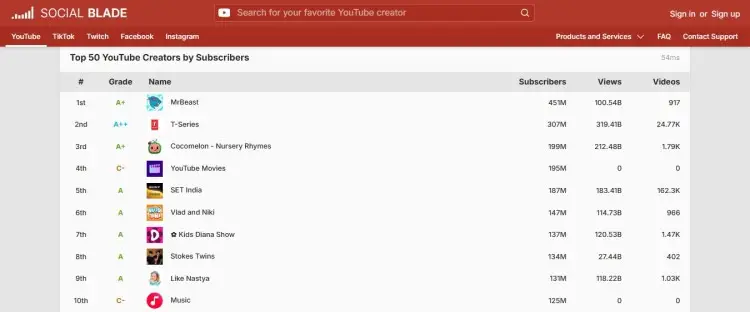
What does being a top channel look like? Here are some YouTube platform statistics to aspire to reach:
- Top YouTube creator statistics: MrBeast is the most subscribed individual creator in the world with 451 million subscribers (Social Blade, 2026).
- Top brand: T-Series continues to be the most subscribed brand channel globally with 307 million subscribers (Social Blade, 2026).
YouTube channel statistics online
The number of creators is growing, but so is the competition.
- Million club: Over 35,000 channels have crossed the million subscriber milestone (Rev, 2024).
- Active channels: There are over 113.9 million active channels posting content on YouTube (Hootsuite, 2025).
YouTube Video Statistics Online

More creators mean more video content. With more video podcasters hosting on YouTube, there’s a definite increase in the volume of new videos being uploaded every day.
YouTube video statistics show just how important it is for creators to stand out. You need to produce high-quality content that will capture and retain your audience’s attention.
How many videos are there on YouTube?
A seemingly infinite library of videos? That’s what YouTube is.
- Total library: There are over 3.9 billion videos currently available to watch (Analyzify).
- Shorts volume: Short-form videos now make up 20% of the total video count (Analyzify).
YouTube statistics video
Understanding what people watch helps you create better content.
- Music dominance: Music videos still account for a majority of the most-viewed content (Measure Studio, 2024).
- Average length: The average video length clocks in at around 11.7 minutes (Blogging Wizard, 2025).
YouTube upload statistics
The rate at which content is uploaded to YouTube is incredible. This includes new video podcasts being published every day.
- Upload speed: Creators upload over 500 hours of content every single minute (The Social Shepherd, 2025).
- Daily uploads: Approximately 12,000 hours of video are uploaded every day (Charle Agency, 2024).
YouTube livestream statistics
You don’t have to just stick with podcast recordings. Live video is a powerful way to engage with your audience in real-time.
- Live engagement: 10 million users engage with live content daily (Charle Agency, 2024).
- Platform rank: YouTube is the second-largest live-streaming platform, right behind Twitch (Measure Studio, 2024).
YouTube View Statistics by Video
Views are the currency of visibility.
If you want meaningful engagement that leads to monetization, grow your video views. This signals to the platform that you’re performing well, attracting big audiences, and are a good partner for ads.
Here’s what you need to know about YouTube views to optimize your videos.
YouTube video statistics viewer
How people watch is just as important as what they watch. These stats can help you create for certain aspect ratios and devices.
- Mobile first: 63% of views come from users on mobile devices (Charle Agency, 2024).
- TV viewing: Over 40% of U.S. adults watch content on their TV screens (Measure Studio, 2024).
YouTube statistics views
Getting millions of views is the dream, but consistent viewership is what actually builds careers. You want your audience to keep coming back and watching.
- Daily consumption: Users watch over a billion hours of content daily (SocialPilot, 2025).
- Shorts views: Shorts generate 70 billion daily views (Analyzify, 2025). This shows the power of short-form content in attracting attention.
YouTube stats download
While streaming is king, offline viewing is a key feature for Premium users.
- Offline access: Premium allows YouTube music and video downloads for offline playback (YouTube, 2025).
- Data saving: Downloading is a primary reason users subscribe to Premium to save data (YouTube, 2025).
- YouTube app downloads: While there’s no exact number of video downloads by Premium users, the app itself has been installed more than 5 billion times (YouTube, 2025).
YouTube traffic statistics
YouTube drives a significant amount of internet traffic. If you’re still wondering if you should upload your video podcast here, look at these figures:
- Site visits: It receives over 30 billion visits every single month (Blogging Wizard, 2025).
- Referral source: It’s one of the top sources of referral traffic for many brands (Foundation Inc, 2025).
YouTube Monetization Statistics
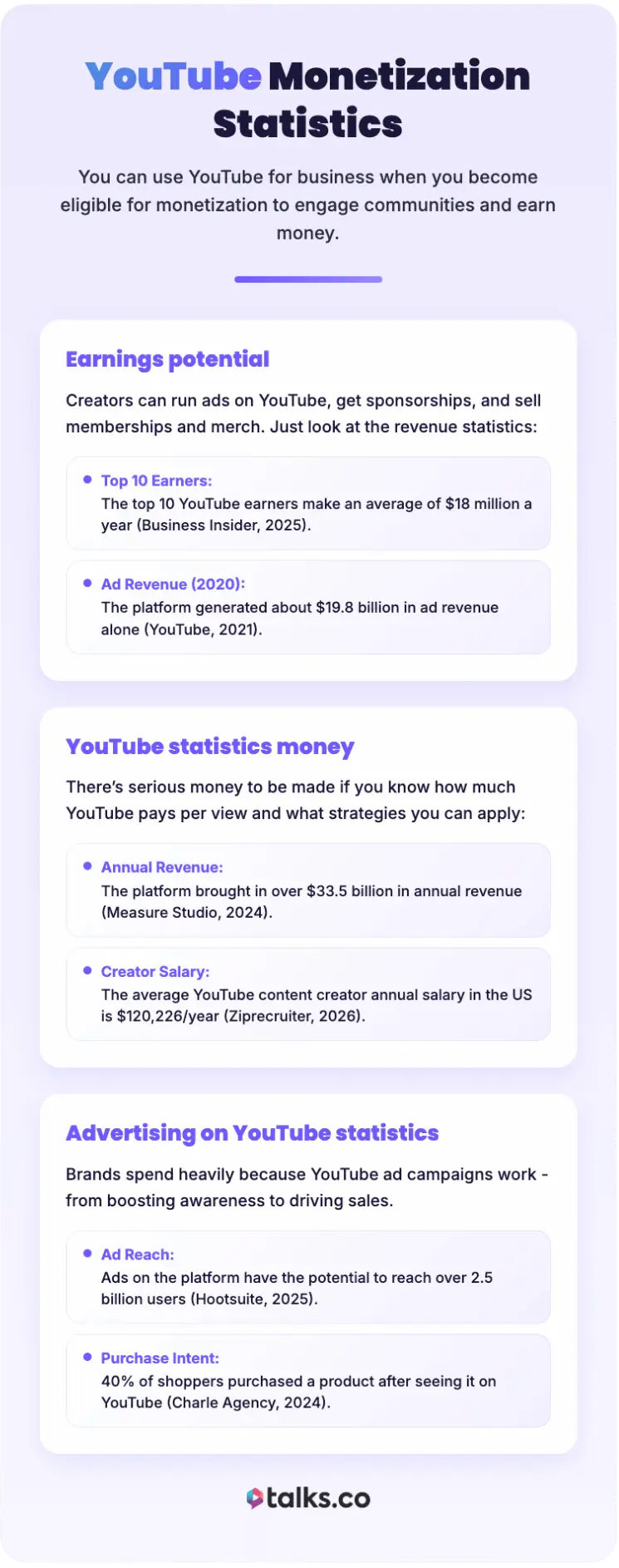
You can use YouTube for business when you become eligible for monetization. Many people use YouTube to engage their communities and earn money.
Creators can run ads on YouTube, get sponsorships, and sell memberships and merch. Just look at the revenue statistics:
- Earnings potential: The top 10 YouTube earners make an average of $18 million a year (Business Insider, 2025).
- Ad revenue: In 2020, the platform generated about $19.8 billion in ad revenue alone (YouTube, 2021).
YouTube statistics money

There’s serious money to be made if you know how much YouTube pays per view and what strategies you can apply to attract those views:
- Ad revenue: The platform brought in over $33.5 billion in annual revenue (Measure Studio, 2024).
- Creator earnings: The average YouTube content creator annual salary in the US is $120,226/year (Ziprecruiter, 2026).
Advertising on YouTube statistics
Brands spend heavily because YouTube ad campaigns work. Whether it’s boosting brand awareness or driving sales, YouTube has proven its value.
- Ad reach: Ads on the platform have the potential to reach over 2.5 billion users (Hootsuite, 2025).
- Purchase intent: 40% of shoppers purchased a product after seeing it on YouTube (Charle Agency, 2024).
YouTube Descriptive Statistics
YouTube is one of the early players that really solidified video, but it’s not alone in the game.
If you’re thinking about which social media platform to upload your podcast clips, consider your options. When it’s short-form content, TikTok is another key player.
Let’s look at how TikTok actually compares to YouTube, in terms of growth and engagement.
TikTok vs YouTube statistics
The battle between TikTok and YouTube is heating up.
- User base: YouTube has a larger global audience than TikTok, with over 2.5 billion monthly active users (vs. 1.6 billion MAU) (Castr, 2026).
- YouTube watch time: Users generally spend longer sessions on YouTube compared to TikTok (Measure Studio, 2024).
- Content: TikTok’s short-form, entertaining content is popular among younger audiences, while YouTube’s long-form, educational content is popular among a wider demographic (Influencer Marketing Hub, 2021).
- Monetization: While both platforms offer opportunities to make money, YouTube has more established options (Business of Apps, 2021).
Overall, both TikTok and YouTube have their own strengths, and it ultimately depends on your target audience and goals.
YouTube Use Statistics
Not all YouTube videos use up data equally. If you’re producing videos for mobile, remember that this is one of your audience’s concerns.
Video quality is still very important, but make sure you have other visual elements to engage viewers when their data and definition drops.
For example, add closed captions so they can still read and understand what’s going on.
How much data does YouTube use per hour?
Want to understand YouTube usage statistics better? It relies heavily on video quality.
- Standard definition: Users spent about 560MB per hour while watching in 480p (MakeUseOf, 2025).
- High definition: Watching in 1080p can consume up to 3GB per hour (MakeUseOf, 2025).
How much data does a YouTube video use?
A single video might not use much data, but it adds up.
- Short videos: A five-minute video in HD uses roughly 250MB (MakeUseOf, 2025). The longer that your audience scrolls, the more data they consume.
- Low quality: Watching that same video in 360p uses significantly less data (MakeUseOf, 2025). While this isn’t ideal for your content, consider adding subtitles and visual elements that viewers can still enjoy at this resolution.
How much data does YouTube consume?
For heavy users, it’s no surprise that usage statistics also stack up.
- Daily usage: An hour of daily HD viewing adds up to 90GB per month (MakeUseOf, 2025).
- Mobile limits: This is why many users switch to Wi-Fi for the YouTube mobile app (Measure Studio, 2024).
How much data does YouTube Music use?
Audio uses far less data than video, which makes using YouTube Music more appealing to audiences.
- High quality: Streaming YouTube music at high quality uses about 144MB per hour (Android Authority, 2025).
- Normal quality: Standard quality streaming uses significantly less data (Android Authority, 2025).
YouTube Growth Statistics
Is the platform slowing down? The numbers say otherwise.
- User growth: It’s projected that monthly active YouTube users will reach 2.5 billion between 2025 and 2026 (Statista, 2026).
- YouTube influencers: In recent years, influencer marketing on YouTube has become increasingly popular and successful for brands looking to reach a wider audience (Forbes, 2020).
Is YouTube becoming less popular?
Even if new social and entertainment platforms arise, YouTube remains active and growing.
- Ad growth: The advertising audience grew by 1.6% (39.7 million users) between 2024 and 2025 (Datareportal).
- Engagement: The average engagement rate on YouTube is 1.5%-3.5% of total views, with 3%-7% considered a strong performance depending on channel size and niche (Umbrex Consulting).
Is YouTube losing popularity?
YouTube remains a dominant channel in the digital world.
- Retention: It has high retention rates compared to other social platforms. Average YouTube audience retention generally ranges between 30%-60% (Views4U).
- Daily visits: 62% of US internet users visit the site daily (The Social Shepherd, 2025).
Is YouTube still popular?
Yes, it’s still a popular choice. Just looking at video consumption, the answer’s obvious.
- Videos per visit: On average, a YouTube user watches nine videos on each visit (Statista).
- Annual videos: If a viewer logs in daily, it adds up to about 3,240 videos a year (Statista).
Is YouTube still growing?
The platform is evolving and expanding. It’s a strong candidate for hosting video podcasts.
- Podcast viewers: There are more than a billion podcast users on YouTube (Google, 2025).
- Preference: 31% of listeners choose YouTube over other podcasting platforms like Spotify and Apple Podcasts (Edison Research).
Why YouTube is popular with consumers and content creators
There are many reasons why YouTube appeals to the public. The same goes for why it attracts so many creators on the platform.
- Versatility: YouTube is the place for everything from music to education. Popular podcasts like The Joe Rogan Experience and Jay Shetty have an established presence here.
- Accessibility: It’s free to use and available on almost every device. You’d only have to pay for Premium if you want additional features.
- Wide library: There are over 115 million YouTube channels with different types of content, from gaming, lifestyle, to news and entertainment.
Why is YouTube so successful?
YouTube’s success comes from its ability to innovate and adapt.
- Creator economy: It was one of the first platforms to pay creators directly, paving the way for making content creation a profession.
- Algorithm: The recommendation engine keeps users glued to the screen. Viewers can easily find suggestions that suit their taste.
- Platform evolution: With livestreaming and membership features, YouTube creates engaged communities and new viewing experiences.
- Top podcasting choice: It’s become a host for video podcasts, with growing opportunities for podcast guesting. You can also easily start your own show by creating a channel with your podcast name.
How to Check YouTube Statistics
Ready to start a podcast or a YouTube channel? Start with tracking the right numbers. Knowing YouTube statistics can give you an advantage in your content strategy.
You’ll get a clear picture of the market and your competitors. You’ll also understand the pulse of your audience and what actually matters to them.
Let’s list what you should do to find and analyze YouTube stats.
How to see YouTube statistics
Focus on the metrics that matter for YouTube performance.
- Watch time: How much total time your audience watches your content.
- Click-through rate (CTR): How often people decide to watch your video after seeing the thumbnail.
- Subscriber growth: How fast you’re gaining or losing fans.
- Revenue per mille (RPM): How much you earn per 1,000 ad views.
How to check your YouTube stats
If you want to find your own data, you don’t need an external tool. YouTube provides analytics tools so you can gauge your channel’s health.
- Download the Studio app: You can check stats on the go when you install the mobile app.
- Check YouTube Studio Analytics: Dive deep into the analytics tab on the desktop site. You can see the number of views, impressions, audience demographics, and trends that you can follow.
- Double down on what works: Make more types of videos related to your best-performing content. You can also create specific videos based on audience insights you gather.
How to get YouTube statistics for other channels
If you want to get viewer and subscriber statistics of other channels, try a YouTube statistics tracker and follow these steps.
- Choose your tool: Pick a statistics tracker based on the metrics you want to see. Morning Fame gives you niche-specific data. Social Insider includes the engagement rate and top-performing videos.
- Add browser extensions (if available): Installing the VIDIQ extension lets you see channel stats in real-time.
- Compare with benchmarks: Look for reports (e.g., Statista, Hootsuite) and compare competitor data with the benchmark, so you can better assess their performance.
YouTube statistics tracker
There are great tools available to track performance. You can use a YouTube statistics tracker to simplify this.
- VIDIQ: A powerful extension for keyword research and channel audits.
- Tubular Intelligence: The essential social video measurement platform for enterprise.
- Brandwatch: Great for social listening and understanding consumer sentiment.
YouTube statistics website
Sometimes you need a quick look at public data. If you need an accessible YouTube statistics website, SocialBlade gives you an overview of the top channel’s growth, including:
- Ranking based on subscribers, views, and internal rating
- Number of subscribers
- Number of views
- Date created
- Achievements
How to Conduct a YouTube Data Analysis
Data is useless if you don’t know how to read it. Here are some tips for conducting a successful YouTube data analysis:
- Define your objectives: Know what you want to achieve. Are you looking to increase views, improve engagement, or expand your audience reach?
- Monitor trends: Keep an eye on industry trends and popular videos to see what resonates with audiences.
- Analyze video metrics: Look at metrics such as views, watch time, likes, dislikes, comments, and click-through rate (CTR) to understand how viewers are engaging with your content.
How often do YouTube analytics update?
You need to know attribution rules to understand when data actually counts.
- General performance (views and subs): Every 24-48 hours
- Estimated earnings: Updated daily, with about a two-day delay.
- Monetization eligibility: Takes a few weeks to update.
How to see your YouTube analytics earnings
Want to know how much a YouTuber makes? You can easily find it on the platform.
- Go to YouTube Studio and click “Analytics”.
- Go to the Revenue tab.
- Check the report, showing you how much your channel has earned in the last six months.
- Explore your revenue sources (e.g., watch page ads, Shorts feed ads, memberships, Supers).
- Know your RPM to understand your rates.
- Go to your AdSense account if you want to see your finalized earnings.
How often to post on YouTube
Now that you have the data, apply these insights to your content creation process, starting with your posting frequency.
- Maintain an online presence: Uploading more frequently, around two to three times a week, can boost your reach and views.
- Have a consistent schedule: More than frequency, choose a schedule you can maintain (e.g., every Saturday at 6:00 PM).
- Check your data: Know when your viewers are on YouTube based on analytics reports to pick the best upload time on YouTube.
Grow Your YouTube Channel
YouTube statistics paint a clear picture: The platform isn’t going anywhere. Video content is going to become more and more relevant to your visibility strategy.
If you’re still not sure whether or not you should start a video podcast, this is your wake-up call to hit the studio.
Start by finding guest experts on Talks. Podcast interviews are always a hit, especially when you’ve found the right match to invite. With Talks, you can quickly connect.
- Strong matches: AI tools recommend pros who match your needs.
- Instant connects: Auto-accept and Auto-message automatically match you with relevant people who are ready to record.
You have the data. You have the tools. All that’s left is to record.
Say YES to podcasting and create a FREE Talks Profile today!


