

Why is getting booked on stages or podcasts so hard?
It’s hard because hosts and event organizers move fast, so they don’t really have that much time to figure you out.
If they can’t understand who you are, what you speak about, and why their audience should care in a few seconds, you’re out.
A speaker one sheet exists for that moment.
When yours is clear, everything speeds up. Your topic is obvious. The outcome is obvious. The reason to invite you doesn’t need explaining.
This guide shows you how to build a speaker one sheet that does its job. What to include. What to cut. How to structure it so it gets you that dream invite.
Because the goal is one thing only: make saying yes to you the easiest option.
What Is a Speaker One Sheet?
A speaker one sheet is a concise document that summarizes your speaking expertise. It’s a powerful marketing asset that works for you 24/7, so you can close more deals and land better stages.
Think of it as a resume specifically designed for the speaking industry. It highlights your topics of expertise and experience.
There are many benefits to having a one sheet ready to send.
- Look polished and professional: It shows event planners that you take your speaking career seriously. It also saves them time during their research process.
- Consistent brand image: It makes sure that everyone sees the same high-quality version of you.
- Great follow-up tool after networking: You can easily email it to someone who expresses interest in your work.
- Streamlines the booking process: This document immediately answers the most critical questions an organizer might have.
What is the purpose of a speaker one sheet?
The main purpose is to get you hired for a speaking engagement, like a sales tool designed to convince an organizer to book you.
- Gives context in under 10 seconds: Who you are. What you talk about. Who you’re for. All without them opening another tab or assuming.
- Shows exactly where you fit: Your topics, audience type, and outcomes tell a host if you belong on their stage, their podcast, their event or not.
- Replaces the awkward back-and-forth: You can forget getting “can you clarify your angle?” emails or DMs. Your one sheet answers those questions upfront.
- Signals professionalism: Having a clean, clear one sheet tells organizers you’ve done this before or at least understand how their world works.
- Helps them picture the episode or talk: Your titles, themes, and past appearances let them imagine the intro, the conversation, or the audience reaction without effort.
- Makes internal sharing easy: Producers forward it. Assistants drop it into Slack. Co-hosts skim it before saying yes. One page. Simple and clean.
- Filters opportunities automatically: If someone’s audience, format, or expectations don’t match your message, they self-select out. That’s a win.
- Gets reused without you being there: For speaker bios, event pages, podcast show notes, run-of-show docs, and intro scripts, your one sheet becomes the source.
What to include in a one page speaker sheet (Checklist)
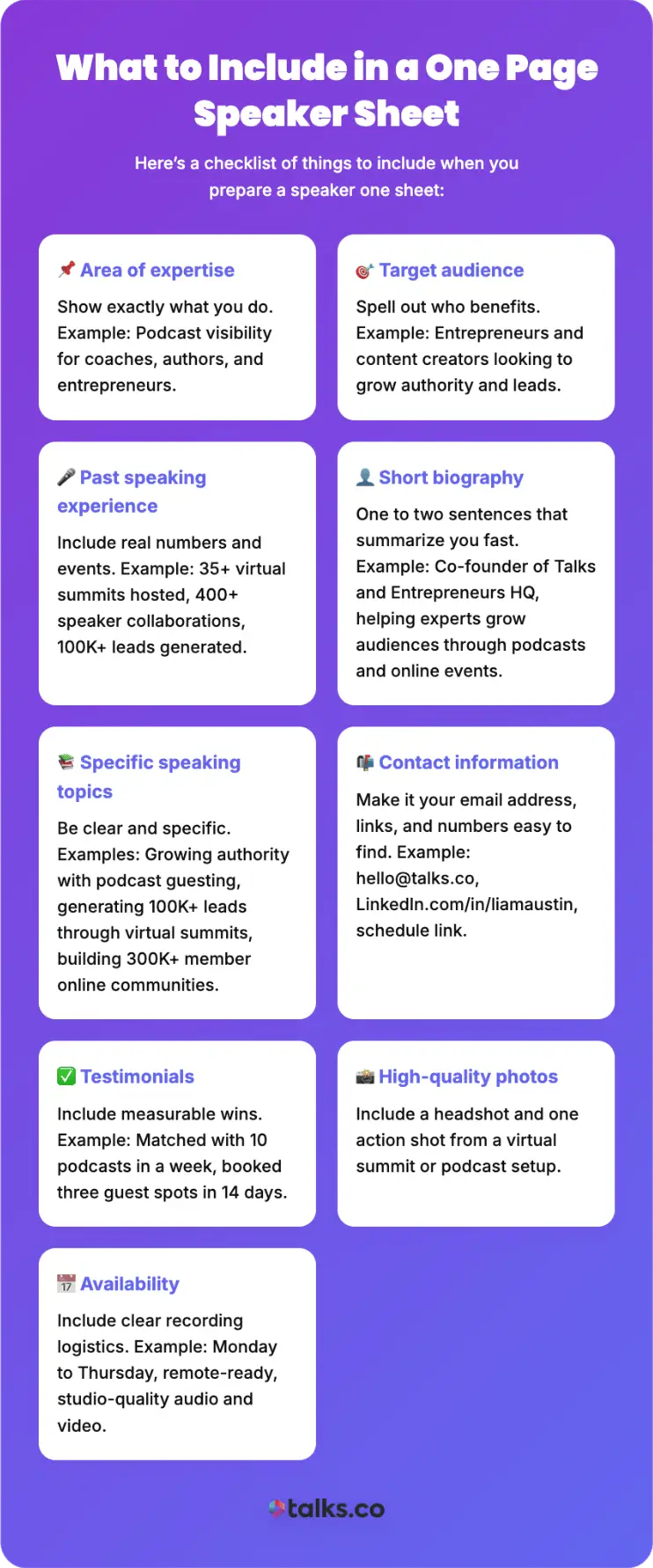
Here’s a checklist of things to include when you prepare a speaker one sheet:
☐ Area of expertise: Show exactly what you do. Example: Podcast visibility for coaches, authors, and entrepreneurs.
☐ Target audience: Spell out who benefits. Example: Entrepreneurs and content creators looking to grow authority and leads.
☐ Past speaking experience: Include real numbers and events. Example: 35+ virtual summits hosted, 400+ speaker collaborations, 100K+ leads generated.
☐ Short biography: One to two sentences that summarize you fast. Example: Co-founder of Talks and Entrepreneurs HQ, helping experts grow audiences through podcasts and online events.
☐ Specific speaking topics: Be clear and specific. Examples: Growing authority with podcast guesting, generating 100K+ leads through virtual summits, building 300K+ member online communities.
☐ Contact information: Make it your email address, links, and numbers easy to find so you don’t lose a gig. Example: [email protected], LinkedIn.com/in/liamaustin, schedule link.
☐ Testimonials from past clients: Include measurable wins. Example: Matched with 10 podcasts in a week, booked three guest spots in 14 days.
☐ High-quality photos: Include a headshot and one action shot from a virtual summit or podcast setup. Hosts should picture you in their show immediately.
☐ Availability: Include clear recording logistics. Example: Monday to Thursday, remote-ready, studio-quality audio and video.
3 Speaker One Sheet Examples
Seeing examples helps you visualize what works best and how other experts have successfully created their own. It also gives you inspiration for your own layout and design.
The best ones typically balance visual appeal with information, making sure nothing gets lost or overlooked.
1. Liam Austin (Digital Media and Entrepreneurship Expert): Best speaker one sheet
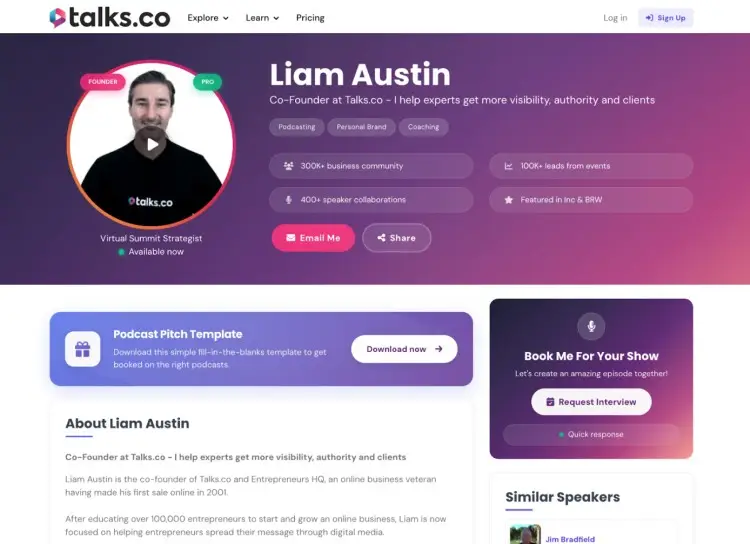
A digital speaker one sheet is often the most effective option today. It’s easy to update and share with a simple link.
A great example is the profile for Liam Austin on Talks.co, which doubles as a personalized landing page that:
- Highlights area of expertise: Clearly showcases his speaking experience as a digital strategist, community builder, and guide for generating leads.
- States important information explicitly: Includes details like his availability and preferred speaking topics (e.g., virtual events, entrepreneurship, digital media) instantly.
- Compiles past appearances: You can listen to his previous guest appearances using embedded players within the site.
- Direct booking: Interested hosts can message and connect within the Talks platform, so he can get booked on podcasts easily.
Since everything is online, Talks really helps speakers conveniently share their profile link instead of attaching a large PDF file.
It even makes you searchable, so you reach new audiences easily.
2. Craig Keegan (Expert Speaker): Professional speaker one sheet
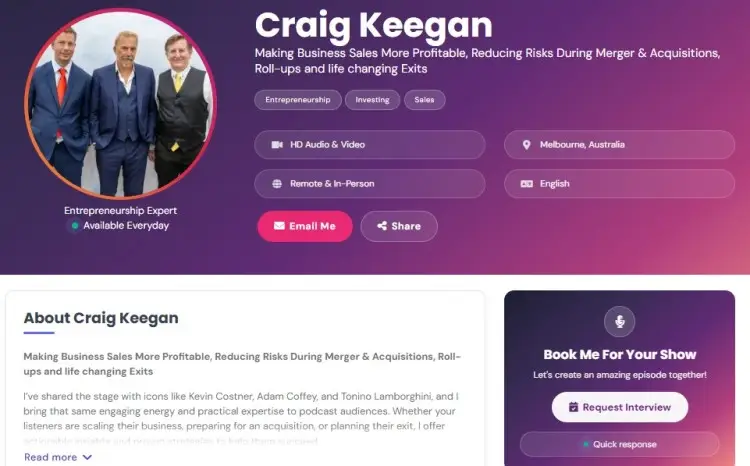
A professional speaker needs a sheet that screams competence. It should look premium and well-designed.
- Focuses heavily on results, telling organizers exactly what the audience walks away with and what types of podcasts or events you suit best.
- Uses high-end photography and consistent branding colors to communicate expert authority.
Craig’s professional speaker one sheet is a good example.
- Clear outcomes: From his tagline to his short bio, the results he provides are defined. This makes it easy to attract niche shows that align with his professional goals.
- Links: He includes links to his testimonials, podcast, coaching and more.
3. Kevin Keohane (Business Transformation Expert): Keynote speaker one sheet
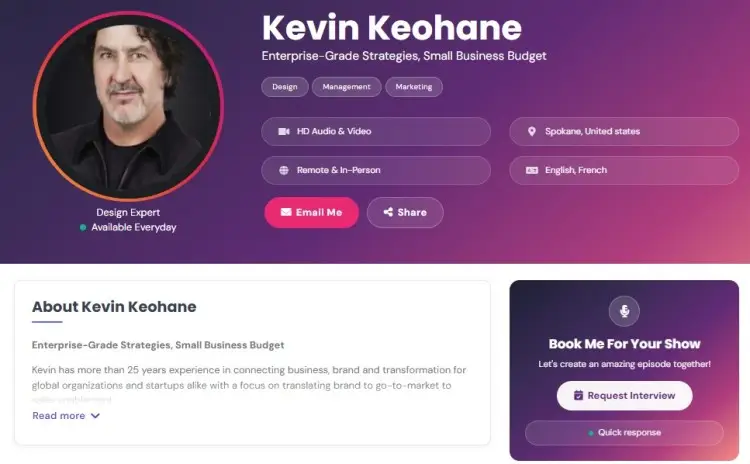
A keynote speaker sheet has a specific job to do. It must justify a higher fee and a prime spot on the agenda.
- Includes a section of your philosophy or unique approach to stand out.
- Focuses on the transformation you provide for an audience.
- Looks flawless, especially since you’re asking clients to invest in you.
- Requires proof of impact, so testimonials and logos of big clients you’ve worked with help.
Look at Kevin’s sheet for inspiration.
- Credentials: He starts with a short and memorable tagline and then relates his experience in an authentic, approachable way.
- Client list: His bio ends with the clients he’s worked with like AstraZeneca, Barclays, The BBC, British Telecom (BT), Coca-Cola, and more.
How to Create a Speaker One Sheet
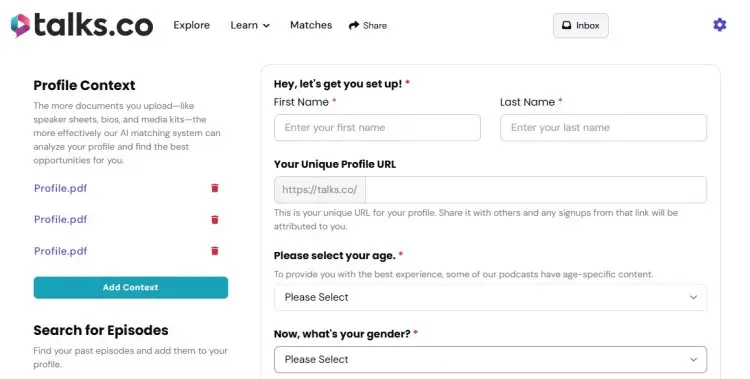
You know what to include, and you understand the purpose of creating a speaker sheet. Your next step is to actually make your own.
The process is simple when you have a template and know what to do. So here’s a step-by-step guide to help you create a speaker one sheet from scratch:
1. Gather your information
Pull only what a host or organizer uses to decide if you’re credible, relevant, and worth the slot.
- Credentials: Degrees, certifications, or titles that back your authority.
- Past speaking gigs: Events, podcasts, or summits you’ve presented at.
- Metrics and results: Leads generated, audience size, or engagement numbers.
- Special projects: High-profile collaborations or unique initiatives.
- Marketing angle: Frame your experience to appeal to the type of host you want.
Example: Position as a “curator of experiences” if your background is in events.
2: Define your target audience and value
Spell out who this is for and what they walk away with. If they can’t picture their audience nodding along, they move on.
- Exact audience type: Are they entrepreneurs, coaches, or experts who want visibility through podcasts and digital stages?
- Core problem you solve: Lack of reach, weak authority, or wasted interviews that don’t convert.
- Clear outcome: Audience growth, lead generation, and authority building through guest interviews and virtual events.
- Conversation lanes you operate in: Podcast visibility, collaboration systems, virtual summits, and community growth.
- Why you specifically: To be a guest on a podcast, show that you’ve done it at scale and can explain how it works.
3. Write your bio and headline
Your headline earns the read. Your bio proves you’re worth listening to.
- Headline: One clear outcome, like helping business owners build authority and leads through virtual events and podcast guesting.
- Credibility snapshot: 11+ years in growth marketing, co-founder of Entrepreneurs HQ and Talks.co.
- Signature proof points: Built a 100K+ email list organically, hosted 400+ expert speakers, grew a 150K community.
- Relevant background: Scaling global businesses with a partner, running virtual events, building visibility without ads.
- Current focus: Authority building, podcast guesting, virtual events, and organic lead growth.
4. Choose your format and platform
Pick the format based on how opportunities actually come to you.
- PDF: Best if you’re pitching events directly or need something printable.
- Digital profile: Best for podcasts and inbound stages where hosts scan fast.
If you book visibility online, a live profile like Talks is a much easier alternative to multiple links and files every time.
5. Design your one sheet
Design exists to help someone understand you fast and trust you faster. Every element should earn its place on the page.
- Talks profile: Fill in the structured fields or use AI to generate a complete, scannable profile in minutes.
- PDF option: Use a proven Canva template or a professional designer so you don’t feel so nervous or blank out on what to include.
Talks tip: Clear headline, visible proof, defined topics, generous spacing, easy skim.
6. Proofread and get feedback
Don’t just hit publish or send. Before potential leads even get their hands on your sheet, have another set of eyes check it first.
- First pass: Triple-check for typos, tighten sentences, and remove filler.
- Second pass: Ask someone who books guests or speakers to check it out.
- Final test: Can someone explain what you speak about in five seconds after reading it?
7. Make it downloadable and shareable
Once your one sheet is complete, make it easy for people to access it.
- Talks: Your profile link is the one sheet. One URL. Always updated.
- PDF: Host it on your site with a clean link and send it to interested event organizers.
Speaker One Page Template Examples
Creating a speaker one sheet from scratch is easier when you have a template to follow. These free speaker one page templates will save you time and make sure you don’t forget the core elements of a speaker profile.
Free speaker one sheet template
Here’s a comprehensive free speaker one sheet template you can use as your guide:
[Name]
[Job title]
[Professional headshot]
About me
[2-3 sentences on what you do, who you help, and a key result or credential.]
Area of expertise
[One clear sentence defining your core focus.]
Speaking topics
- [Topic 1]: [Outcome or result for the audience]
- [Topic 2]: [Outcome or result for the audience]
- [Topic 3]: [Outcome or result for the audience]
Target audience
Ideal for: [Specific audience type (e.g.,corporate professionals, entrepreneurs, students, etc.)]
Audience takeaways
- [Practical takeaway #1]
- [Practical takeaway #2]
- [Practical takeaway #3]
Past stages
[List of events, companies, or shows]
Client testimonials
- “[Client feedback quote.]” – [Client name, Title, Company]
- “[Client feedback quote.]” – [Client name, Title, Company]
- “[Client feedback quote.]” – [Client name, Title, Company]
Connect with me
- Email: [Your email]
- Phone: [Your phone number]
- Website: [Your website]
- LinkedIn: [Your LinkedIn URL]
[Call to action: “Ready to book me? Contact me today!”]
Speaker one sheet template Word file
Here’s a Word file you can use to outline your speaker one sheet details before turning it into a ready-to-send PDF:
[Name]
[Job title]
[Professional headshot]
About
[2-3 sentences on what you speak about, who it’s for, and why you’re qualified.]
Speaking topics
- [Key topic or theme]
- [Key topic or theme]
- [Key topic or theme]
Audience benefits
[Clear outcomes listeners leave with, written clearly and directly.]
Testimonials
- “[Short result-focused quote.]” – [Name, title]
- “[Short result-focused quote.]” – [Name, title]
Contact
Email: [ ] | Phone: [ ] | Website: [ ]
Book me: [Direct CTA]
For more guides, check out podcast one sheet and speaker one sheet templates to download professionally designed formats that are ready to customize.
How to Create a Speaker One Sheet Design
A well-designed speaker one sheet makes a strong first impression. It needs to look as good as you speak.
- Choose a pre-made template: This makes the process easier since you can drag-and-drop elements you need and make minimal edits.
- Stick to your branding: Use your signature colors, graphics, and font styles to be recognizable.
- Make your text clear: Your copies should be large enough to read easily. Also, avoid using script fonts that are hard to decipher.
- Keep it clean and easy to read: A good one sheet balances text and white space. Don’t crowd the page with too much information.
If you want to become a content creator who speaks, this sheet is your foundation. It bridges the gap between your content and live audiences.
How to create a speaker one sheet in Canva
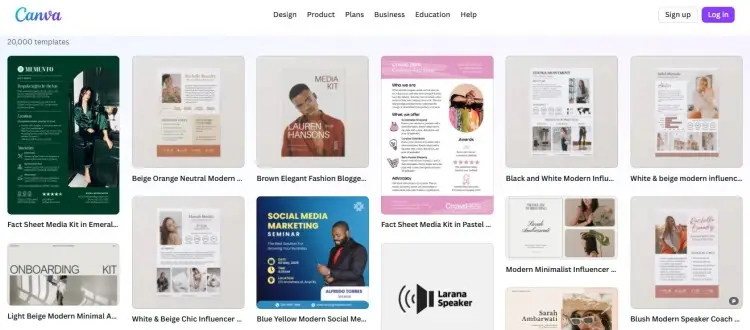
Canva is a fantastic tool for creating marketing materials. Here’s how you can design your one sheet in Canva:
- Choose from the templates available: Search for “one-page media kit” or “speaker sheet” in the search bar.
- Match your personal brand: Once the base layout is there, you can easily change the colors and fonts to match your style.
- Add your own media: Upload your photos and drag them into the frames. Include other recognizable materials like brand logo and graphics.
- Edit the text: Replace the placeholder copies with your own information.
- Check your output: Be sure to proofread everything carefully before you download it.
- Save the file as a high-quality PDF: Set your download preferences so it looks crisp when you email it to organizers.
Once you’re ready with your speaker kit, prepare to be a good podcast guest by practicing what you’ll say with these free podcast script templates.
Something Else Is Speaking Up For You Now
You’ve got everything you need to create your speaker one sheet that has your phone blowing up with “Love your profile! Want you on my show ASAP.” and “Booked you for my next episode!”
But if you want one place where this lives, stays updated, and is easy to create and share?
Now’s the time for you to join the Talks community so you have:
- What hosts need: Share availability, fees, and promotion willingness.
- Episode topics ready: Show exactly what you can cover with clear examples.
- A custom link: One URL to share your sheet everywhere.
- Easy podcast access: Build your sheet and streamline bookings in one place.
Your next speaking engagement is just 5 minutes away. So, what do you say?
Yes! Sign Me Up for Talks Right Now!


