

Choosing the right streaming platform can feel like picking your starting lineup for a big match. You need tools that perform under pressure without draining your resources before halftime.
That’s where this comparison guide comes in. I analyzed the top streaming software to help you decide on the best fit for your situation.
Specifically, let’s break down the Restream vs Streamlabs debate for coaches, authors, and entrepreneurs who want more visibility through podcasting.
I’ll help you choose which software fits your podcasting goals, so you can focus on sharing your message with the world.
Comparison of Restream vs Streamlabs (Overview)
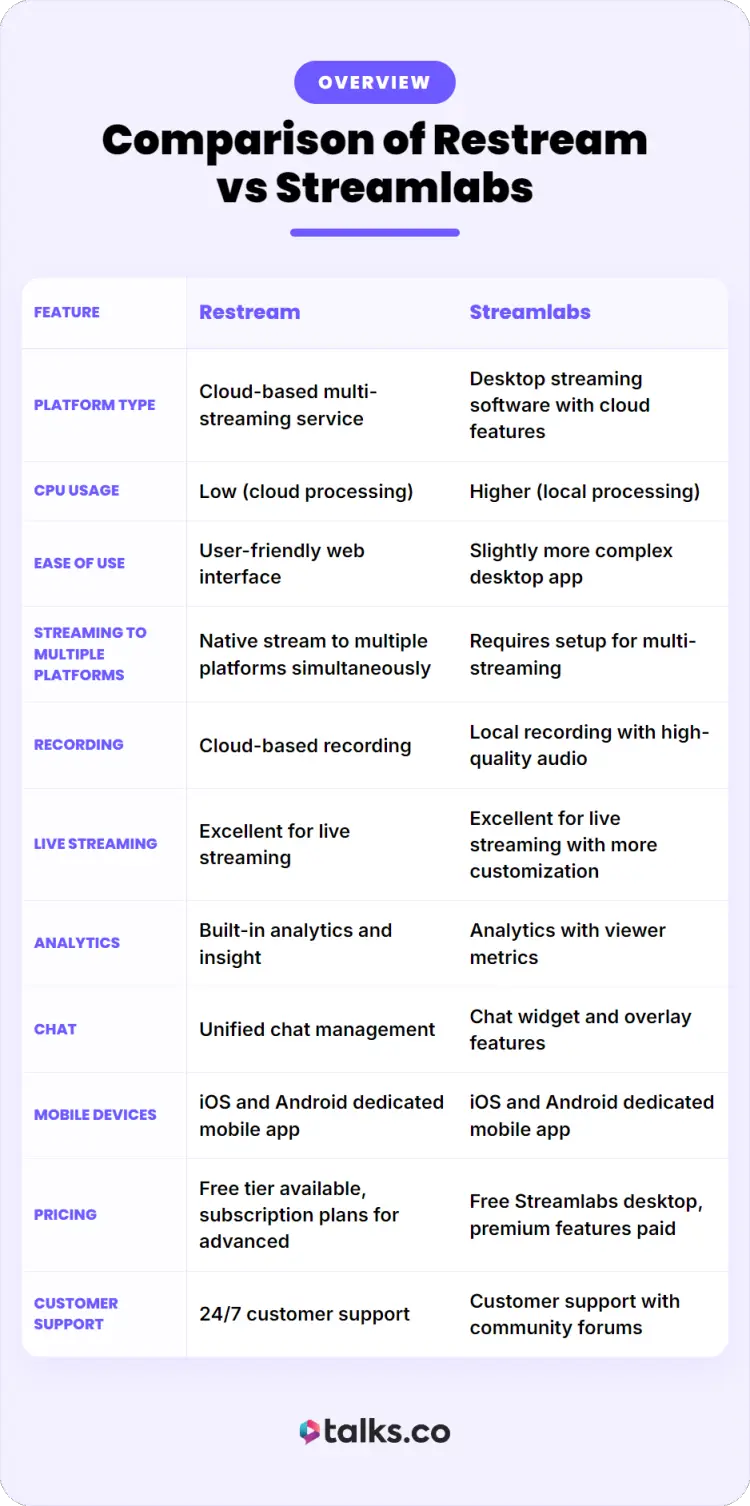
When evaluating Restream and Streamlabs, you need to look at how each platform handles your stream under different conditions. Both Streamlabs and Restream offer solutions for content creators, but they approach it from different angles.
| Feature | Restream | Streamlabs |
|---|---|---|
| Platform type | Cloud-based multi-streaming service | Desktop streaming software with cloud features |
| CPU usage | Low (cloud processing) | Higher (local processing) |
| Ease of use | User-friendly web interface | Slightly more complex desktop app |
| Streaming to multiple platforms simultaneously | Native stream to multiple platforms simultaneously | Requires setup for multi-streaming |
| Recording | Cloud-based recording | Local recording with high-quality audio |
| Live streaming | Excellent for live streaming | Excellent for live streaming with more customization |
| Analytics | Built-in analytics and insight | Analytics with viewer metrics |
| Chat | Unified chat management | Chat widget and overlay features |
| Mobile devices | iOS and Android dedicated mobile app | iOS and Android dedicated mobile app |
| Pricing | Free tier available, subscription plans for advanced | Free Streamlabs desktop, premium features paid |
| Customer support | 24/7 customer support | Customer support with community forums |
In short, Restream is a platform designed for simplicity and reach, while Streamlabs Desktop is built for control and customization.
- If your goal is to reach a wider audience across multiple social media platforms, Restream allows you to do that quickly.
- If you want full control over visuals, branding, and interactive elements, Streamlabs provides a deeper toolkit.
For entrepreneurs looking to start streaming interviews and grow their reach, Talks works seamlessly with both options. Whether you use Streamlabs or Restream, you can use Talks to find podcast guests who match your expertise and get recording.
Restream vs Streamlabs multistream features
Understanding features helps you see how each tool supports your podcast or show. Here’s a simple breakdown of what each platform offers.
Restream is a platform built primarily for streaming to multiple platforms. It handles the heavy lifting in the cloud so you can focus on your content.
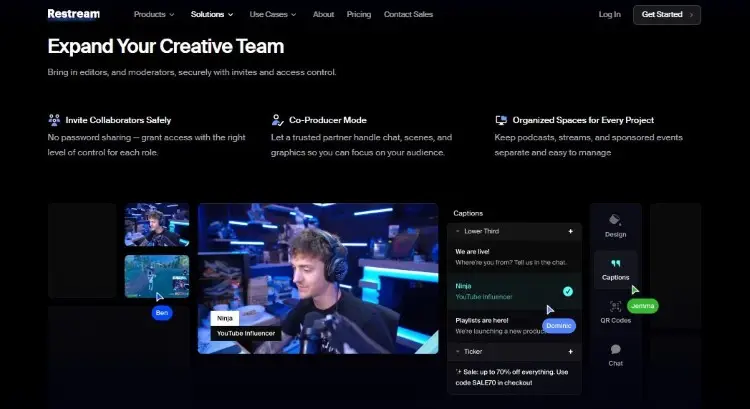
Key features:
- Restream allows you to simultaneously broadcast to Twitch, YouTube, and social media platforms from one central dashboard.
- Restream provides cloud-based recording that saves your sessions automatically for later use.
- The platform includes a unified chat system where you can see comments from all social media platforms in one window.
- Restream’s scheduling feature lets you go live at predetermined times without manual intervention.
- You can engage with your audience using interactive polls and graphics.
Streamlabs is a reliable streaming platform that gives you professional production capabilities right from your desktop. It’s designed for streamers and creators who want full control over their broadcasting experience.
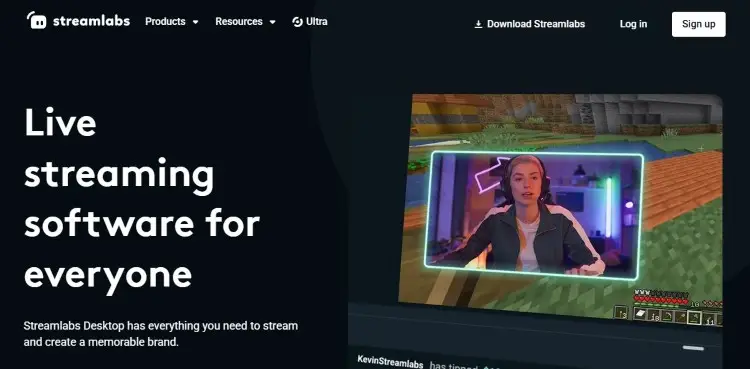
Key features:
- Streamlabs provides hundreds of overlay templates and alert systems to accept donations and monetize your stream.
- Streamlabs also supports widget creation for donation tracking and subscription notifications.
- The software includes Streamlabs Tools for creating graphic elements with high-quality resolution.
- Streamlabs helps content creators manage YouTube and Twitch streams with professional audio mixing.
Restream vs Streamlabs pricing comparison
When looking at pricing, both Streamlabs and Restream offer free tiers, but their paid models differ significantly.
Restream operates on a subscription basis where you pay monthly or annually for increased stream destinations and advanced analytics.
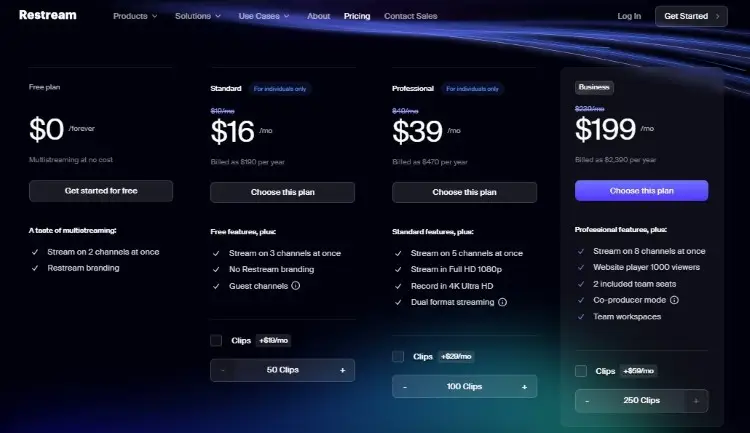
- Free: One seat, six guests, two channels, and HD video quality.
- Standard ($16/month): Three channels, ten guests, unlimited cloud recording, and six hours of local recording.
- Professional ($39/month): Two seats, five channels, workspaces, and split-feed downloads.
- Business ($199/month): Access to workspaces with more controls and advanced features
Streamlabs offers its core Streamlabs Desktop software for free, charging only for premium theme packs and additional cloud storage.
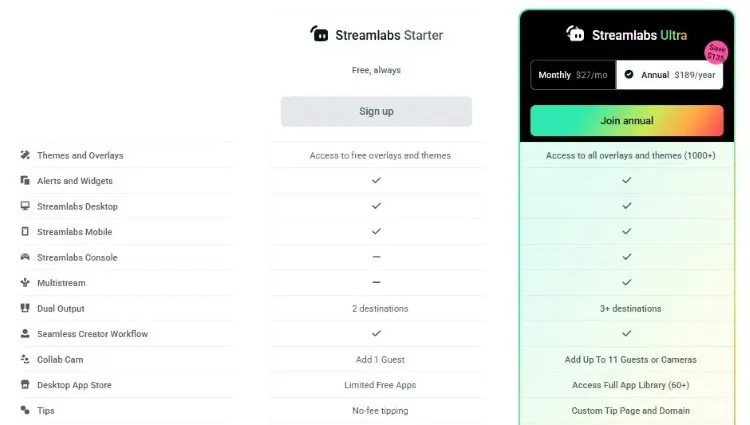
- Free: Two destinations, one guest, and limited free apps.
- Ultra ($27/month): Over three destinations, up to 11 guests or cameras, full app library, and custom cloud bot.
What’s worth it comes down to what you’re willing to pay for. With Restream, you’re paying for reach and features that make you present where your listeners are. With Streamlabs, you’re getting more ways to polish your branding.
As you’re computing your budget, make sure to consider other costs like equipment and podcast hosting platforms. Add in a section for your visibility efforts (e.g., marketing, networking).
That’s where Talks can fit right in, providing you with quick and easy podcast guest matching solutions that are forever free to start.
Restream vs Streamlabs pros and cons
Understanding the pros and cons of each platform helps you make an informed decision for your podcasting journey. Here’s a breakdown of what each software excels at and where it falls short.
| Software | Pros | Cons |
|---|---|---|
| Restream | Minimal local processing Quick start streaming process Native streaming to multiple platforms Good customer support | Dependent on internet connection Limited offline capabilities Fewer overlay options Less customization for themes |
| Streamlabs | Wide range of tools for streaming Built-in tools to monetize and accept donations Strong mobile devices support Excellent graphic customization | Higher CPU usage on your local device Steeper learning curve Can overwhelm beginners with options Requires decent computer specs |
Restream and Streamlabs support different needs depending on your technical setup and goals.
- Restream fits podcasters who prioritize expanding their reach on multiple platforms simultaneously.
- Streamlabs suits those who want high-quality production value with alert systems and widget displays during their stream.
Once you have made your choice between these popular solutions, it’s time to head to Talks to book podcast guests or interviews. Your streaming platform becomes the vehicle for the conversations that build your authority and visibility.
Restream vs Streamlabs similarities and differences
Both tools serve the same core purpose, but they approach it differently. Understanding this helps you choose the right tool for your workflow.
Similarities:
- Both support live streaming and recording.
- Both integrate with social media platforms.
- Both help you engage with your audience.
- Both offer analytics and performance insight.
Differences:
- Restream is cloud-based, while Streamlabs Desktop runs locally.
- Restream focuses on distribution while Streamlabs focuses on production.
- Restream and Streamlabs support different workflows depending on your setup.
In simple terms, one helps you go everywhere, the other helps you look polished.
What Is Restream?
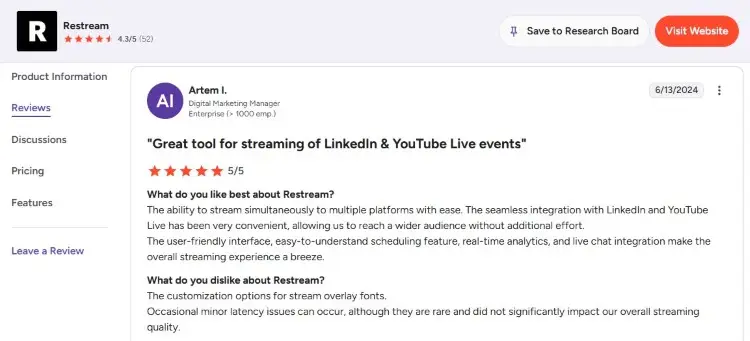
Restream is a cloud-based streaming platform that allows content creators to simultaneously broadcast their live streaming content to multiple destinations.
Users appreciate that it’s easy to use and that you can schedule streams ahead of time. But some hope for more storage for recordings, especially when they regularly create new content.
- Artem I. shares, “The user-friendly interface, easy-to-understand scheduling feature, real-time analytics, and live chat integration make the overall streaming experience a breeze.”
- Emiliano G. says, “Way easier than trying to figure out implementation on OBS and ensure it works.”
Is Restream good?
Yes, it’s a solid option when you’re starting a podcast and need good podcast interview software. You can easily run interview shows with multiple guests remotely.
But if your podcast format requires complex scene switching, high-quality overlays, or heavy graphic elements, Resream can feel limiting. It doesn’t allow elaborate widget displays or alert systems for donation tracking during your show.
Is Restream worth it?
For entrepreneurs and authors building their visibility, Restream is worth the investment when you value time and want to just set up fast.
If you’re serious about using live streaming as a business tool to monetize your expertise, restream provides enough value to justify the cost. You can explore what popular podcasts are doing to understand how multi-platform presence builds authority.
What Is Streamlabs?
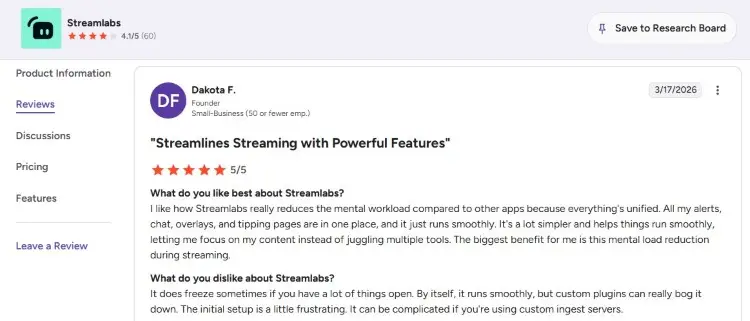
Streamlabs Desktop is an application used by content creators to get professional results without needing a studio engineer.
Users enjoy all the customization offers on the platform, but some note that the best features are locked behind a paywall.
- Dakota F. shares, “I like how Streamlabs really reduces the mental workload compared to other apps because everything’s unified. All my alerts, chat, overlays, and tipping pages are in one place, and it just runs smoothly.”
- Divy S. says, “In Streamlabs, there are so many options and widgets that you can use during your live stream, such as a chat section and superchat notification.”
Is Streamlabs good for streaming?
Streamlabs is excellent for streaming when you need production value that rivals broadcasts.
- Special tools: Includes widget creation, chat moderation tools, and alert systems that keep your stream looking professional.
- Branding: You can customize every visual element to match your brand.
- Streaming features: Includes scene transitions, audio filters, and resolution controls.
For coaches doing live Q&A sessions or consultants running training webinars, Streamlabs helps you engage with your audience through interactive elements that Restream can’t match.
Is Streamlabs better than OBS?
Streamlabs is generally easy to use compared to OBS (Open Broadcaster Software) when it comes to setup. While OBS Studio requires manual configuration of scenes and sources, Streamlabs provides a guided setup wizard that walks you through connecting to YouTube and Twitch.
Streamlabs also comes with pre-built templates that OBS lacks, letting you start streaming within minutes. Meanwhile, in terms of CPU usage, OBS is lighter on your system resources during the initial setup.
Is it better to use OBS or Streamlabs?
For recording podcasts and shows, OBS and Streamlabs both deliver high-quality results, but they serve different needs.
- OBS Studio offers more codec options and file format flexibility for archiving your content.
- Streamlabs simplifies the recording process with one-click start and automatic file organization.
If you need a recording purely for documentation and later editing, Streamlabs handles this beautifully with its user-friendly approach. For those who need specific audio tracks separated or advanced encoding settings, OBS provides deeper technical control.
You can also explore how OBS compares to Restream with this guide.
Is OBS or Streamlabs better for streaming?
When actively streaming to your audience, the choice depends on your computer specs and needs.
- Streamlabs provides better built-in monetization tools, alert systems, and overlay management that help you accept donations and monetize your stream effectively.
- OBS runs lighter on CPU, leaving more resources for background apps.
For pure podcasting and interview shows, Streamlabs usually provides better engagement tools. For users with older computers or those running memory-intensive applications alongside their stream, OBS Studio offers stability.
Is StreamElements better than Streamlabs?
StreamElements and Streamlabs compete closely in the streaming platform space, each with distinct strengths.
- Streamelements runs as a web-based overlay system that works alongside OBS, while Streamlabs offers a full desktop application.
- Streamelements excels in cloud-based chat management and loyalty systems, but Streamlabs offers superior graphic design tools.
For podcasters who want everything in one place without juggling multiple browser tabs, Streamlabs provides a more cohesive experience. Streamlabs also has better dedicated mobile app features for managing your stream on the go.
How to Choose Between Restream and Streamlabs
Making the right choice requires an honest assessment of your technical skills and business goals. Here’s your step-by-step guide to picking your perfect match.
- Identify your primary goal: Are you hoping to reach more audiences or encourage deeper engagement?
- Assess your computer specs: If you have an older device, Restream cloud processing saves you from lag and dropped frames.
- Count your destinations: List the social media platforms where your target audience actually spends time.
- Test both free versions: Try Streamlabs and Restream free offers to see which interface feels more intuitive.
- Check your internet speed: Restream needs stable upload bandwidth, while Streamlabs relies more on local processing.
- Evaluate your budget: Determine if monthly subscription costs fit your plan or if you prefer free software with optional upgrades.
How to use Restream with Streamlabs
You can combine these popular comparisons to get the best of both worlds. Here’s how to set them up together.
- Install Streamlabs Desktop: Download and install the software from the official website.
- Configure your scenes: Set up your overlay, widget, and alert systems in Streamlabs.
- Get your Restream stream key: Log into your Restream account and copy the unique key provided.
- Connect the two: Paste the Restream key into Streamlabs stream settings to bridge the platforms.
- Go live: Hit the go live button in Streamlabs to send your feed through Restream to multiple destinations.
Restream vs Streamlabs Alternatives
While Restream and Streamlabs are already solid solutions, other streaming tools can be a better fit for your needs. Consider these options before making your final decision.
- Streamyard: A browser-based streaming platform that makes it easy to host podcast interviews with multiple guests and simple broadcasts.
- Castr: A platform similar to Restream designed for high-quality multi-streaming and video hosting.
- Riverside: An AI-powered platform for live streaming, remote audio and video recording, and editing. It’s often compared to Zencastr, another remote podcasting solution.
For all these alternatives, Talks is a good partner to complete your podcasting tool kit. It’s the modern way of growing through visibility, whether that means collaborating with guests or cross-promoting on another podcast yourself.
Go Live with Your Podcast
Choosing between Restream vs Streamlabs comes down to your specific needs. Both software are pretty solid options that can get you started on your podcasting journey.
Put your new streaming platform to work. Create your free Talks profile today and find podcast guests to interview.
No time to make connections? Too busy to prepare for pitches? No worries.
Talks keep it simple and quick, using AI-matching tech to bring you relevant experts in your field. It’s the easiest way to boost your visibility, all with just a couple of clicks.
Deborah found 10 shows exactly to her taste. Brian filled up 12 interview spots in a month.
Sign up for a Talks profile for free today and find your next opportunity.


