

You’ve got a newsletter, a growth goal, and a pile of collaboration messages you haven’t sent. Substack just handed you a shortlist. Talks.co hands you a different one.
Substack opened Creator Match to all publishers on August 26, 2026, and it does a solid job of finding other Substack writers. It stops at the Substack border, though, and plenty of your best collaborators publish, podcast, and build audiences outside it.
This Substack Creator Match vs Talks.co comparison covers what each tool does, where each fits, and how the Talks Substack filter finds podcast hosts who also run newsletters.
Substack Creator Match vs Talks: Side-by-Side Comparison
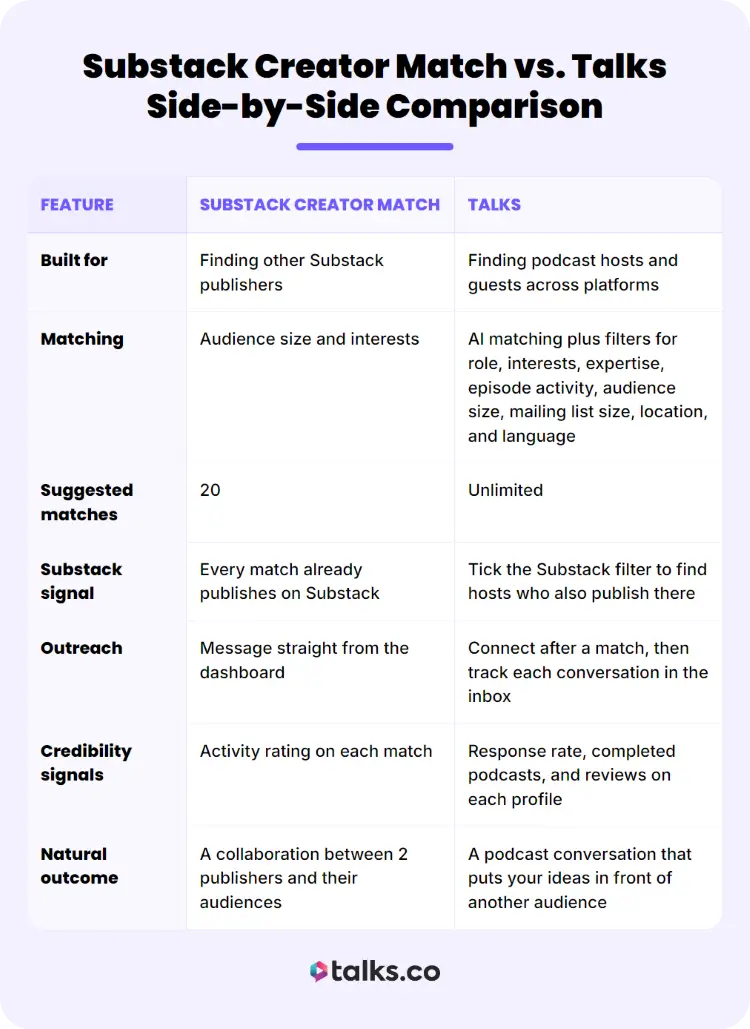
Both tools help you find podcast guests to collaborate with, but they point you toward different places. The table shows the features, and the list below shows what those differences mean for your week.
| Feature | Substack Creator Match | Talks |
|---|---|---|
| Built for | Finding other Substack publishers | Finding podcast hosts and guests across platforms |
| Matching | Audience size and interests | AI matching plus filters for role, interests, expertise, episode activity, audience size, mailing list size, location, and language |
| Suggested matches | 20 | Unlimited |
| Substack signal | Every match already publishes on Substack | Tick the Substack filter to find hosts who also publish there |
| Outreach | Message straight from the dashboard | Connect after a match, then track each conversation in the inbox |
| Credibility signals | Activity rating on each match | Response rate, completed podcasts, and reviews on each profile |
| Natural outcome | A collaboration between 2 publishers and their audiences | A podcast conversation that puts your ideas in front of another audience |
What these differences mean for you:
- Starting point: Creator Match gives you a ready shortlist inside your dashboard. Talks starts with a profile you build once, which doubles as your public speaker page.
- Best first step: Creator Match fits a quick Substack swap you can send this week. Talks fits podcast relationships that develop over several conversations.
- Audience you reach: Creator Match puts you in front of readers already on Substack. Talks puts you in front of listeners and subscribers across platforms.
- How conversations begin: Creator Match lets you message a match directly, a single click from your shortlist. Talks starts conversations once both sides show interest, which can help conversion from first message to getting booked on a podcast episode.
- Cost to start: Creator Match is available to every Substack publisher. Talks has a free plan with 1 connection request every 30 days, and Pro includes 30 per month.
- Best use of each: Creator Match suits cross-posts, recommendations, and shared Notes. Talks suits podcast interviews and guest spots. Plenty of writers use both.
What Is Substack Creator Match?
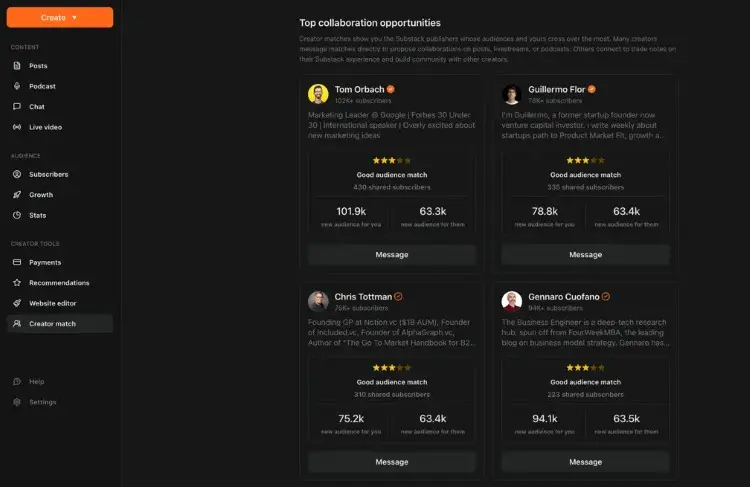
Creator Match is a tool inside your Substack publisher dashboard that finds other publishers worth collaborating with. It has one job: pairing Substack writers with other Substack writers.
Creator Match reads audience size and interests, ranks potential partners by how promising the collaboration could be for both sides, and lets you message them from the dashboard.
Substack names cross-posts, recommendations, podcast episodes, and shared Notes as the typical outcomes.
- Finds similar publishers: It matches you with writers whose audience size and interests resemble yours.
- Ranks every match: The strongest collaboration prospects sit at the top.
- Opens direct outreach: You message from the dashboard without hunting for contact details.
Why should you use Substack Creator Match?
Creator Match takes the slowest part of collaborating, figuring out who to pitch, and hands you a ranked list.
Substack points to cross-posts, recommendations, podcast episodes, and shared Notes as the ways publishers grow through these partnerships and many Bestsellers got their start that way.
- Save hours of research: You get a ranked shortlist instead of scrolling recommendations to find writers in your lane.
- Borrow trust that’s already built: Another publisher’s readers meet you through someone they already follow.
- Message without leaving Substack: Outreach happens from the dashboard, so the pitch gets sent instead of sitting on a to-do list.
- Start with a fit: Matches share your audience size and interests, so your first message has a real reason behind it.
Not interested in Substack? I did a deep dive on Beehiiv vs Substack to help you decide faster.
What Is Talks?
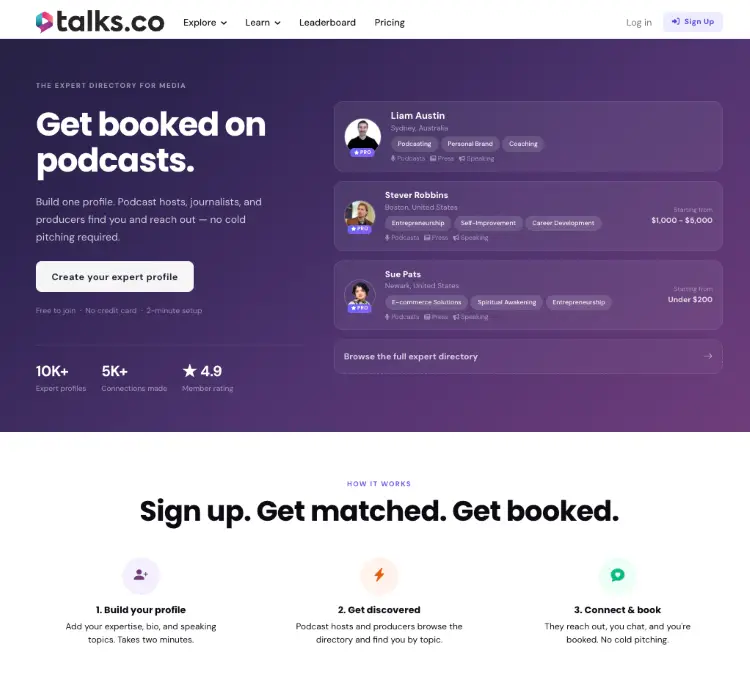
Talks.co is a matching platform where podcast hosts and guests find each other, with profiles that double as a public speaker one-sheet. You build a profile as a host, a guest, or both, and Talks suggests people in your space.
How matching works
- AI matching: Your interests and expertise drive the suggestions, and you can ask the AI for specific matches too.
- Unlimited suggested matches: Browse as many as you like, with limits only on connection requests.
- Mutual opt-in: Messaging unlocks once both sides show interest, so you skip cold pitches.
Your public profile
- Speaker profile: Add your bio, topics, availability, and past episodes from Spotify, Apple, or YouTube on one page.
- Custom profile URL: Claim a link like talks.co/yourname on any plan, including free, for your LinkedIn, email signature, and website.
- Lead magnet and video pitch: Pro profiles can add a download offer and a video pitch.
- Credibility signals: Response rate, completed podcasts, and reviews show on your profile, so hosts can judge you before replying.
Staying organized
- Built-in inbox: Each conversation moves from active to scheduled to completed to archived.
- Reminders and reviews: Talks prompts you before an interview and asks for a review afterward.
What each plan costs
- Free plan: $0 gets you 1 connection request every 30 days.
- Pro plan: $32 per month gets you 30 connections a month, auto-accept and auto-respond, top placement in search, and premium filters.
- Agency plan: $90 per month covers up to 5 profiles, with 30 connections a month per profile and priority support.
- Annual billing: Switching to a yearly plan saves up to 50%.
How does Talks match podcast hosts and guests?
Talks uses AI to suggest matches from your profile, and you can ask the AI for specific matches too. You show interest in the people who fit, and conversations start from there.
- AI-powered matching: Your profile details drive the suggestions.
- Unlimited suggested matches: Browse as many suggestions as you want.
- Connection limits by plan: The free plan includes 1 connection request every 30 days, and Pro includes 30 connections per month.
- Organized inbox: Each conversation moves through clear stages, from first message to scheduled interview to published episode.
What advanced filters does Talks offer on paid plans?
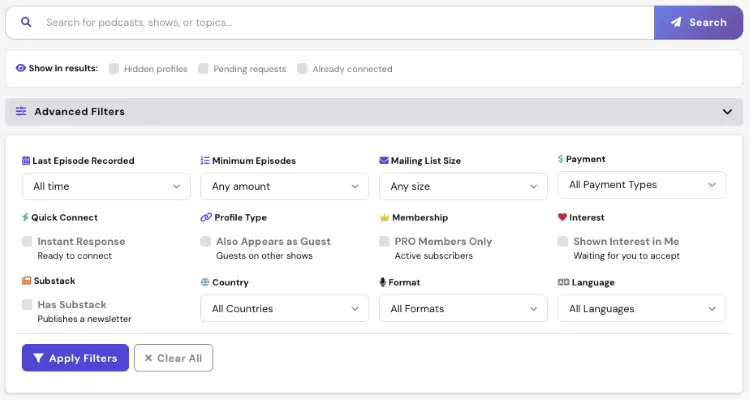
Paid plans add filters that turn a big pool into a short list of serious prospects. Each one answers a question you’d otherwise have to research by hand.
- Audience size: Search by mailing list size.
- Episode activity: Filter by episode count and recent activity to find shows that publish.
- Recently active users: Spot people who are actively looking to connect.
- Pro-only search: Limit results to members who take connecting seriously.
How the Talks Substack Filter Works
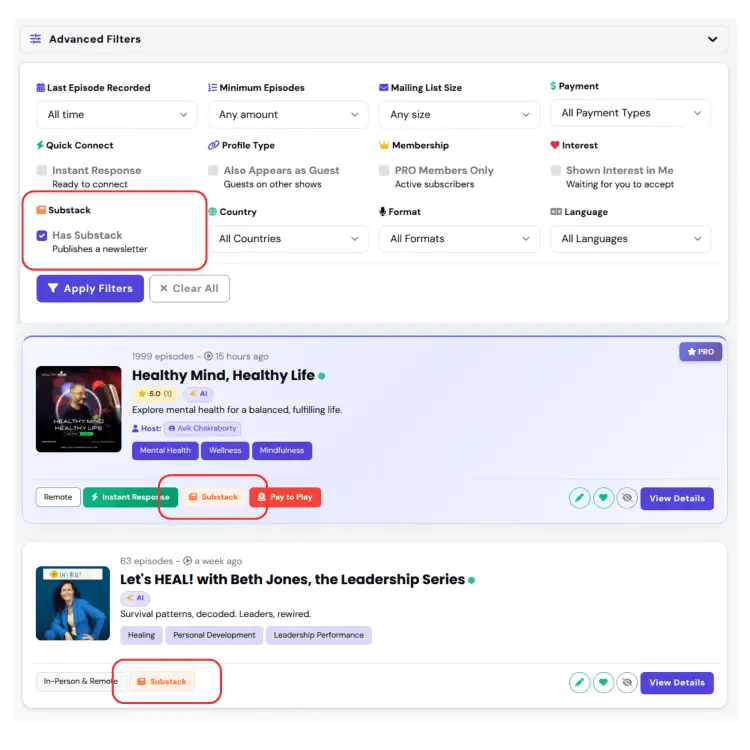
Talks added a Substack filter for people who want podcast hosts that also publish a newsletter. Tick the Substack box in the advanced filters and your results narrow to shows where the host writes on Substack.
How to find podcast hosts who also publish on Substack
The Substack label appears right on the show results, and the host’s Substack link can show up in the social section of their Talks profile. That gives you something to read before you send a single message.
- Open the advanced filters: Choose the Substack option alongside your interests.
- Stack the filters: Add episode activity to find hosts who are publishing right now.
- Add mailing list size: See which Substack publishers run podcasts with established audiences.
- Read their newsletter first: Use what you find to personalize your opening message.
Who should use the Talks Substack filter?
Anyone who writes on Substack and wants their ideas heard by a new audience will get the most from it. A host who already writes about your topics gives you a built-in reason to start the conversation.
- Newsletter writers: Pitch yourself as a guest to hosts who already cover your subject.
- Coaches and consultants: Turn podcast conversations into new subscribers and clients.
- Podcast hosts with a newsletter: Find peers for guest swaps.
Want to find podcast hosts who already publish on Substack? Create your free Talks profile and start filtering today.
When to Use Creator Match, Talks, or Both
The right pick depends on the audience you want to reach next. Match the tool to the goal and you’ll stop wasting outreach.
When Substack Creator Match is the better pick
Choose it when the goal is a Substack-to-Substack collaboration. It’s the fastest route to people already publishing on the platform.
- Cross-posts: Share a post with another publisher’s readers.
- Recommendations: Land in front of readers who follow similar writers.
- Shared Notes: Reach a feed you couldn’t crack alone.
When Talks is the better pick
Choose Talks when you want collaborators beyond Substack, especially podcast hosts and popular podcasts. Talks keeps suggesting new types of podcasts after Creator Match’s 20 are used up.
- Podcast interviews: Get matched with shows in your niche.
- A wider pool: Reach hosts and guests no matter which platform they publish on.
- Substack-specific search: Use the Substack filter to find hosts who also write newsletters.
How to use both in a write-talk-write loop
Your newsletter and your podcast appearances feed each other when you treat them as one system. Your posts surface the ideas worth discussing, and your conversations carry those ideas to people who haven’t found your newsletter yet.
- Write: Publish the idea on Substack.
- Talk: Take it to a podcast host you found on Talks.
- Reach a new audience: Let the episode introduce you to listeners.
- Write again: Bring what came out of the conversation back to your newsletter.
Ready to start the loop to become a content creator? Create your free Talks profile and get matched with hosts in your niche.
Substack Creator Match vs Talks FAQs
Is Substack Creator Match free?
Every Substack publisher has access to Creator Match from the publisher dashboard.
How many matches does Creator Match show?
It currently suggests 20 matches.
Can Talks find creators who publish on Substack?
Yes. Tick the Substack box in the advanced filters and your results narrow to shows where the host publishes a newsletter on Substack.
Is Talks free to join?
Yes. The free plan includes 1 connection request every 30 days, and Pro includes 30 connections per month along with premium filters.
Should I use Creator Match or Talks?
Use Creator Match for Substack collaborations and Talks for podcast hosts and guests across platforms. Using both gives you the widest reach.
Best of Both Worlds
When it comes to Substack Creator Match vs Talks.co, Creator Match earns its spot if you want Substack collaborations fast, but Talks earns its spot the moment you want podcast conversations, a bigger pool than 20 names, and hosts who already write on Substack.
The smartest move is using both, because the writers and hosts who could grow your audience won’t all be in one place. Start with the Substack filter, read a host’s newsletter, and send a message that proves you did.
Create your free Talks Creator profile and find hosts who already publish on Substack in as fast as 5 minutes.


