

Most podcasters pick the wrong tool for one simple reason: they base their decision on features before they compare goals.
Buzzsprout and Riverside both help you create a podcast, but one is dedicated to hosting and distributing your show while the other comes with a user-friendly interface so you can record professional-quality audio and video immediately wherever you are.
Choose the wrong one, and you’ll either pay for support options and features you don’t need or find yourself shopping for another platform six months from now.
This comprehensive Buzzsprout vs Riverside comparison is designed to help you see where each platform fits the bill, where each solution falls short, and which one makes the most sense based on your podcasting goals, budget, and stage of growth as a newbie or seasoned podcaster.
What Is Riverside?

We’ve all listened to interviews where one person sounds hollow, distant, or way too close to the mic. And if you’re asking guests to give you an hour of their time, poor audio can make great conversations feel amateur before anyone hears your message.
Riverside was built to solve bad audio problems by giving creators the tools to record, edit, host, and publish podcasts and videos from one platform.
What Riverside offers:
- Local recording: Captures each participant on their own device for clearer audio and video.
- High-quality recording: Records up to 4K video and up to 48 kHz audio.
- Built-in editing: Edit recordings, generate transcripts, create show notes, and remove filler words.
- Podcast hosting: Publish episodes and manage your podcast from the same platform to millions of potential listeners through major directories and podcast charts.
- Video creation: Turn interviews into clips for YouTube, LinkedIn, Instagram, TikTok, and other social platforms.
- Live content: Host livestreams and webinars without adding another tool to your stack.
How does Riverside work?
Getting your first recording takes just a few steps.
- Create a studio: Set up your recording space and invite guests with a shareable link.
- Record locally: Riverside records each participant separately while progressively uploading files and creating cloud backups.
- Edit your episode: Clean up the recording with text-based editing, transcripts, Magic Audio, show notes, and social clips.
- Publish your content: Host your podcast, track analytics, and distribute episodes to platforms like Spotify and Apple Podcasts.
If you’re recording interviews with guests you’ve connected with through a platform like Talks, Riverside gives you the tools to produce those conversations in much higher quality than a standard video call.
Is Riverside worth it?
Is Riverside worth it?
Think about the last podcast interview you watched where the guest froze mid-sentence, the audio crackled, or everything looked blurry. Those little moments distract from your message.
Riverside was built to reduce those problems before they happen.
The best reviews praise the clean interface and strong audio and video quality. The worst ones tell a different story: bugs, slow support, uploads that stall, editing that breaks, and too many steps just to find or download a file.
If you can live with that tradeoff, Riverside can still be a smart choice.
Best for:
- Interview podcasts: Record remote guests with better audio and video than a standard call.
- Video podcasters: Capture interviews, clips, and full episodes from one place.
- Coaches and consultants: Record webinars, client sessions, and educational content.
- Content creators: Turn long recordings into clips for YouTube, LinkedIn, Instagram, and TikTok.
- Teams that want an all-in-one setup: Keep recording, editing, hosting, and publishing in one platform instead of juggling multiple tools.
If you need fast support, a super smooth editor, or a tool that feels invisible when something goes wrong, the reviews suggest Riverside still has some rough edges.
What Is Buzzsprout?
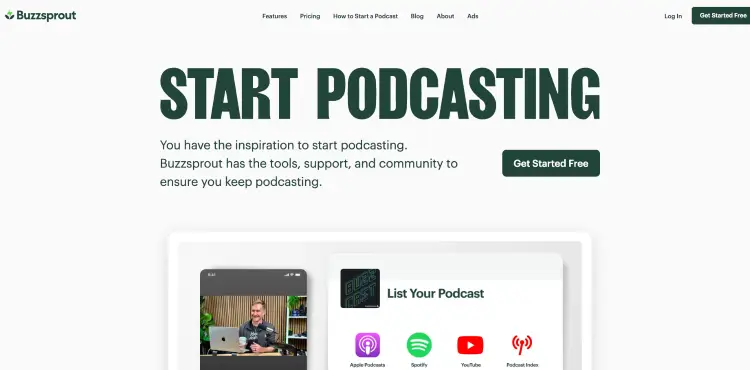
Buzzsprout is a podcast hosting platform that helps creators publish, manage, and distribute their podcasts.
Once you’ve recorded and edited an episode, Buzzsprout stores your audio files, generates your podcast RSS feed, and submits your show to listening platforms like Spotify, Apple Podcasts, and other podcast directories.
Its clean interface and beginner-friendly setup have made it one of the most popular podcast hosting platforms for new and growing creators.
If you’re also appearing as a guest on other podcasts through platforms like Talks, Buzzsprout gives you a simple place to publish your own show alongside those guest appearances.
How does Buzzsprout work?
Getting your podcast online is refreshingly straightforward.
- Upload your episode: Add your finished audio or video file to your Buzzsprout account.
- Complete your episode details: Write your title, description, artwork, and publish date.
- Distribute your podcast: Buzzsprout generates your RSS feed and submits your show to major podcast apps.
- Track your growth: Monitor downloads, listener trends, and manage your podcast from one dashboard.
The first time you publish a podcast, the process feels much bigger than it actually is. Once you’ve done it once, you’ll probably spend more time deciding on your episode title than uploading the file itself.
Is Buzzsprout worth it?
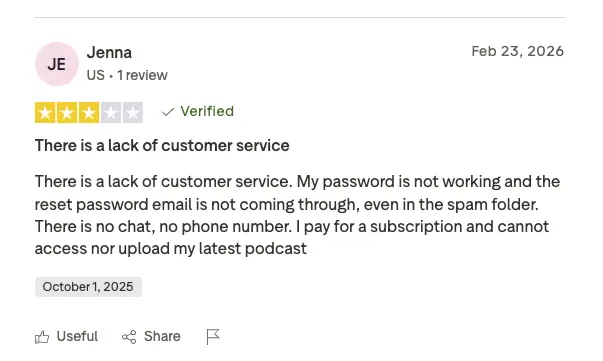
Buzzsprout has built its reputation around one thing: making podcast hosting feel approachable. That said, recent reviews highlight a few frustrations worth knowing before you sign up.
What users like:
- Easy to learn: Beginners regularly praise the clean interface and simple setup.
- Reliable hosting: Long-time customers report years of stable podcast hosting.
- Helpful support: Many creators speak highly of Buzzsprout’s educational resources and customer service.
- Professional features: Analytics, podcast websites, monetization, and distribution are all easy to access.
Common complaints:
- Pricing changes: Some long-time customers preferred the previous pricing structure and upload limits.
- Account access: A handful of users report password reset and login issues.
- Transcripts: The free transcription tool still receives mixed feedback.
- Dashboard experience: Some reviewers say parts of the platform feel less intuitive than expected.
If your priority is publishing and growing a podcast without spending days learning new software, Buzzsprout remains one of the easiest platforms to start a podcast with.
If you expect unlimited upload hours, highly advanced production tools, or enterprise-level customization, you may find yourself comparing a few alternatives before deciding.
Buzzsprout vs Riverside Pricing, Features & Pros/Cons
Buzzsprout and Riverside often end up in the same conversation, but they weren’t built with the same job in mind. One shines as a podcast hosting platform. The other focuses on helping you record, edit, and publish professional-quality podcasts and videos from one place.
If you’re deciding between them, here’s how they compare.
Buzzsprout vs Riverside similarities and differences
The better choice depends on what you need most. Buzzsprout is built for hosting and distribution, while Riverside is designed for recording and production.
| Category | Buzzsprout | Riverside |
|---|---|---|
| Primary purpose | Podcast hosting and publishing | Podcast and video recording, editing, hosting, and publishing |
| Best for | Publishing and growing a podcast | Recording and producing remote podcasts and videos |
| Built-in recording | No | Yes, up to 4K video |
| Podcast hosting | Yes | Yes |
| Built-in editing | Basic production tools | Advanced audio and video editing |
| AI transcripts | Yes | Yes |
| Podcast distribution | Yes | Yes |
| Podcast website | Yes | Limited |
| Remote guest recording | No | Yes |
| Analytics | Advanced podcast analytics | Podcast and content analytics |
| Livestreaming | No | Yes |
What both platforms offer:
- Free plans: Try each platform before upgrading.
- Centralized workflows: Manage your episodes, files, and settings from one dashboard.
- Flexible publishing: Make it easier to get your content in front of listeners.
- AI-powered tools: Speed up common publishing and production tasks.
- Performance insights: Monitor how your content performs over time.
- Creator-friendly dashboards: Manage your podcast from one place.
Choose Buzzsprout if you want to:
- Create a home for your show: Manage episodes, your RSS feed, and your podcast website in one place.
- Reach listeners faster: Publish across major podcast apps from a single dashboard.
- Measure audience trends: Understand what resonates with your listeners.
- Monetize your show: Use listener support, subscriptions, and Buzzsprout Ads.
- Spend less time on setup: Focus on creating instead of configuring your host.
Choose Riverside if you want to:
- Invite guests from anywhere: Send a link and record separate tracks for every participant.
- Capture broadcast-quality video: Record polished interviews without a studio.
- Finish episodes faster: Considered one of the best software for podcast interviews that turns raw recordings into publish-ready content.
- Host and publish your podcast: Keep recording, editing, and publishing together.
- Run livestreams and webinars: Create live content alongside your podcast.
Buzzsprout vs Riverside feature comparison
Neither platform wins every category because they solve different problems. One mistake I see creators make is trying to force one platform to do everything. That’s usually where the frustration starts.
This breakdown compares Buzzsprout and Riverside.fm side-by-side to show where one clearly has the edge as an audio-video platform for podcasts.
| Feature | Buzzsprout | Riverside | Winner |
|---|---|---|---|
| Podcast hosting | Yes | Yes | Tie |
| Podcast publishing | Yes | Yes | Tie |
| Remote recording | No | Yes | Riverside |
| Local recording | No | Yes | Riverside |
| 4K video recording | No | Yes | Riverside |
| Built-in editing | Basic | Advanced | Riverside |
| Podcast analytics | Yes | Yes | Tie |
| Podcast website | Yes | Limited | Buzzsprout |
| Livestreaming | No | Yes | Riverside |
| Social media clips | Basic | Advanced | Riverside |
| Video podcast support | Yes | Yes | Tie |
Choose Riverside if you want to:
- Record remote interviews: Capture separate audio and video tracks for every guest.
- Create 4K video podcasts: Produce professional-quality video content.
- Edit from one platform: Clean up recordings, generate transcripts, and create clips.
- Keep production together: Manage recording, editing, and publishing in one workspace.
- Go live when it makes sense: Host webinars or livestream interviews from the same platform.
Buzzsprout vs Riverside pricing comparison
Pricing depends on whether you need a simple hosting platform or a more complete podcast recording program and production suite. Here’s how the plans compare at a glance.
| Plan | Buzzsprout | Riverside |
|---|---|---|
| Free plan | Yes | Yes |
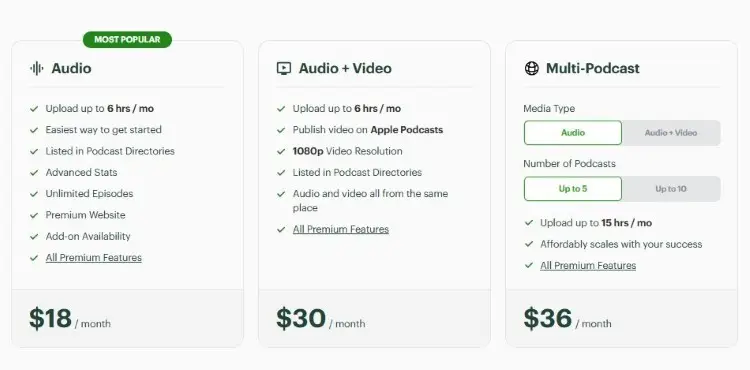
| Entry-level paid plan | Starts at $18/month (Audio) | Paid plans available |
| Video podcast plan | Starts at $30/month | Included on eligible paid plans |
| Best value | Podcast hosting and distribution | Recording, editing, and production tools |
Buzzsprout offers better value if you need:
- Podcast hosting: Manage and publish your show with ease.
- Distribution: Reach major podcast directories quickly.
- Advanced podcast analytics: Measure downloads and audience growth.
- Monetization: Generate revenue through subscriptions, listener support, and ads.
- A simple workflow: Spend less time configuring your hosting platform.
Riverside offers better value if you need:
- Professional remote recording: Capture every guest locally for better quality.
- Video podcast production: Record up to 4K video from anywhere.
- Built-in editing: Edit, transcribe, and create clips without extra software.
- An all-in-one workflow: Record, edit, host, publish, and livestream from one platform.
Buzzsprout vs Riverside pros and cons
Both platforms have clear strengths, but they also come with trade-offs. Here’s a quick look at the biggest pros and cons for each one.
Buzzsprout pros
- Easy learning curve: Get comfortable quickly, even on your first podcast.
- Reliable podcast hosting: Trusted by over 115,000 podcasters.
- Wide directory support: Submit your show to the biggest podcast platforms.
- Built-in monetization: Includes listener support, subscriptions, and Buzzsprout Ads.
- Podcast website included: Create a professional home for your show.
Buzzsprout cons
- No built-in remote recording: You’ll need another platform to record interviews.
- Light production tools: Better suited to simple edits than full post-production.
- Limited recording features: Video hosting is included, but recording happens elsewhere.
Riverside pros
- Separate tracks for every speaker: Gives you much more control during editing.
- Text-based editing: Trim episodes, generate transcripts, and create clips from one editor.
- One connected workflow: Move from recording to publishing without juggling multiple platforms.
- Live content support: Broadcast interviews or webinars whenever you want.
Riverside cons
- Feature-rich interface: Expect more settings than a traditional podcast host.
- Priced for creators: Makes the most sense if you record regularly.
- Occasional technical hiccups: Some users report upload, syncing, or editing issues.
Buzzsprout vs Riverside: Which Is Better?
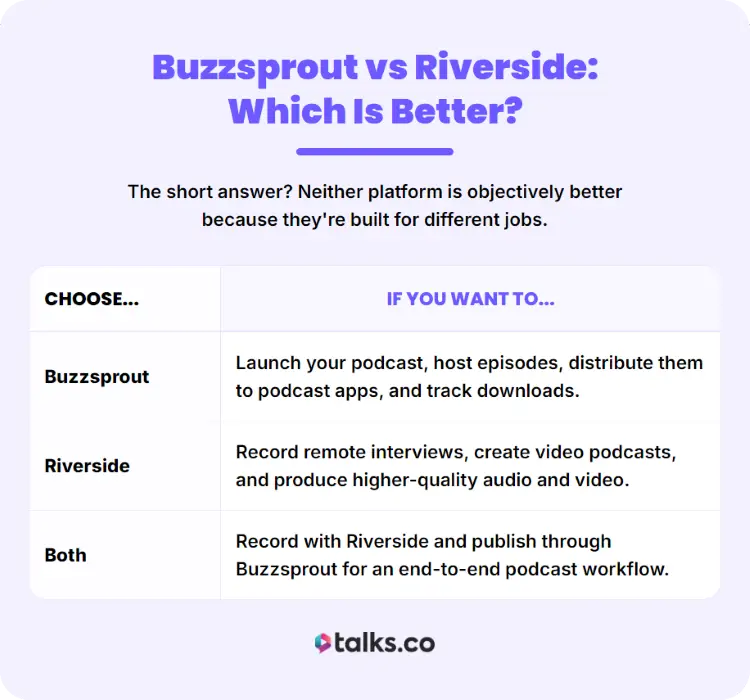
The short answer? Neither platform is objectively better because they’re built for different jobs.
If your goal is to publish and grow a podcast, Buzzsprout is the better choice. If your priority is recording professional-quality remote interviews or video podcasts, Riverside comes out ahead.
For many creators, the real answer isn’t Buzzsprout vs Riverside. It’s Buzzsprout and Riverside.
A common workflow looks like this:
- Record your episode in Riverside.
- Edit the recording.
- Upload the finished episode to Buzzsprout.
- Distribute it to Spotify, Apple Podcasts, and other listening apps.
Here’s a quick way to decide.
| Choose… | If you want to… |
|---|---|
| Buzzsprout | Launch your podcast, host episodes, distribute them to podcast apps, and track downloads. |
| Riverside | Record remote interviews, create video podcasts, and produce higher-quality audio and video. |
| Both | Record with Riverside and publish through Buzzsprout for an end-to-end podcast workflow. |
If podcasting is part of how you grow your business, there’s often a third piece of the puzzle: consistently finding new interviews and audiences.
That’s where platforms like Talks complement your recording and hosting tools.
Buzzsprout review snippets
Buzzsprout has earned a loyal following because it keeps podcast hosting simple without stripping away the features creators need.
Users frequently highlight:
- An intuitive dashboard that’s easy for beginners to learn.
- Fast podcast distribution to major listening platforms.
- Helpful analytics that make it easy to monitor podcast growth.
- Responsive customer support and educational resources.
- A straightforward publishing workflow with very little setup.
Some users also mention a few drawbacks:
- Recording and editing features are fairly limited.
- Video podcast creators may need additional software.
- Advanced users may outgrow some of its built-in tools over time.
Overall, Buzzsprout is best suited to creators who want a reliable podcast host without spending hours learning a complicated platform.
Riverside reviews from actual users
Riverside consistently receives praise for producing high-quality remote recordings, especially for interview-based podcasts and video content.
Common themes from user reviews include:
- Excellent audio and video quality, even when guests are recording from home.
- Separate audio and video tracks make editing much easier.
- Built-in editing, transcripts, and clip creation save time after recording.
- A polished experience for remote podcast interviews.
Some reviewers also point out areas for improvement:
- It isn’t a podcast hosting platform, so you’ll still need somewhere to publish your episodes.
- Some features take time to learn if you’re brand new to podcasting.
- Premium plans can feel expensive if you only record occasionally.
If recording quality is your biggest priority, Riverside remains one of the strongest options available.
Buzzsprout vs Riverside alternatives

Buzzsprout and Riverside are strong podcast production tools, but they aren’t the only options. If you’re looking for a different fit, these Riverside and Buzzsprout alternatives are worth considering.
- Talks: Best for coaches, consultants, authors, speakers, entrepreneurs, and podcast hosts who want to get booked on more podcasts or find the right guests.
- Transistor: Best for businesses, networks, and creators managing multiple podcasts in one place.
- Captivate: Best for growing podcasts that want stronger marketing and audience growth tools.
- Podbean: Best for creators who want podcast hosting with built-in monetization options.
- Zencastr: Best for remote podcast recording with simple production tools.
- SquadCast: Best for recording high-quality remote interviews and conversations.
Don’t Let the Wrong Tool Slow You Down
When it comes to Buzzsprout vs Riverside, the winner depends on what you’re trying to accomplish. Buzzsprout helps you publish and grow a podcast. Riverside helps you create one worth listening to.
Pair them together, and you’ve got a strong podcast workflow from recording to distribution. Now make sure people actually hear it.
Create your free Talks profile and let podcast hosts discover you automatically.
With instant matching and new automation tools working around the clock, you can spend less time pitching and more time saying “yes” to interviews.
Create your free Talks profile today.


