

Choosing the wrong editing software without key features you actually need gets expensive fast for your wallet, your time, your patience, and basically every project that takes twice as long as it should.
If you’re weighing Adobe Audition vs Logic Pro, you’re probably wondering which one deserves a spot in your workflow.
Well… The answer depends on what you’re creating.
Podcasts? Voice overs? Music? All three?
Each program is obviously “the best for something” in different ways, so picking the right one for your business can make recording, editing, and publishing feel far less frustrating for you.
In this guide, you’ll see how I compare Adobe Audition and Logic Pro on audio editing software features, product pricing, ease of use and accessibility, and everyday workflows so you can verify your requirements and select the one that fits your goals and specifications best.
What Is Adobe Audition?
Adobe Audition is Adobe’s digital audio workstation (DAW) for recording, editing, mixing, restoring, and mastering audio.
It’s part of Adobe Creative Cloud and is widely used by podcasters, voice-over artists, video creators, broadcasters, and audio editors who need polished, professional sound.
Unlike music-focused DAWs, Adobe Audition puts audio editing first.
Its multitrack editor, waveform editor, noise reduction tools, and batch processing features make it a popular choice for spoken-word content.
If your work involves podcast episodes, interviews, webinars, YouTube videos, or voice-over recordings, Adobe Audition gives you the tools to clean up audio, remove background noise, balance levels, and export files in a wide range of formats.
Is Adobe Audition worth it?
Yes. Adobe Audition is a digital audio workstation (DAW), but it wasn’t built to do everything. It was built to do spoken audio exceptionally well. If you’re recording podcasts, editing interviews, cleaning up voice-overs, or polishing dialogue for videos, that’s exactly where it shines.
| Adobe Audition is best for… | Less suited for… |
|---|---|
| Podcasts | MIDI composition |
| Voice-overs | Beat production |
| Interviews | Virtual instruments |
| Video dialogue | Songwriting workflows |
| Audio restoration | Electronic music production |
You’ll get the most value from Adobe Audition if you’re a:
- Podcaster: Turn raw recordings into polished episodes people enjoy listening to.
- Voice-over artist: Deliver clean, professional audio clients can use immediately.
- Video creator: Fix dialogue without jumping between multiple podcast editing tools.
- Educator or course creator: Record lessons and webinars that sound clear from start to finish.
- Marketing or communications professional: Produce presentations, ads, and branded audio with confidence.
If your goal is making music from scratch, there are better tools for the job. Adobe Audition knows what it does well, and it doesn’t try to be everything to everyone.
Is Adobe Audition easy to use?
Adobe Audition is relatively easy to learn if your focus is editing spoken audio.
The interface is well organized, and common tasks like trimming clips, reducing background music for podcasts, adjusting volume, and exporting finished files become much easier after a few editing sessions.
That said, beginners should expect a learning curve. Features like multitrack sessions, compression, EQ, and mastering take practice, especially if you’ve never used a DAW before.
My advice is simple: don’t wait until you’ve mastered every feature before publishing. Your editing will improve with every episode you finish. Most creators learn more from recording 10 interviews than watching 10 hours of tutorials.
The good news is that Adobe Audition has plenty of tutorials, templates, and an active user community, making it easier to build confidence as your projects become more advanced.
Is Adobe Audition a DAW?
Yes. Adobe Audition is a digital audio workstation (DAW) designed for recording, editing, mixing, and restoring audio. While every DAW handles audio, each one is built with different creators in mind.
| Adobe Audition is built for | Less focused on |
|---|---|
| Podcast editing | Music composition |
| Voice-over production | MIDI sequencing |
| Audio restoration | Virtual instruments |
| Dialogue cleanup | Beat production |
| Video post-production | Songwriting workflows |
Adobe Audition is widely used by:
- Podcasters: Edit interviews and weekly episodes.
- Voice-over artists: Record and polish client work.
- Video creators: Clean up dialogue before publishing.
- Broadcasters: Produce radio and spoken-word content.
- Educators: Record courses, webinars, and presentations.
Is Adobe Audition a good DAW?
Yes, as long as you’re choosing it for the right reasons.
Adobe Audition earns its reputation because the average user rating echoes how it provides the solution to the problems that podcasters, video editors, and voice-over artists deal with every day.
Here’s where Adobe Audition stands out based on their key features:
- Spectral editing: Remove clicks, hums, coughs, and other distractions without affecting the rest of the recording.
- Multitrack sessions: Blend narration, sample music, and sound effects into one organized project seamlessly.
- Essential Sound panel: Improve dialogue quickly without spending hours adjusting every setting.
- Batch processing: Apply the same edits across dozens of files and save yourself repetitive work.
- Creative Cloud integration: Move audio between Audition and Premiere Pro without slowing your workflow or user experience.
Spend a few minutes reading popular comparisons plus verified user reviews and ratings on Adobe Audition’s overall performance and you’ll notice the same things people like and don’t like and could probably use more of, so the question you should be asking yourself before subscribing is:
When you finish recording, what’s the first thing you usually do?
If the answer is cleaning up dialogue, removing background noise, balancing levels, and getting an episode or video ready to publish, Adobe Audition’s audio editing tools are built for exactly that.
I’ve recorded well over 400 interviews over the years, and one thing hasn’t changed. People will forgive average video much faster than they’ll forgive poor audio.
If listeners are distracted by hiss, echo, or background noise, they stop paying attention to what you’re saying. That’s why clean dialogue has always been one of my highest priorities.
What is the best Adobe Audition version?
For almost everyone, the latest version of Adobe Audition is the right one.
Adobe now updates Audition through Creative Cloud, so new features, bug fixes, and compatibility improvements arrive regularly instead of waiting for major releases.
Here’s why staying current usually makes the most sense:
- Latest tools: Access new editing features and workflow improvements as they’re released.
- Better compatibility: Keep projects working smoothly with Premiere Pro and other Creative Cloud apps.
- Improved stability: Benefit from ongoing performance and security updates.
- Long-term support: Reduce the chance of running into compatibility issues with newer hardware and operating systems.
The only time I’d recommend an older version is if your computer, workplace, or production setup depends on it. Otherwise, there’s little benefit to using outdated software when Adobe is continually improving the current release.
What Is Logic Pro?
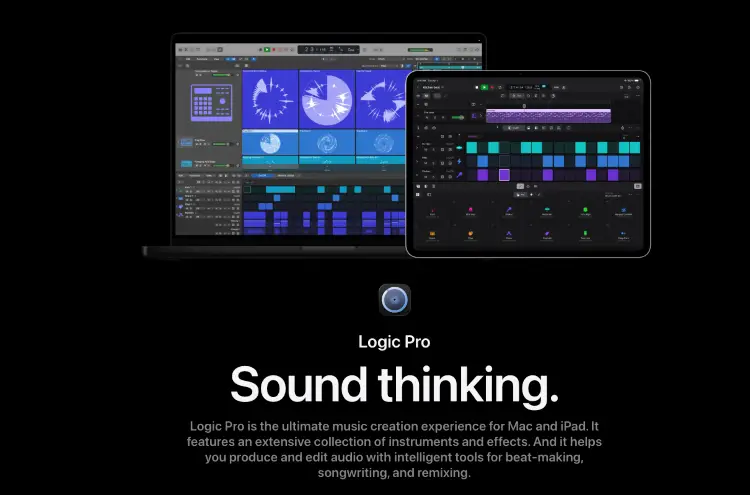
Logic Pro gives you almost every professional tool you’ll eventually grow into, instead of forcing you to buy another plug-in every few weeks as your skills improve.
That’s a big reason it’s become the DAW so many Mac musicians stick with for years. Recording, songwriting, virtual instruments, mixing, mastering, intelligent production tools, and one of the largest built-in sound libraries all live under one roof.
Here’s what you’re getting:
- Complete music production: Record, write, arrange, mix, and master from a single project.
- Massive sound library: Thousands of loops, Producer Packs, instruments, and effects are included.
- Intelligent production tools: Session Players, Stem Splitter, Smart Tempo, Flex Pitch, Chord Track, and Mastering Assistant help speed up your workflow.
- Professional plug-in support: Add Audio Unit plug-ins from thousands of developers whenever your projects demand them.
- Built for macOS: Optimized for Apple silicon with deep integration across Apple’s creative ecosystem.
Browse recent Logic Pro reviews and you’ll notice plenty of people bought it for one reason, then stayed because they kept discovering new features months or even years later.
That’s hard to say about many creative tools.
Is Logic Pro worth it?
Yes, Logic Pro is a strong fit for:
- Musicians and producers: Record, arrange, mix, and master complete songs.
- Songwriters and composers: Build ideas with MIDI instruments, Apple Loops, and a large sound library.
- Content creators: Produce original music, intros, and soundtracks alongside spoken audio.
- Voice-over artists: Record and polish narration with professional mixing and processing tools.
- GarageBand users: Move into a more advanced workflow without starting a podcast from scratch.
It’s similar to upgrading your recording setup. I started with a Logitech C920 webcam back in 2015 and used it for hundreds of interviews before moving to a 4K setup. You don’t need premium gear right now. You just want tools that still support you as your quality improves.
Music producers regularly mention another benefit in reviews: there’s simply less pressure to buy extra plug-ins early on. Apple’s included library covers a surprising amount of ground, making Logic Pro feel complete.
Is Logic Pro easy to use?
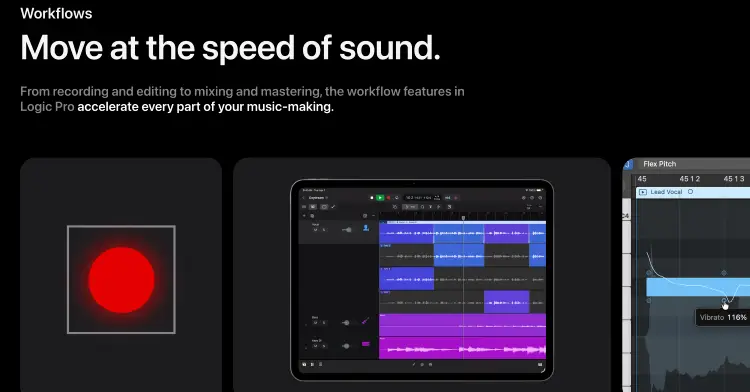
Logic Pro is beginner-friendly in some areas but can feel intimidating at first because of the number of features available.
Recording audio is straightforward, and Apple includes helpful templates that make it easier to start new projects. As your skills grow, you can explore advanced tools for MIDI editing, automation, surround sound, spatial audio, and professional mixing.
The learning curve depends on what you want to create. Fortunately, Logic Pro has an active community, plenty of tutorials, and years of educational content that can help you progress from your first recording to professional-quality productions.
Adobe Audition vs Logic Pro Similarities and Differences
At first glance, Adobe Audition and Logic Pro X look similar. Both podcast editing software let you record, edit, mix, and export professional-quality audio. Both Logic Pro and Adobe Audition offer support, third-party plugins, multitrack sessions, and high-resolution audio files.
Once you start using them, though, the spec, capability, and functionality differences become obvious. The table below provides insight on where the best software for podcast interviews stand.
| Feature | Adobe Audition | Logic Pro |
|---|---|---|
| Best for | Podcasts, voice overs, audio restoration | Music production, songwriting, audio production |
| Operating system | Windows and macOS | macOS only |
| Recording | Yes | Yes |
| Multitrack editing | Yes | Yes |
| MIDI support | Basic | Extensive |
| Virtual instruments | Limited | Large built-in library |
| Audio restoration | Excellent | Good |
| Noise reduction | Industry-leading | Good |
| Podcast editing | Excellent | Very good |
| Music production | Good | Excellent |
| Video workflow | Excellent with Premiere Pro | Limited |
| Plugin support | VST, AU (Mac) | AU |
| Pricing | Subscription | One-time purchase |
- A podcast editor producing three client shows every week will usually spend more time removing background noise, balancing dialogue, cutting pauses, and exporting finished episodes than creating music. Adobe Audition was built for exactly that workflow, helping creators capture clean dialogue efficiently.
- A voice-over artist recording commercials or online courses can benefit from Adobe Audition’s spectral editing tools to remove clicks, mouth noises, and unwanted sounds without affecting the rest of the recording.
- A musician, on the other hand, may record guitars, program drums, add orchestral instruments, automate effects, and mix dozens of tracks inside one project.
Logic Pro handles these creative workflows far better thanks to its extensive instrument library and MIDI tools.
Adobe Audition vs Logic Pro features
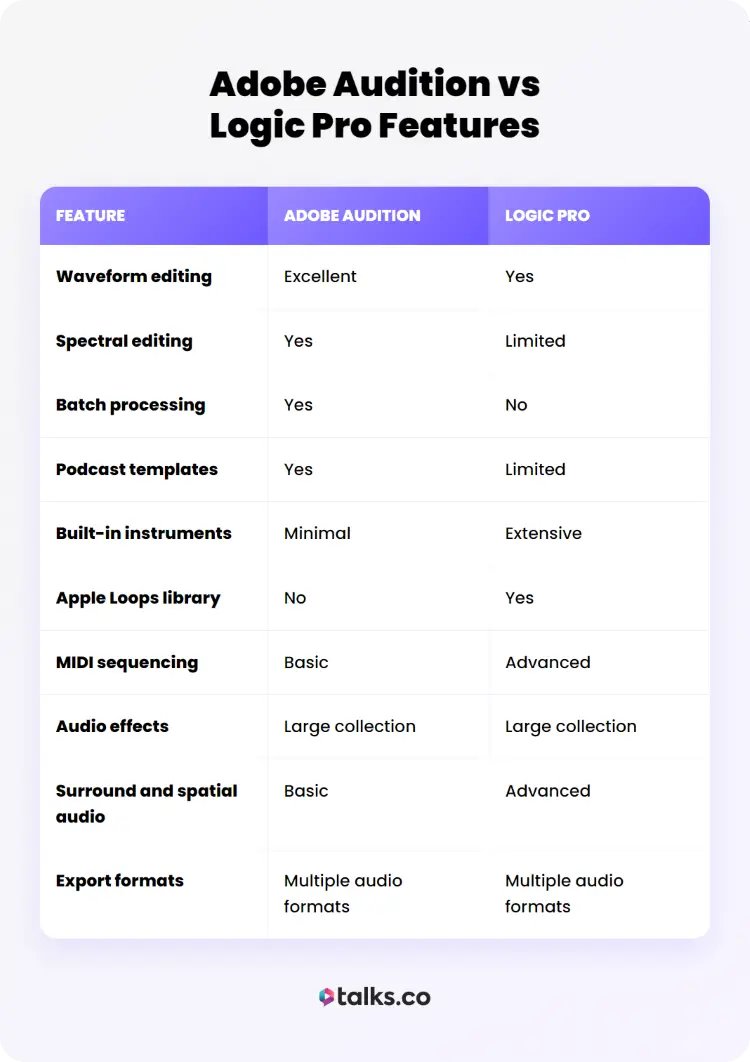
Both applications include professional recording and editing tools, but they emphasize different strengths. The comparison below helps align each platform’s feature set with the type of work you actually do.
| Feature | Adobe Audition | Logic Pro |
|---|---|---|
| Waveform editing | Excellent | Yes |
| Spectral editing | Yes | Limited |
| Batch processing | Yes | No |
| Podcast templates | Yes | Limited |
| Built-in instruments | Minimal | Extensive |
| Apple Loops library | No | Yes |
| MIDI sequencing | Basic | Advanced |
| Audio effects | Large collection | Large collection |
| Surround and spatial audio | Basic | Advanced |
| Export formats | Multiple audio formats | Multiple audio formats |
Editing speed
For spoken-word projects, Adobe Audition generally feels faster.
When you’re editing one episode, saving a few minutes doesn’t seem like much. Multiply that across weekly interviews for a year and those small workflow improvements quickly become hours you get back.
Simple tasks like removing filler words, reducing background noise, matching loudness, and exporting podcast episodes require fewer steps. Features such as Favorites and batch processing can also align and save time when you’re producing episodes on a regular schedule.
Logic Pro can complete the same tasks, but its interface is designed with music production in mind, so podcast editors may find themselves working through menus they’ll rarely use.
Talks tip: Take screenshots of the Adobe Audition Waveform Editor beside the Logic Pro Tracks Area while editing the same podcast recording to show how each workflow is organized.
Plugin support
Adobe Audition supports VST plugins on Windows and Audio Units (AU) on macOS.
Logic Pro uses Apple’s Audio Units (AU) format and comes with one of the largest collections of built-in plugins available in any DAW. Many musicians find they rarely need additional plugins because so much is included from the start.
Adobe Audition also supports a wide range of third-party plugins from almost any major audio vendor, giving creators plenty of flexibility when expanding their workflow.
Export options
Both applications export WAV, MP3, AIFF, AAC, and other common audio formats.
- Adobe Audition makes it easy to create multiple export presets for podcast platforms or clients.
- Logic Pro offers flexible export settings as well, including options for stems, project archives, Dolby Atmos mixes, and high-resolution audio formats.
If you’re researching reviews on each product’s official website, you’ll notice Adobe Audition has received consistent praise for spoken-word editing, while Logic Pro continues to rank highly in the music production category and overall DAW ranking comparisons.
Adobe Audition vs Logic Pro X
Many people still search for “Logic Pro X,” even though Apple officially renamed the software to Logic Pro in 2023.
If you’re comparing Adobe Audition vs Logic Pro X, you’re effectively comparing Adobe Audition with the current version of Logic Pro.
The core differences remain the same:
- Adobe Audition focuses on audio editing, restoration, and spoken-word production.
- Logic Pro focuses on music production, composition, recording, and mixing.
- Adobe Audition works on Windows and macOS.
- Logic Pro is available only for macOS.
If you’re reading older reviews mentioning Logic Pro X, the overall comparisons still apply. Just keep in mind that today’s Logic Pro includes additional features and ongoing updates that weren’t available in earlier versions.
Adobe Audition vs Logic Pro pricing options
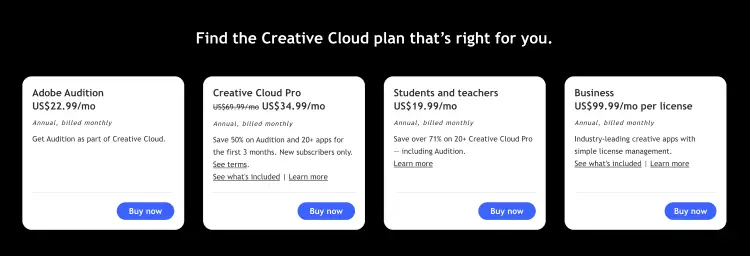
Pricing shapes the long-term cost of owning your DAW just as much as the features do. Adobe Audition follows a subscription model, while Logic Pro is available as a one-time purchase.
| Pricing factor | Adobe Audition | Logic Pro |
|---|---|---|
| Price | US $22.99/month (Annual, billed monthly) US $34.49/month (Monthly) US $263.88/year (Annual prepaid) | US $199.99 one-time purchase* |
| Free trial | 7 days | 30 days |
| Payment model | Subscription | One-time purchase |
| Major updates | Included while subscribed | Included at no extra cost |
| Creative suite | Available as a single app or included with Creative Cloud All Apps | Available as a standalone purchase or through Apple Creator Studio |
| Operating system | Windows and macOS | macOS |
Adobe Audition works well for creators already paying for Adobe Creative Cloud because it’s included in many plans alongside Premiere Pro, Photoshop, and other Adobe applications.
Logic Pro appeals to creators who prefer paying once instead of managing another monthly subscription.
Before deciding based on price alone, consider your entire workflow and how you do a podcast interview.
- If you already edit video in Premiere Pro, Adobe Audition may save time through tighter integration.
- If you’re already invested in Apple’s creative ecosystem, Logic Pro often provides better long-term value.
Price matters, but I’d weigh it against the amount of time the software saves you every week. The cheapest option can easily become the most expensive if every edit takes twice as long.
Adobe Audition vs Logic Pro pros and cons
Neither application is objectively better. Each excels in different situations.
Adobe Audition pros:
- Excellent audio restoration
- Fast podcast editing workflow
- Strong integration with Premiere Pro
- Powerful batch processing
- Available on Windows and macOS
Adobe Audition cons:
- Subscription required
- Limited music production tools
- Small virtual instrument library
- Basic MIDI support
Logic Pro pros:
- Outstanding music production tools
- Huge collection of built-in instruments
- One-time purchase
- Excellent MIDI editing
- Frequent feature updates
Logic Pro cons:
- macOS only
- Less specialized for podcast editing
- More features than many podcast editors need
- Batch processing is less streamlined
Adobe Audition vs Logic Pro Alternatives
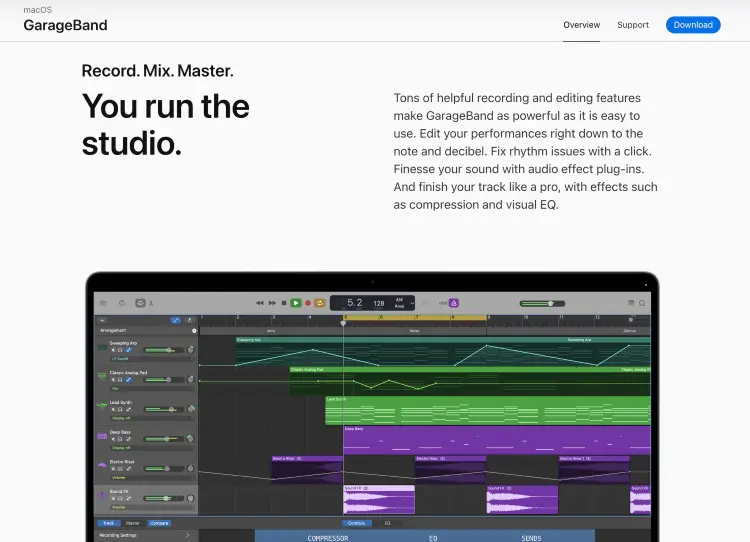
Adobe Audition and Logic Pro are excellent choices, but they aren’t your only options. Depending on your budget, operating system, and the type of projects you create, another DAW may suit your workflow even better.
Here’s a quick comparison of some of the most popular alternatives like Audacity vs GarageBand.
| Software | Best for | Operating system | Pricing model |
|---|---|---|---|
| Audacity | Beginners and simple audio editing | Windows, macOS, Linux | Free |
| Reaper | Flexible recording and editing | Windows, macOS, Linux | One-time license |
| Pro Tools | Professional recording studios | Windows, macOS | Subscription or perpetual license |
| Ableton Live | Electronic music production and live performance | Windows, macOS | One-time purchase |
| FL Studio | Beat making and music production | Windows, macOS | One-time purchase with lifetime updates |
| GarageBand | Apple beginners | macOS, iPadOS | Free |
One Decision Away From Better Sound
When it comes to Adobe Audition vs Logic Pro, the better choice depends on what you create most.
Adobe Audition shines for podcasts, voice overs, and audio cleanup. Logic Pro takes the lead for music production and MIDI workflows.
Pick the software that matches your projects, then spend less time tweaking and more time publishing.
Want your content to reach a bigger audience? Create your free Talks profile and start getting matched with podcast hosts automatically.
Your next interview could already be waiting.
Yes! Set Up My Talks Profile Now!


