

A room full of people. One speaker. 30 seconds in, half the audience is looking anywhere but at you and your visual aids (mostly their phones if we’re being honest). Brutal, right?
You could have the best idea in the room and still fail to keep your audience engaged before you get to the good part of the presentation. The difference often comes down to your presentation structure and its compelling narrative.
How you open with your key message, build your argument, and deliver your final point can set the tone for what people remember long after you leave the stage. And if you’re a coach, author, or entrepreneur pitching your next big idea, those minutes matter.
Your well-structured presentation needs a beginning that pulls people in, a middle that leave the audience something worth thinking about, and an ending that compels them to act on your call to action at the end of your presentation.
Let’s get your presentation template structure right.
What Is a Presentation Structure?
A presentation structure is the order in which you introduce, develop, and wrap up your complex ideas, sales pitch, or persuasive presentation.
A presentation structure gives your audience a cohesive path to follow from the first slide down to the last, so they can understand your message without having to work for it just to follow along.
Think of a presentation structure like planning a soccer match where every player has a role, and every move serves a purpose. Your presentation needs that same sense of direction.
5 Key Elements of a Presentation Structure
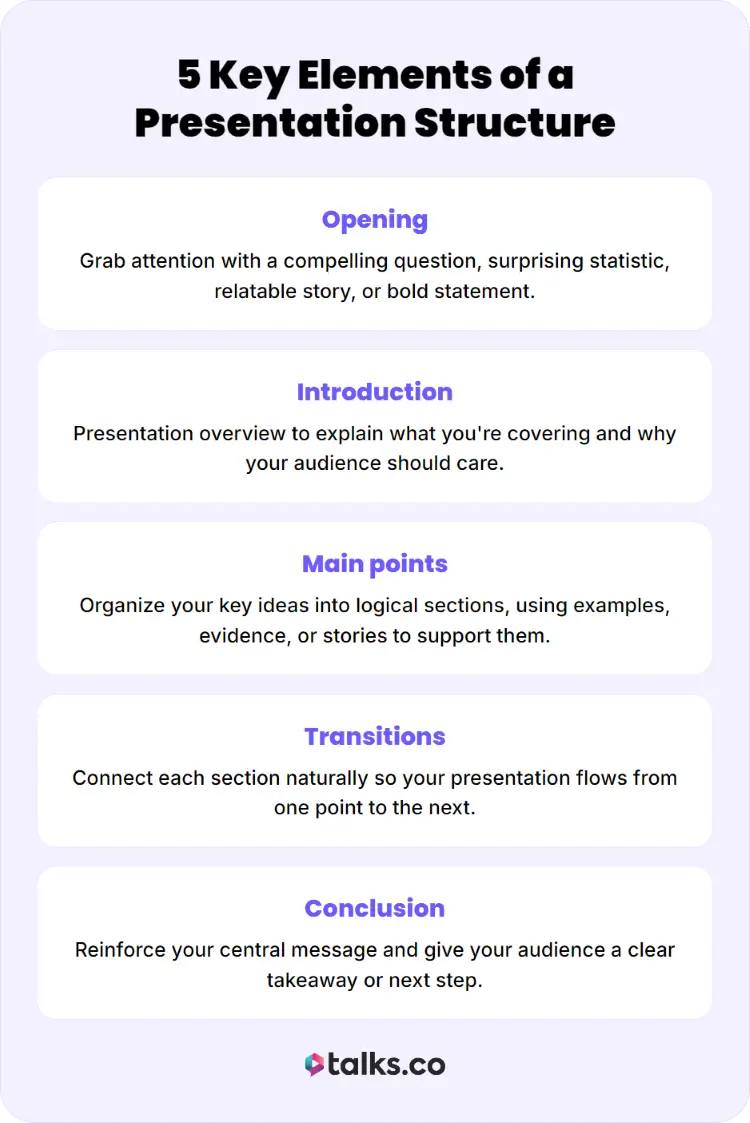
A strong presentation has a clear and logical beginning, middle, and end. Each section serves a specific purpose to help the audience to follow your ideas and inspire your audience to take action after every presentation.
- Opening: Grab attention with a compelling question, surprising statistic, relatable story, or bold statement.
- Introduction: Presentation overview to explain what you’re covering and why your audience should care.
- Main points: Organize your key ideas into logical sections, using examples, evidence, or stories to support them.
- Transitions: Connect each section naturally so your presentation flows from one point to the next.
- Conclusion: Reinforce your central message and give your audience a clear takeaway or next step.
Presentation Structure Examples
A presentation structure gives your audience a clear path to follow, from the opening hook to the main points and final takeaway. The best format depends on your topic, your goal, and what you want your audience to do with the information.
The examples below show how different structures work in practice, along with tips you can use to build your own presentation.
Good presentation structure example

A good presentation gives your audience a reason to listen, a clear point to remember, and something useful to take away. Use these tips to keep your content focused and give each section a purpose.
- Lead with the stakes: Open by showing why your topic matters. In my video on writing a USP, I connect a business’s message to its potential success, giving viewers a reason to pay attention.
- Address a common concern: Anticipate what your audience might question. I explain that a business doesn’t need a completely unique product or service to stand out.
- Repeat your main point: Give people a memorable idea to take away. I emphasize knowing what differentiates your business from others, then reinforce that message.
- End with a practical step: Give your audience something they can act on. For the USP example, that means looking at your business from the customer’s perspective.
Effective presentation structure example
Build your presentation around what you want your audience to think, feel, and do by the end. Work backward from that outcome to decide which points belong in your talk and how they should fit together.
- Define the desired outcome: Decide what your audience should know, believe, feel, or do afterward.
- Identify the gap: Consider what they currently think and what might prevent them from moving forward. A business coach pitching a group program, for example, might need to address the belief that one-on-one coaching is the only way to get results.
- Choose content that closes the gap: Use client stories, explanations, and evidence to address those concerns. The coach could share a client example and explain how group members receive support.
- Arrange the content logically: Put each point where it will help the audience understand the next one. Presentation coach Phil Waknell’s Audience Transformation Roadmap uses this kind of backward planning to connect presentation content to audience change.
Presentation structure template for storytelling
A story gives your audience a sequence to follow and a reason to stay until the end. Build yours around a clear progression, with each section adding context or deepening the message.
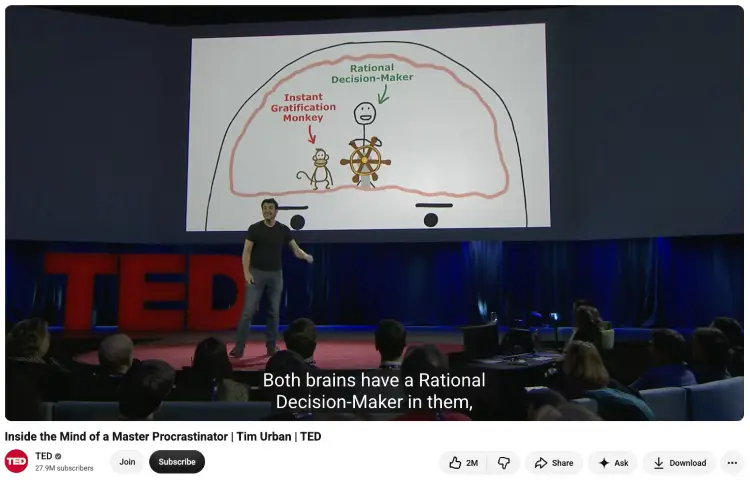
- Open with a specific moment: Start with an experience, problem, or surprising detail. In his TED Talk on procrastination, Tim Urban begins with a humorous story about writing a year-long thesis in 72 hours, then reveals that the story about receiving praise for it was made up.
- Develop the central idea: Use examples or characters to make your message easier to follow. Urban introduces the Instant Gratification Monkey and the Panic Monster to explain competing impulses.
- Raise the stakes: Show why the issue matters beyond the initial example. Urban shifts to procrastination without deadlines, where delaying important goals can have lasting consequences.
- Close with a takeaway: End with an idea or image that gives people something to consider. Urban’s Life Calendar represents a 90-year life as a grid of boxes, prompting the audience to think about how they spend their time.
Presentation structure ideas
Different presentation structures suit different goals. Choose one based on the job your presentation needs to do.
- Problem-solution structure: Explain a problem, show why it matters, present a solution, and outline the next steps. For example, a consultant could describe a company’s customer retention problem, identify its likely causes, and recommend changes to its follow-up process.
- Chronological structure: Present information in the order events happened. This works well for project updates, company histories, case studies, and process explanations.
- Cause-and-effect structure: Explain what led to a situation and what happened as a result. A presentation on declining sales could connect changes in customer behavior to sales trends and their business impact.
- Persuasive structure: State your position, support it with evidence, address objections, and finish with a clear ask. An entrepreneur pitching a new service could use this format to explain the market need, demonstrate demand, and request funding.
- Compare-and-contrast structure: Examine two or more options against the same criteria. A speaker discussing marketing channels might compare their costs, reach, and suitability for different business goals.
You can also combine structures. A business case presentation might begin with a problem, use cause-and-effect reasoning to explain it, compare possible solutions, and finish with a recommendation.
Presentation Outline Templates and Formats
Once you’ve chosen a structure, use a presentation outline to help you allocate time before you start building slides.
Use this 10-minute structure as a starting point, then adjust it to fit your topic and audience.
- Minutes 0-1: Open with a hook. Start with a question, surprising fact, short story, or problem your audience recognizes.
- Minutes 1-2: Introduce your main points. Preview the three ideas you’ll cover so people know what to expect.
- Minutes 2-8: Develop your three main points. Spend about two minutes on each, using an example, explanation, or piece of evidence to make the idea concrete. Add transitions that connect each point to the next.
- Minutes 8-9: Recap the key takeaways. Summarize your main points and remind the audience how they connect.
- Minutes 9-10: Close with a next step. Ask the audience to take a specific action, apply an idea, or consider a question.
For a 20-minute presentation, expand the main sections with more explanation, evidence, or examples. Keep enough time for your conclusion so you don’t end abruptly when the clock runs out.
Oral presentation structure
An oral presentation needs a clear sequence that helps listeners follow your ideas without relying on slides. This format works well for explanatory and academic presentations or emcees.
- Introduction: Introduce your topic, explain why it matters, and state your main question or argument.
- Background: Give the audience the context they need to understand your subject.
- Main points: Present your key ideas in a logical order, supporting each with evidence, examples, or explanations.
- Discussion or implications: Explain what the information means and why the audience should care.
- Conclusion: Summarize your central message and leave listeners with a final takeaway.
For example, a student presenting research on sleep and academic performance could introduce the research question, explain the methods, present the findings, discuss what they suggest for students, and finish with the main conclusion.
PowerPoint presentation structure
A PowerPoint presentation should follow the same logical flow as your spoken message. Each slide should help the audience understand the next part of your argument, rather than compete with what you’re saying.
Imagine a consultant presenting a proposal to a prospective client. The slides could follow this sequence:
☐ Title slide: Introduce the proposal and the outcome it aims to deliver.
☐ The problem: Show the client’s current challenge using a relevant example or data point.
☐ Key findings: Present the evidence behind your recommendations.
☐ Proposed solution: Explain what you recommend and how it addresses the problem.
☐ Implementation plan: Outline the main steps, timeline, and responsibilities.
☐ Expected results: Show the outcomes the client can reasonably expect, supported by evidence where available.
☐ Closing slide: Summarize the recommendation and state the decision or next step you need from the client.
Presentation format on PowerPoint
You can organize this sequence directly in PowerPoint before spending time on design:
- Outline View: Draft your slide headings first to check the order and flow of your argument.
- Sections: Group related slides into blocks, such as the problem, findings, recommendations, and conclusion.
- Speaker Notes: Add supporting details and reminders for your delivery while keeping slide text concise.
- Rehearse Timings: Practice your presentation and check how long each slide takes, then adjust the pacing to fit your allotted time.
Start with the message you need to communicate, then choose the slides that help you communicate it. You’ll be able to spot gaps in your argument before spending time formatting the deck.
How to Structure a Good Presentation (Checklist)
A good presentation takes your audience from the problem they’re facing to the idea, solution, or action you want them to remember. Start with one clear objective, then organize your content so every section earns its place.
☐ Define your main message: Decide what you want people to remember, such as a health coach helping busy parents build a realistic 20-minute daily fitness routine.
☐ Open with a hook: Start with a question, story, surprising statistic, or relatable problem that gives people a reason to listen.
☐ Build 3 main points: Group your ideas into three manageable sections, such as identifying a problem, explaining your approach, and showing the results.
☐ Support your claims: Use specific examples, customer stories, data, or demonstrations to make your ideas easier to understand.
☐ Connect each section: Use short transitions that explain how the next point builds on the previous one.
☐ Finish with a clear takeaway: Summarize your main message and give the audience one practical next step.
How to structure presentation slides (Checklist)

Each slide should help your audience understand one idea at a time. Use your slides to support your spoken explanation, with clear headings, readable text, and visuals that make your message easier to follow.
☐ Give each slide one job: Use a slide to explain one concept, such as the three stages of a virtual summit: attract registrants, deliver expert sessions, and follow up with attendees.
☐ Write specific slide titles: Replace a vague heading like “Our approach” with “How EHQ uses virtual summits to attract potential clients.”
☐ Keep text readable: Use short phrases, large fonts, and enough white space for people watching from the back of a conference room or on a laptop screen.
☐ Choose visuals with a purpose: Show a simple chart of webinar registrations over six months instead of filling the slide with paragraphs about audience growth.
☐ Use consistent formatting: Keep fonts, colors, heading styles, and image placement consistent throughout your PowerPoint.
☐ Reveal information in a useful order: Introduce a problem, explain its impact, and then show the solution so your audience can follow your reasoning.
☐ Move supporting details into your speech: Explain the research behind a statistic aloud while keeping the key number and its source visible on the slide.
Ready to become a content creator but unsure how to engage an audience? Check the full guide on how to make your presentations fun
How many slides should a presentation have?
Your slide count depends on your speaking time, delivery style, and the complexity of your topic. Use the estimates below as a starting point, then rehearse with your actual slides to see how much time each section needs.
- 5-minute presentation: Aim for 3-5 slides covering your opening, key points, and conclusion.
- 10-minute presentation: Start with 5-10 slides, leaving enough time to explain your ideas and answer any planned questions.
- 20-minute presentation: Try 10-15 slides for a topic that needs examples, supporting evidence, or a short demonstration.
- 30-minute presentation: Plan around 15-25 slides, adjusting the count for audience participation, stories, and visual explanations.
- 60-minute workshop: Use 20-40 slides as an initial estimate, allowing time for exercises, discussion, and questions.
- Complex or data-heavy presentations: Allow more time for charts, technical explanations, and audience questions, even if that means using fewer slides.
- Story-driven presentations: Give important stories and examples enough breathing room, with each slide supporting a key moment or idea.
One practical test: Rehearse your presentation with a timer. If you’re rushing through slides or skipping explanations to finish on time, cut material or adjust your pacing before presenting.
Techniques to Structure Your Presentation
The order of your ideas can make a complicated topic easier to follow and give your audience a clear reason to keep listening. Choose a structure that fits your goal, then use these presentation techniques to keep your presentation focused and engaging.
- Problem and solution: Introduce a problem your audience recognizes, explain its impact, and present your solution. For example, a business coach could show how inconsistent lead generation affects revenue before explaining a weekly client acquisition system.
- Chronological order: Present events or steps in the order they happen, such as walking new course creators through planning, recording, launching, and selling an online course.
- Cause and effect: Explain how one event leads to another like showing how unclear positioning can weaken a consultant’s marketing message and reduce qualified inquiries.
- Compare and contrast: Put two approaches side by side, e.g., comparing live webinars with prerecorded workshops to help an audience choose a delivery format.
- Topical organization: Group related ideas into clear categories, like dividing a presentation on podcast guesting into finding shows, pitching hosts, and preparing for interviews.
5 Presentation structure tips
A few deliberate choices can help you organize your material, manage your speaking time, and make your main message easier to remember. Use these five tips when planning your next public speaking opportunity.
- Start with your audience’s biggest question: A presentation for first-time course creators might open with, “How do you sell your first 50 course enrollments?” before introducing the marketing strategy.
- Limit your main points: Build your presentation around three or four key ideas, giving each one enough time for an explanation and a specific example.
- Use signposting: Tell your audience where you’re going next with transitions such as, “Now that we’ve covered your offer, let’s look at how to price it.”
- Match your structure to your goal: Use a problem-solution format for a persuasive pitch, a chronological sequence for a tutorial, or topical sections for an educational talk.
- Rehearse the full presentation aloud: Time each section, check that your transitions sound natural, and trim material that doesn’t support your central message.
10 Common mistakes to avoid when designing a presentation structure
Small planning mistakes in your structure and content can make a presentation harder to follow, even when the speaker knows the subject well.
Check your outline for these ten issues before opening PowerPoint.
- Starting without a clear purpose: Define the one main idea your audience should remember before adding supporting content.
- Opening with too much background: Lead with a relevant question, problem, or example before sharing the history behind your topic.
- Packing in too many main points: Prioritize the ideas that support your objective and move secondary details into a handout or follow-up resource.
- Arranging ideas in a confusing order: Place information in a sequence your audience can follow, introducing essential concepts before advanced ones.
- Using weak transitions: Add a short linking sentence between sections so listeners understand how each point connects to the next.
- Overloading slides with text: Replace dense paragraphs with concise phrases, diagrams, or examples you can explain aloud.
- Repeating the same information: Give each section a distinct purpose and remove examples that make the same point without adding anything new.
- Ignoring the time limit: Allocate time for each section and rehearse with a timer to keep your presentation within the allotted slot.
- Relying on unsupported claims: Back up important statements with credible sources, relevant data, or real examples, such as a documented change in webinar registrations.
- Ending without a clear takeaway: Close by reinforcing your main message and giving the audience a specific action, such as testing one new client outreach strategy that week.
A Strong Spine for Your Best Ideas
A strong presentation structure helps people remember your ideas long after you leave the room. Ready to get those ideas in front of a much bigger audience?
Talks connects you with podcast hosts looking for experts like you.
Create your free profile, showcase your expertise, and find shows where your message can reach potential clients, partners, and new audiences.
Find Your Next Speaking Opportunity


