
So you’ve decided to kick your podcasting game up a notch and plunge into the world of video podcasting.
That’s a great move.
Putting a face to your voice builds a stronger connection with your audience and opens up new platforms for you to conquer, like YouTube.
But to make a real impact, you need the right gear, and that starts with finding the best podcasting video camera for your show.
Here are 15 of the best cameras for podcasting out there, their key features and costs. Compare them all to see which suits your needs, from webcams to mirrorless cameras.
15 Best Camera for Podcast Video Recording (2026 Snapshot)
Finally choosing the right camera for your podcast? Here’s a quick snapshot of the best options for your podcasting setup:
- Logitech C922 Pro: Best for beginners who want an affordable and easy-to-use webcam.
- Logitech StreamCam: Best for streamers and podcasters looking for a step up in quality.
- Lumina AI Webcam: Best for those who want AI-powered features to enhance their video.
- Logitech Brio 4K Webcam: Best for creators who want high-resolution 4K video in a compact package.
- OBSBOT Tiny 2: Best for podcasters looking for excellent video and who love AI-powered tracking.
- GoPro HERO12: Best for podcasters who are always on the go or recording in unique environments.
- Sony Alpha a6000: Best for content creators looking for a high-performing and compact mirrorless camera.
- Canon EOS M50 Mark II: Best for YouTube podcasting with its user-friendly features.
- Sony Alpha a6600: Best for those ready to invest in a serious podcasting camera setup.
- Canon R10: Best for achieving a professional podcasting camera setup with great autofocus.
- Sony Alpha a6700: Best for podcasters who want top-tier video quality and advanced features.
- Sony ZV-E1: Best for video podcasters seeking enhanced video quality and creative control.
- Sony Alpha FX3A: Best for creators aiming for cinematic-level video and audio content.
- Nikon Z30: Best for creators who want a camera designed for video with professional results.
- Panasonic LUMIX G7: Best for those looking for a versatile and affordable mirrorless camera.
What Is a Video Podcast?
A video podcast is pretty much what it sounds like. It’s a podcast that includes a visual component, allowing your audience to watch you and your guests as you record.
Instead of just listening to the audio, viewers get a richer and more engaging experience. They can see your expressions, your body language, and the overall dynamic of the conversation.
If you do it right, it’s a powerful tool for growing your audience and building a stronger community around your show.
Benefits of a podcast video format
Adding video to your podcast can feel like a big step, but the benefits are well worth the effort. Here’s why you should consider a podcast video format:
- Deeper audience connection: When your audience can see you, they feel more connected. Visuals help build trust and familiarity, turning casual listeners into loyal fans.
- Expanded reach: Video podcasts open the door to huge video platforms like YouTube. It’s a good opportunity to reach new audiences who prefer watching content over just listening.
- More engaging content: Let’s face it. Visuals are captivating. A video podcast can hold your audience’s attention longer and make your content more memorable using graphics, clips, and other visual aids.
- Repurposing opportunities: Video content is incredibly versatile. You can create short clips for social media, turn transcripts into blog posts, or even create highlight reels to promote your show.
- Increased monetization: With a video podcast, you can explore new revenue streams. Think video ads, sponsored product placements, and YouTube monetization for your professional-looking podcast.
What Equipment Do I Need for a Video Podcast?
Now that you’re sold on the idea of a video podcast, let’s talk about the best video podcast gear you’ll need to make it happen.
Getting the right professional podcast equipment is important for producing a high-quality show with crystal-clear video that looks and sounds professional.
Podcasting video equipment
Here is a list of the essential podcast equipment and video gear you’ll need to get started:
- Camera: This is the star of your video podcast setup. Choose a camera that can produce clear, high-quality image. You can choose between many cameras like webcams, mirrorless cameras and your phone camera to record.
- Microphone: Don’t forget that audio is still king in podcasting. A good podcast microphone is non-negotiable, and the Samson Q2U is a great starting point.
- Lighting: Good lighting is the secret ingredient to a professional video. For an affordable option, consider a ring light like the Elgato Ring Light.
- Tripod: You need something to hold your camera steady. A basic tripod will do the job, but make sure it’s sturdy enough for your camera setup.
- Headphones: A good pair of headphones, like the Audio-Technica ATH-M20X, will help you monitor your audio quality in real-time and prevent echo.
- Audio interface/mixer: If you’re using multiple microphones, you’ll need an audio interface or mixer to manage them. The Focusrite Scarlett 2i2 is a popular choice for beginners.
Check these full lists on what equipment is needed for a podcast and podcast equipment bundle recommendations.
Importance of podcast video clip quality
When it comes to video podcasting, the quality of your video can make or break your podcast.
Here’s why high-quality video recording does more than just make you look good:
- It shows your audience that you’re serious about your content and dedicated to providing them with the best possible experience.
- Excellent video quality helps you stand out in a crowded market and builds credibility with both viewers and potential sponsors.
- A crisp, clear video and audio signals professionalism and keeps your audience engaged from start to finish.
15 Best Podcasting Video Camera Options
Choosing the best podcast camera is easy when you have all the key features laid out for you. Compare each camera, what makes them great for podcasting, and their price points.
Here are 15 of the top podcasting video camera choices for 2026:
1. Logitech C922 Pro: Good camera for video podcast
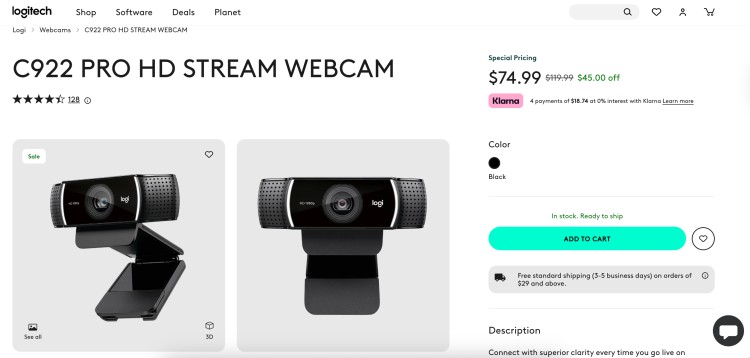
Best for: Beginners and budget-conscious podcasters.
This webcam is a fantastic entry point for anyone starting a video podcast. It’s easy to set up and provides reliable 1080p video quality that’s a big step up from your computer’s built-in camera.
- Key features: Full HD 1080p recording at 30fps, automatic low-light correction, two built-in microphones, and includes a tripod.
- Price: $74.99
2. Logitech StreamCam
Best for: Podcasters and streamers looking for a premium webcam option.
The StreamCam is designed for video creators. This camera offers smooth, high-quality video with smart features that help you look your best on camera.
- Key features: Full HD 1080p resolution at 60fps, smart auto-focus and exposure, versatile mounting options, and USB-C connection.
- Price: $129.99
3. Lumina AI Webcam
Best for: Podcast hosts wanting AI-enhanced video quality.
This is not just a webcam. The Lumina AI Webcam uses artificial intelligence to fine-tune your lighting, colors, and background, giving your video a professional, DSLR-like quality.
- Key features: 4K resolution, AI-powered lighting and color adjustment, configurable background blur, and compact design.
- Price: $150
4. Logitech Brio 4K Webcam
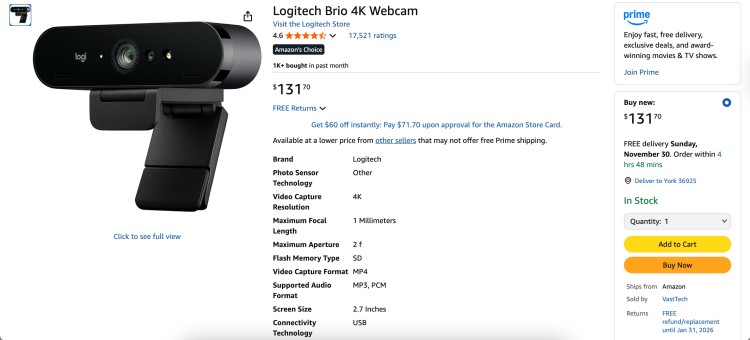
Best for: Creators needing a webcam with high-resolution video.
As the best webcam for podcast creators who want top-tier quality, the Brio offers 4K video recording. It delivers sharp, detailed video content that will make your podcast look incredibly professional.
- Key features: 4K Ultra HD video at 30fps, HDR technology, adjustable field of view, and Windows Hello compatibility.
- Price: $131.70
5. OBSBOT Tiny 2
Best for: Podcasters who demand excellence in webcams.
The OBSBOT Tiny 2 is a powerhouse of a webcam. It uses advanced AI to track your movements, keeping you perfectly in frame, and delivers stunning 4K video.
- Key features: AI-powered auto-tracking and auto-zoom, 4K resolution, gesture and voice control, and dual native ISO for great low-light performance.
- Price: $329
6. GoPro HERO12
Best for: Podcasters who record on the go or in outdoor environments.
GoPro cameras are known for their durability and versatility. The HERO12 is a fantastic action camera that can handle any recording situation, delivering smooth video content.
- Key features: HDR 5.3K and 4K video, HyperSmooth 6.0 stabilization, Bluetooth audio support, and a waterproof and rugged design.
- Price: $369.99
7. Sony Alpha a6000
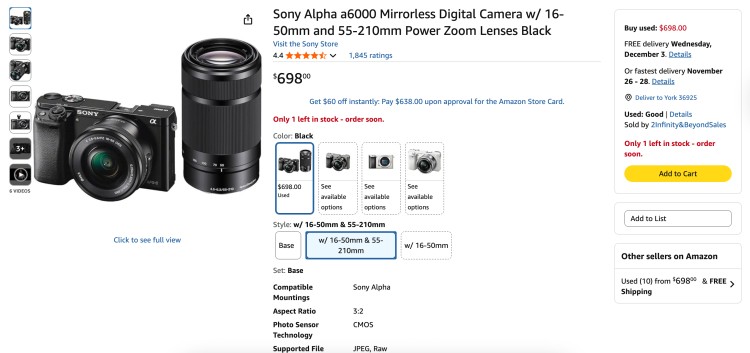
Best for: Content creators looking for a compact, high-performing mirrorless camera.
The a6000 is a classic for a reason. This camera for video podcasting packs a large sensor into a small body, delivering excellent video quality and performing well even in low light.
- Key features: 24.3-megapixel APS-C sensor, fast hybrid autofocus, interchangeable lenses, and compact body.
- Price: $698
8. Canon EOS M50 Mark II
Best for: Hosts going into YouTube podcasting.
This camera is a favorite among YouTubers for its user-friendly interface and great video features. It’s perfect for creating video podcasts with its easy-to-use vertical video shooting and live streaming capabilities.
- Key features: 4K video recording, improved autofocus with eye detection, vari-angle touchscreen, and clean HDMI output for streaming.
- Price: $1,098 (with kit lens)
9. Sony Alpha a6600
Best for: Video podcasters at the beginning of their journey but ready to invest.
The a6600 is a step up in the Alpha series, offering in-body image stabilization and a larger battery. It’s a fantastic choice for video creators who want professional features in a compact body.
- Key features: In-body image stabilization, real-time tracking and eye AF, large Z-battery for longer recording times, and 4K HDR video.
- Price: $1,499 (with lens)
10. Canon R10
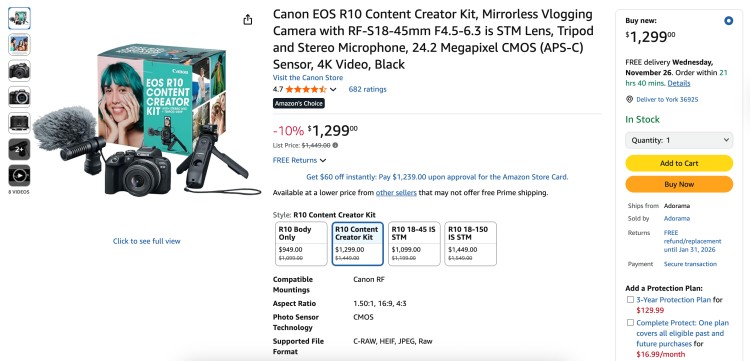
Best for: Podcasters looking for a professional podcasting camera setup.
The Canon R10 is a powerful mirrorless camera that brings high-end features to a more accessible price point. Its advanced autofocus system makes it easy to get sharp, professional-looking footage for your great podcast.
- Key features: High-speed shooting, advanced subject tracking autofocus, uncropped 4K video at 30fps, and a lightweight design.
- Price: $1,299 (Content creator kit)
11. Sony Alpha a6700
Best for: Podcasters and creators who want top-quality video and advanced features.
The a6700 is the latest in Sony’s a6000 series, and it’s packed with their newest tech. This camera for video offers incredible video capabilities for serious creators.
- Key features: New 26MP sensor, AI-powered subject recognition autofocus, 4K video up to 120fps, and in-body image stabilization.
- Price: $1,699.99-$1,999.99 (with lens)
12. Sony ZV-E1
Best for: Podcasters upgrading for enhanced video quality.
The ZV-E1 is a full-frame camera specifically designed for video recording. It has AI-powered features that make it easier to get cinematic shots, making it one of the best cameras for creating a visually stunning podcast.
- Key features: Full-frame sensor, AI-based auto-framing and framing stabilizer, dedicated product showcase setting, and cinematic vlog settings.
- Price: $2,799.99 (with lens)
13. Sony Alpha FX3A
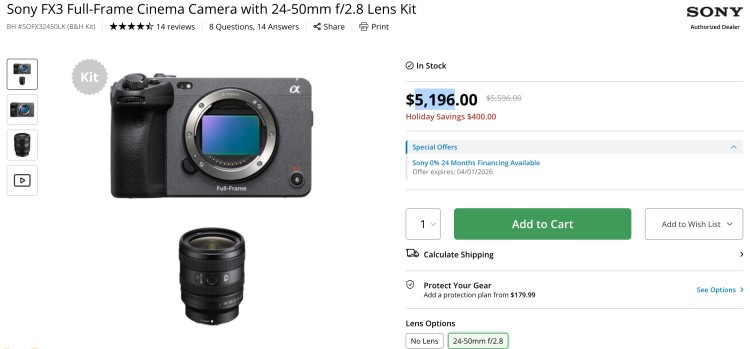
Best for: Content creators striving for cinematic excellence.
The FX3A is part of Sony’s Cinema Line, built for professional video production. If you want your video podcast to have a truly cinematic look, this is the camera for you. It’s an investment, but it offers excellent video quality.
- Key features: Full-frame sensor, S-Cinetone color science, high-frame-rate recording, and XLR handle unit for professional audio.
- Price: $5,196 (with lens)
14. Nikon Z30
Best for: Creators seeking professional results and wanting to attract viewers.
The Nikon Z30 is a compact mirrorless camera made for vloggers and video creators. It’s lightweight, easy to use, and delivers beautiful quality video, making it a great option for your podcasting needs.
- Key features: 4K UHD video, front-facing vari-angle screen, built-in stereo microphone, and fast and reliable autofocus.
- Price: $1,099.95 (Creator’s Kit)
15. Panasonic LUMIX G7
Best for: Video podcasters looking for a versatile camera.
The LUMIX G7 is a fantastic entry-level mirrorless camera that offers 4K video recording at a very affordable price. It’s a great all-arounder for podcasters who want to step up from a webcam without overspending.
- Key features: 4K Ultra HD video with 4K photo modes, 3-inch flip-out touchscreen, easy-to-use controls, and excellent image quality.
- Price: $799.99
How to Choose a Great Podcast Video Camera
The right camera will not only improve your production value but also make your recording process smoother. That’s why your choice in gear matters.
But where do you start?
For me, 4K video recording capabilities matter. So I switched from Logitech C920 and upgraded to Logitech Brio. But when I’m travelling, I just use my 2025 MacBook Pro camera, which already records at 1080p HD.
Let’s look at what other key factors you should consider when buying your podcasting video camera.
What to consider when choosing a podcasting camera
Consider the following when you look for a camera for your video podcast:
- Budget: The costs of podcast equipment vary, so decide how much you’re willing to spend. A webcam is more affordable, but a mirrorless camera will offer better quality and more flexibility.
- Resolution: You want a camera that can record in 1080p (Full HD). But if you want to future-proof your content, consider a camera that offers 4K video.
- Sensor Size: A larger sensor generally means better image quality, especially in low light. For example, DSLRs and mirrorless cameras have larger sensors than webcams.
- Lenses: If you choose a DSLR camera or mirrorless camera, you’ll have the option to change lenses. A different lens can completely change the look of your video, giving you more creative control.
- Autofocus: You want a camera that can keep you and your guests in sharp focus without you having to manually adjust it all the time.
- Connectivity: Make sure the camera can easily connect to your computer for live streaming your podcast or recording. Look for features like clean HDMI output or the ability to function as a webcam via USB.
- Audio inputs: While you should use a dedicated podcast microphone for the best sound, having a camera with a microphone input can be a good backup.
Explore other lists on podcast equipment for beginners and podcast equipment bundles with cameras.
Is a Podcast Audio or Video?
Traditionally, podcasts are audio-only. Think of them as on-demand radio shows.
But the industry is evolving. Many creators now produce both audio and video versions of their shows to cater to different audience preferences and platforms.
So, a podcast can be either audio or video, or both.
Can a video be a podcast?
Yes, a video can definitely be a podcast. A video podcast is simply a podcast that includes a visual element.
These are often published on platforms like YouTube and Spotify, where audiences can choose to either watch the video or just listen to the audio. These days, this hybrid approach is becoming more popular.
Does a podcast have to have video?
No, a podcast does not have to have video. The heart of podcasting has always been audio.
But adding a video component can open up a world of new opportunities for growth and engagement. It all depends on your goals, your audience, and your resources.
How Do You Start a Video Podcast?
Starting a video podcast involves a few more steps than an audio-only show, but it’s a manageable process.
- Plan your content: Just like with an audio podcast, you need a solid content plan. Know your topic, your target audience, and the format of your show.
- Prepare your video podcast setup: Gather all the necessary video podcast equipment, including your podcast camera, microphone, lighting, and any other gear you need.
- Set up your studio: Find a quiet space with a clean background. Set up your lighting and camera to create a professional-looking shot.
- Record your first episode: Focus on delivering great content and engaging with your audience. Don’t worry about being perfect on your first try.
- Edit your video: Once you’re done recording, you’ll need to edit your video and audio. This can involve cutting out mistakes, adding intro and outro music, and including graphics.
- Publish your episode: Upload your finished podcast episode to your chosen platforms, like YouTube and Spotify.
- Market your podcast: Promote it on social media, your email list, and even on other shows when you get booked as a podcast guest.
Podcast video camera setup
Setting up your podcast video camera correctly is key to getting a great shot. Here are some tips for your podcast camera setup:
- Positioning: Place the camera at eye level to create a more natural and engaging angle. You don’t want to be looking up or down at the camera.
- Framing: Follow the rule of thirds. Position yourself slightly off-center and leave a little bit of headroom above you.
- Background: Make sure your background is clean and uncluttered. A simple, professional background keeps the focus on you.
- Lighting: Use a three-point lighting setup if possible. This includes a key light (your main light), a fill light (to soften shadows), and a back light (to separate you from the background).
- Test your shot: Before you start recording, do a test run to make sure everything looks good. Check your focus, exposure, and framing.
How to Record a Video Podcast
Recording a video podcast is similar to recording an audio podcast, with the added element of video. Here are the basic steps for your podcast recording:
- Set up your gear: Make sure your camera, microphone, and lights are all set up and ready to go.
- Use a video podcast platform: Tools like Riverside.fm or StreamYard are great because they record high-quality local video files for each participant, which is ideal for remote interviews.
- Record a test: Before you dive into your main content, record a short test clip to check your audio levels, video framing, and lighting.
- Start recording: Once you’re happy with your test, it’s time to record your full podcast episode.
- Monitor your audio: Keep an eye on your audio levels throughout the recording to make sure you’re not too loud or too quiet.
- Back up your files: After you finish recording, be sure to save and back up your raw video and audio content immediately.
How to record video with two cameras
Using multiple cameras can make your video podcast more dynamic and professional. Here’s how to record video with two cameras.
- Camera placement: Set up your main camera (Camera A) for a medium shot of you or your guest. Place your second camera (Camera B) for a different angle, like a close-up or a wide shot of the whole setup.
- Matching settings: Try to use two of the same type of camera. If you can’t, make sure to match the settings like resolution, frame rate, and color profile as closely as possible.
- Syncing audio: The easiest way to sync your footage is to clap your hands loudly at the beginning of the recording. This creates a sharp audio spike that you can use to align the clips in your video editing software.
- Using a switcher: This allows you to switch between camera angles in real-time, which saves a lot of time in post-production (e.g., Blackmagic ATEM Mini).
- Editing: In your video editing software, you’ll layer your two video tracks and sync them using the audio clap. Then, you can cut back and forth between the angles.
Framed for Success
A good podcast is about more than just gear, but the right podcasting video camera can take your show to a whole other dimension.
Got your gear ready? It’s time to find guests for your new video podcast or to get featured on other shows.
Create your FREE Talks profile today and connect with a community of creators just like you.
With Talks, you get:
- High-level personalization: You can create profiles to represent your value and experience.
- Quick and relevant matches: Powered by AI and advanced filtering, you get the exact connections you want.
Yes! I Want To Start Matching Now!