

Choosing the wrong podcast platform is like buying soccer boots that don’t fit.
You can still play, but every step rubs, every sprint feels heavier, and sooner or later, you wonder why something that should be exciting has become such a grind.
That’s exactly what happens when your recording software works against you instead of with you.
If you’re comparing SquadCast vs Zencastr, you’re probably trying to avoid wasting money on the wrong platform or eliminate the risk of moving everything over again six months from now.
Smart call.
I’ve switched recording setups more than once over the years, and moving an entire podcast workflow isn’t something you want to do twice. Choosing well the first time saves a lot of “not this again’s” later.
In this podcasting guide, I’ll compare SquadCast vs Zencastr side by side, including pricing, features, reviews, and user-friendly alternatives, so you know what to expect from SquadCast and Zencastr, and you can automatically choose the platform that fits your workflow today and still earns its place as your podcast grows.
What Is SquadCast?
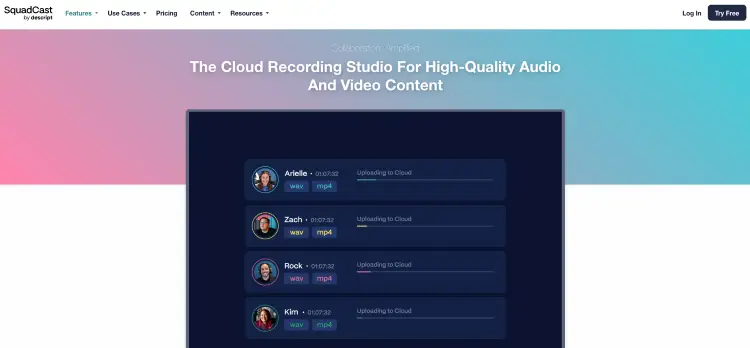
SquadCast is a browser-based remote recording platform built for creators who want professional-quality podcast audio and video. Since joining Descript, it also gives you transcription, editing, publishing, screen recording, captions, and other production tools under one subscription.
Popular use cases include:
- Remote interviews: Record guests from anywhere.
- Video podcasts: Capture separate video and audio tracks.
- Business content: Record webinars, interviews, and client conversations.
- Team productions: Ease of use to collaborate across multiple shows inside one workspace.
How does SquadCast work?
Getting started takes just a few minutes.
- Create a recording session: Set up your show and invite guests with a shareable link.
- Record in your browser: No downloads required for hosts or guests.
- Capture local recordings: Each participant is recorded separately with cloud backup recordings for added reliability.
- Edit inside Descript: Generate transcripts, edit recordings, add captions, improve audio, and export your episode.
- Publish your content: Finish your workflow without switching between multiple platforms.
Is SquadCast worth it?
If you already use Descript or want your recording, editing, and publishing tools connected in one workflow, SquadCast is easy to recommend.
The browser-based setup keeps guest interviews simple, while features like local recordings, cloud backups, separate tracks, and built-in transcription make it a strong choice for creators who publish regularly.
What Is Zencastr?
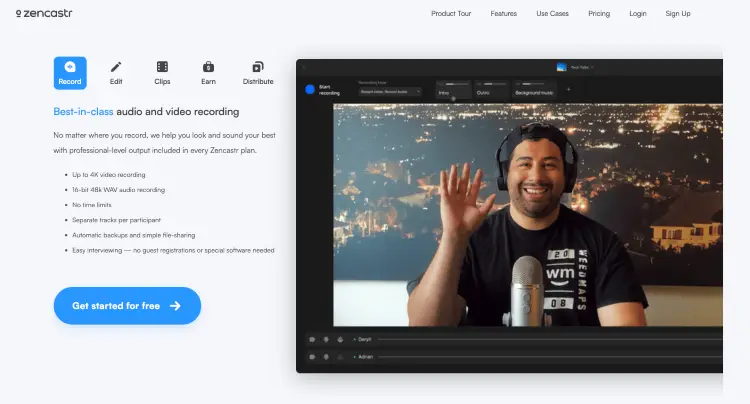
Zencastr’s your all-in-one podcast platform. You can record, host, edit, publish, and grow your podcast without bouncing between five different tools every time you release an episode. If you’d rather keep everything under one roof, that’s exactly what it’s built for.
Popular use cases include:
- Podcast recording: Record remote audio and video from your browser.
- Podcast hosting: Store and publish your episodes from the same hosting platform.
- Video content: Turn podcast episodes into clips for YouTube and social media.
- Growing a show: Create short-form content and publish it faster with built-in AI tools.
How does Zencastr work?
Getting started is pretty straightforward.
- Create a recording: Invite up to 10 participants with a shareable link.
- Record separate tracks: Capture high-quality audio and video for every guest.
- Edit your content: Remove filler words, create clips, and polish your episode.
- Publish your podcast: Host your show on Zencastr or publish videos directly to YouTube.
- Share everywhere: Create captions and social clips without leaving the platform.
Why creators choose Zencastr:
- Unlimited recordings: Record as many episodes as you like, even on the Free plan.
- Built-in hosting: Record and publish from one dashboard.
- Separate tracks: Edit every speaker independently.
- Browser-based recording: Guests join with a simple link.
- AI content tools: Create clips, captions, and social posts faster.
- Up to 10 participants: Plenty of room for interviews and roundtable discussions.
Is Zencastr worth it?
If you want one platform to handle recording, hosting, and content distribution, Zencastr offers excellent value.
Features like unlimited recordings, built-in hosting, AI clip creation, and direct publishing make it especially appealing for creators who’d rather spend less time moving files between different tools and more time growing their audience.
(I go in depth about Zencastr vs Riverside if you’re looking for other alternatives.)
SquadCast vs Zencastr Similarities and Differences
At first glance, SquadCast and Zencastr look pretty similar. Both let you record remote podcast interviews from your browser with separate audio tracks and high-quality video. Once you start looking closer, though, they solve different problems.
| Feature | SquadCast | Zencastr |
|---|---|---|
| Best for | Interview-based podcasts, agencies, coaches, and creators already using Descript | Solo creators and podcasters who want an all-in-one platform |
| Free plan | Yes | Yes |
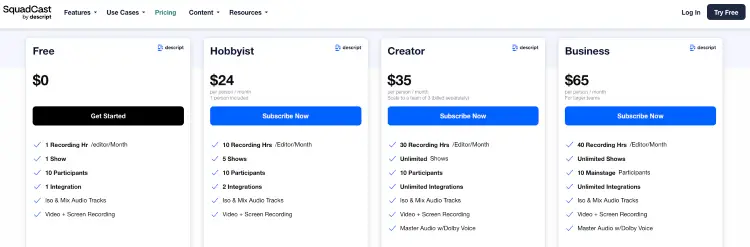
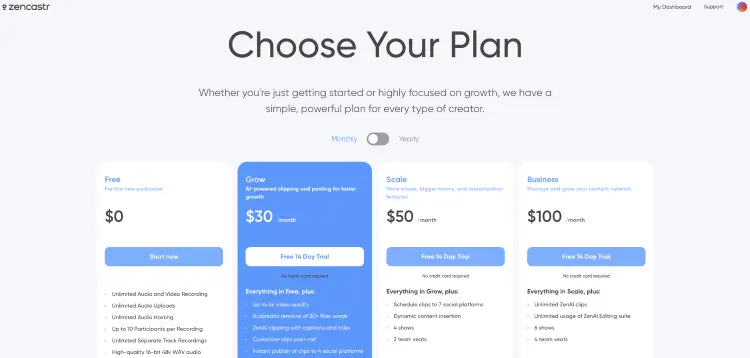
| Paid plans start at | $24/person/month | $30/month |
| Remote recording | Browser-based with local recordings and cloud backups | Browser-based with local separate track recordings |
| Video recording | Up to 4K on higher plans | Up to 4K on paid plans |
| Editing | Included through Descript | Built into Zencastr |
| Podcast hosting | No | Yes |
| AI features | Audio enhancement, captions, editing, eye contact, green screen, and more through Descript | AI clipping, filler word removal, captions, social publishing, and YouTube publishing |
| Standout feature | Deep Descript integration | Complete podcast workflow in one platform |
The biggest difference between two of the best software for podcast interviews comes down to workflow.
- SquadCast focuses on recording first and pairs naturally with Descript for editing.
- Zencastr packs recording, hosting, editing, and publishing into one dashboard, making it easier to manage your entire podcast from one place.
SquadCast vs Zencastr pricing, features & pros/cons
Both platforms offer free plans, so you can try them before spending a dollar. The better value comes down to the features you’ll actually use every week, not simply which subscription costs less.
| Category | SquadCast | Zencastr |
|---|---|---|
| Free plan | Yes | Yes |
| Starting price | $24/person/month | $30/month |
| Remote recording | Yes | Yes |
| Separate audio tracks | Yes | Yes |
| Video recording | Yes | Yes |
| Podcast hosting | No | Yes |
| Editing | Through Descript | Built in |
| Transcription | Included through Descript | Available with editing tools |
| Browser-based | Yes | Yes |
| Best for | Creators who already use Descript or want dependable remote interviews | Creators looking for one platform to record, host, edit, and publish |
SquadCast pros and cons
SquadCast shines when recording quality and reliability matter most.
Pros:
- Local recordings: Capture separate audio and video tracks for every participant even without the best podcast microphones off the bat (I’ve used a Blue Yeti since 2015, and it still delivers excellent audio).
- Cloud backup recordings: Extra protection if someone’s connection becomes unstable.
- Works with Descript: Record, edit, transcribe, and publish from the same ecosystem.
- Guest-friendly: Join recordings from a browser with a simple invite link.
Cons:
- No built-in podcast hosting: You’ll need another hosting platform.
- Best paired with Descript: That’s where you’ll get the most value.
Zencastr pros and cons
Zencastr keeps almost your entire podcast workflow under one roof.
Pros:
- Built-in hosting: Record and publish without switching platforms.
- AI content tools: Create clips, remove filler words, generate captions, and publish to social media.
- Unlimited recordings: Included on the Free plan.
- Beginner-friendly workflow: Fewer tools to learn and manage.
Cons:
- Premium AI features: Available on higher-tier plans.
- Team tools: More collaboration features come with Scale and Business plans.
SquadCast vs Zencastr: Which Is Better?
Both platforms can produce professional-quality podcasts. The real question is how you like to work after you hit record.
If you’re already using Descript or care most about dependable remote interviews, SquadCast is the stronger choice. It keeps recording simple and pairs naturally with one of the most popular podcast editing platforms.
If you’d rather record, host, edit, and publish from one dashboard, Zencastr gives you that convenience without relying on extra software.
Here’s the short version for both podcast recording programs:
- Choose SquadCast if: You record remote interviews regularly and already use, or plan to use, Descript.
- Choose Zencastr if: You want recording, hosting, editing, and publishing under one roof.
- Choose based on your workflow: Both platforms record high-quality audio. The bigger difference is how much of your podcast production you want one tool to handle.
One thing I’ve noticed is that quality audio paired with good video matters far more now than it did a few years ago. Podcast interviews rarely stay on podcast apps.
They’re clipped into short videos for LinkedIn, Instagram, and YouTube, so sharper video has become well worth the investment.
SquadCast vs Zencastr reviews
Looking through recent user reviews, both platforms earn praise for recording quality. Where they differ is everything around the recording experience.
SquadCast users like:
- Recording quality: Local recordings consistently produce clean, professional audio, even when guests have weaker internet connections.
- Simple setup: The browser-based experience makes it easy for guests to join without technical headaches.
- Cloud backups: Automatic backups give creators extra confidence during important interviews.
- Remote collaboration: Recording guests from different locations is one of the platform’s biggest strengths.
Common complaints:
- Higher pricing: Some reviewers feel the subscription costs more than competing remote podcast interview software and platforms.
- Performance: Older computers can struggle during recording sessions.
- Occasional connection issues: Some users report echo or internet-related hiccups during interviews.
Zencastr users like:
- All-in-one workflow: Recording, hosting, editing, and publishing from one dashboard saves time.
- Recording quality: Separate local tracks continue to earn consistently positive feedback.
- Built-in editing tools: Features like filler word removal, AI clips, and timestamps help speed up production.
- Responsive support: Several long-term users highlight helpful customer service and ongoing product improvements.
Common complaints:
- Learning curve: Some menus and settings aren’t as intuitive as they could be.
- Premium pricing: Several reviewers mention upgrading can become expensive over time.
- Occasional bugs: Users report the occasional upload issue, interface quirk, or lag during recording sessions.
Across both platforms, one pattern stands out: creators are generally happy with the recording quality. Most criticism comes from pricing, workflow preferences, or the occasional technical issue rather than the audio itself.
7 Best SquadCast vs Zencastr alternatives
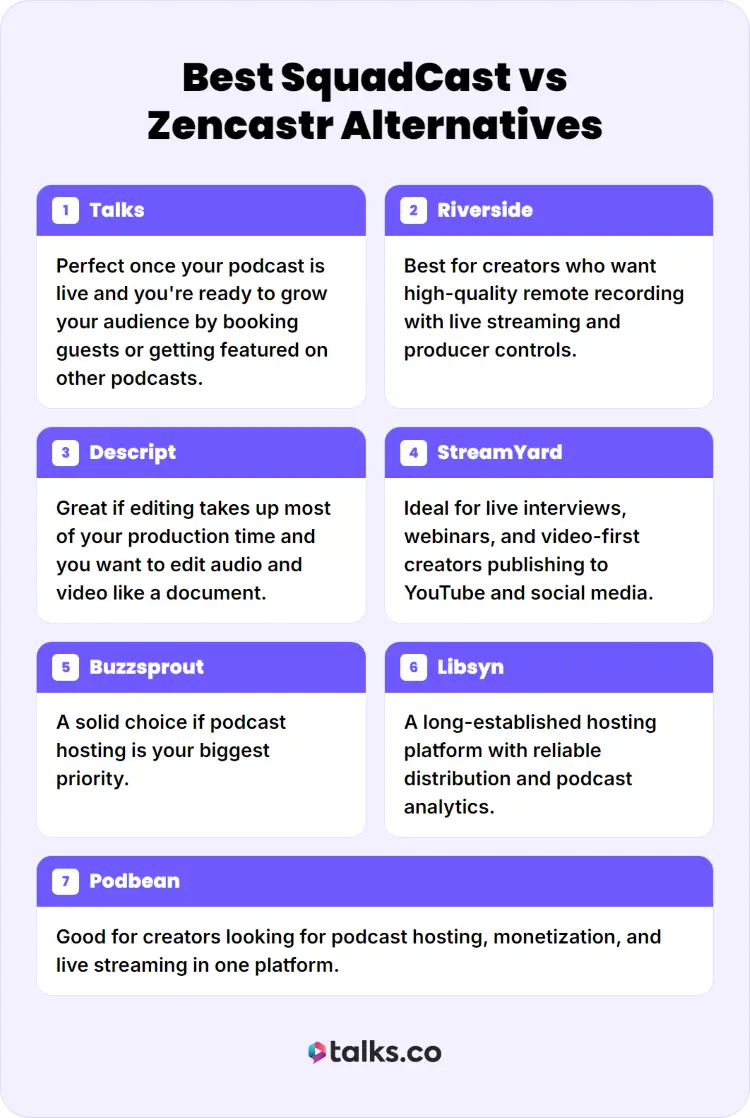
SquadCast and Zencastr aren’t your only options. Depending on your workflow, one of these platforms could be a better fit.
- Talks: Perfect once your podcast is live and you’re ready to grow your audience by booking guests or getting featured on other podcasts.
- Riverside: Best for creators who want high-quality remote recording with live streaming and producer controls.
- Descript: Great if editing takes up most of your production time and you want to edit audio and video like a document.
- StreamYard: Ideal for live interviews, webinars, and video-first creators publishing to YouTube and social media.
- Buzzsprout: A solid choice if podcast hosting is your biggest priority.
- Libsyn: A long-established hosting platform with reliable distribution and podcast analytics.
- Podbean: Good for creators looking for podcast hosting, monetization, and live streaming in one platform.
Your recording software is how you start a podcast with great episodes. Getting those episodes in front of new listeners is a different challenge.
That’s where Talks comes in.
Create a free creator profile, get matched with podcast hosts and guests in your niche, and let the new automation tools help start conversations while you’re busy creating your next episode.
After all, the best podcast setup in the world won’t grow your audience if nobody hears it.
Who’s It Gonna Be?
Whether you land on SquadCast or Zencastr, the best platform is the one you’ll actually use week after week.
Hopefully this SquadCast vs Zencastr comparison helped you find the right fit for your recording style, workflow, and budget.
Now comes the part that grows your podcast: getting in front of new audiences. Want podcast interviews landing in your inbox instead of spending hours pitching hosts?
Create your free Talks profile and let our new automation tools match you with the right podcasts, start conversations, and help you book interviews while you focus on creating.
Yes, I Want My Talks Profile Now!


