
You’re probably overthinking your streaming and video recording setup.
Most people do.
Somewhere between “I’ll just use my laptop camera” and “Do I really need a $2,000 DSLR to get 4K footage?” the momentum dies… and the best podcast never gets recorded.
But let me be the one to un-gatekeep this truth most gear guides won’t tell you: You don’t need fancy equipment or the most top quality webcam to start video podcasting.
You need something reliable, flattering on camera, and easy to use.
That’s where the best webcam for podcast wins.
The best podcast cameras are often the fastest way to go from idea to published episode without blowing your budget or turning your desk into a film studio just to record video calls.
In this guide, I break down the 11 best webcams for podcast recording in 2026.
By the end you’ll know:
- What actually matters when choosing the best webcam for podcasting
- Which features you want a webcam to have and which ones you can ignore (for now)
- And which podcast camera makes the most sense for your setup
Now let’s get you on camera.
11 Top Webcam for Podcast Recording (2026 Snapshot)
Here is a quick look at the 11 top webcams for podcasting to help you quickly identify which is the right choice for your show:
- Elgato Facecam: Best for professional live streaming with uncompressed video.
- Logitech C920S HD Pro Webcam: Best for beginners looking for reliable 1080p HD video.
- Logitech Brio 4K Webcam: Best for Mac users wanting premium 4K HDR video quality.
- OBSBOT Meet 2: Best for dynamic presentations with AI tracking and 4K resolution.
- OBSBOT Tiny 4K Webcam: Best for vloggers and solo creators who move around, thanks to its AI auto-framing.
- Logitech C270: Best for podcasters on a tight budget who still need HD camera quality.
- NexiGo Full HD Webcam: Best for recording on the go with its built-in battery.
- NexiGo N930AF HD Webcam: Best for simple setups needing a reliable microphone and autofocus.
- Razer Kiyo: Best for podcasters needing excellent lighting with its built-in ring light.
- Streamplify Cam: Best for streamers who want good quality video and a stylish design.
- Microsoft Modern Webcam: Best for portable setups and travel due to its compact design.
What Is a Video Podcast?
A video podcast is simply a podcast that includes a video component. Instead of just listening to the audio, your audience can watch you and your guests, creating a more engaging and personal experience.
Here are ten benefits of creating a video podcast:
- Stronger connection: Seeing facial expressions and body language makes you more relatable and builds an emotional bond with your audience which is crucial in podcasting.
- Better engagement: Visual content holds attention longer, keeping viewers focused and interested in your message.
- More content options: You can repurpose video into clips for TikTok, Instagram, YouTube Shorts, and social media graphics.
- Higher discoverability: Videos generate more likes, shares, and comments, boosting your reach on social platforms.
- Increased trust: Being seen on camera lets audiences connect emotionally and trust you more than just audio.
- Cross-platform reach: Video podcasts can be shared on multiple platforms, expanding your audience quickly.
- Better brand perception: Video adds polish and professionalism, enhancing how your podcast and brand are viewed.
- Live interaction: Live streaming video is more interactive and can bring out the best in audience participation.
- Accessibility: Adding subtitles or closed captions makes your content more accessible.
- More memorable: Visual storytelling and on-screen cues make your podcast content easier to remember and impactful.
Video podcast equipment list
To start a video podcast, you will need some basic video podcast equipment. While you don’t need a Hollywood-level studio, investing in a few key pieces can boost your podcast production value.
Here’s a quick list of what you will need:
- Camera: Choose a high-quality webcam with 1080p recording or another type of podcasting video camera.
- Microphone: While some webcams have a built-in microphone, using an external microphone will give you much better sound (e.g., Shure SM7B). Good audio is just as important as good video.
- Lighting: Good lighting can make a huge difference in your video quality. A simple ring light or a three-point lighting setup can make you look more professional (e.g., Godox key light or Elgato Ring Light).
- Tripod: A tripod will keep your webcam stable and help you position it at the perfect angle (e.g., Neewer 60-inch or Manfrotto Pixi).
- Computer: You need a reliable computer (or laptop) to handle video recording and editing (e.g., MacBook Pro M3 or Dell XPS 15).
- Software: You need software for recording, streaming, and editing your podcast episode (e.g., Riverside.fm or Descript).
6 Types of cameras for podcasts
When choosing a camera for your needs, there are several types to consider. Each has its own pros and cons, so the best camera for podcasting depends on your specific situation.
Here are the main types of cameras used for podcasts:
- Webcams: These are the most popular choice for podcasters. Webcams are affordable, easy to use, and connect directly to your computer. Modern webcams offer excellent video quality, often in 1080p video or even 4K.
- DSLR cameras: If you already own a DSLR camera, you can use it for your podcast. DSLR cameras offer superb image quality and the ability to change lenses for different looks. But, they can be expensive and require more setup, including potential limitations on battery life.
- Mirrorless cameras: Similar to DSLR cameras, mirrorless cameras provide exceptional video quality and interchangeable lenses. They are generally more compact and lightweight than DSLRs, making them a great option if you need portability.
- Camcorders: Designed specifically for video recording, camcorders typically have long recording times and excellent built-in microphones. They’re a reliable option for dedicated video producers.
- Action cameras: If your podcast involves recording on the go, an action camera like a GoPro is a good choice. They’re rugged and portable, but won’t perform as well in low-light conditions.
- Smartphones: Don’t underestimate the camera in your pocket. Many new smartphones can record in 4K and are a great budget option to get started.
Best Webcam for Podcast Recording (Top 11 Picks)
Webcams might be small, but they pack a lot of features to make podcast recording easier. There are many options available, but finding the perfect webcam for your podcast means balancing quality, features, and budget.
Here are the 11 best webcams on the market to help you create a professional-looking video podcast.
1. Elgato Facecam: Best webcam for video podcast
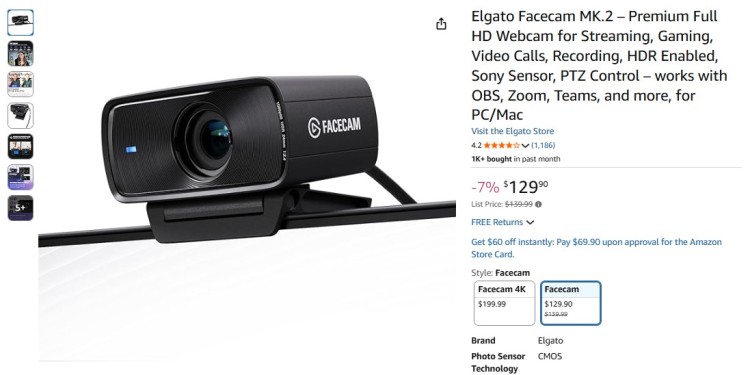
Best for: Streamers and content creators who want the best professional-grade video quality.
The Elgato Facecam is designed for serious creators, delivering uncompressed 1080p video at a smooth 60 fps. This webcam captures incredible detail, making it a top choice for a professional streaming setup.
Key features:
- Sony STARVIS CMOS sensor: This offers exceptional performance in low-light conditions, producing a clean image with minimal noise.
- Video quality: The Facecam’s standout feature is its uncompressed YUV video output. Unlike typical webcams that compress video, the Facecam provides a clean, artifact-free feed.
- Lens and focus: The fixed focus is optimized for a range of 12-47 inches, so you remain sharp without the distracting “hunting” that some autofocus systems exhibit.
- Software control: Elgato’s Camera Hub software is powerful and intuitive. It gives you DSLR-like manual control over shutter speed, ISO, white balance, and more.
Pros:
- Exceptional video quality at 60 fps
- Powerful software for manual control over settings
- No compression means a cleaner video signal
Cons:
- No built-in microphone
- Higher price point compared to other 1080p video webcams
Price: $130.66
2. Logitech C920S HD Pro Webcam
Best for: Beginners and podcasters looking for a reliable and affordable HD webcam.
The Logitech C920S is a classic for a reason and the webcam I used for my first LinkedIn Success Summit. It offers crisp 1080p video recording and is known for its reliability and ease of use, making it an excellent camera to get started with.
Key features:
- Video quality: The C920S captures Full HD 1080p video at 30 frames per second. The video is sharp and well-colored thanks to Logitech’s RightLight 2 technology, which automatically adjusts to your lighting conditions.
- Audio: It includes two microphones, one on each side of the lens, to capture more realistic stereo audio.
- Features and use: Its HD autofocus is generally quick and accurate, keeping you in focus even if you lean in or move slightly. The included privacy shutter is a thoughtful addition for peace of mind.
- Easy setup: As a plug-and-play device, it requires virtually no setup, making it perfect for those who are not tech-savvy.
Pros:
- Great value for the price
- Easy plug-and-play setup
- Good video and audio quality for most podcasting needs
Cons:
- The autofocus can sometimes be slow to adjust
- Video quality can degrade in very low-light situations
Price: $69.99
3. Logitech Brio 4K Webcam: Best webcam for podcast Mac
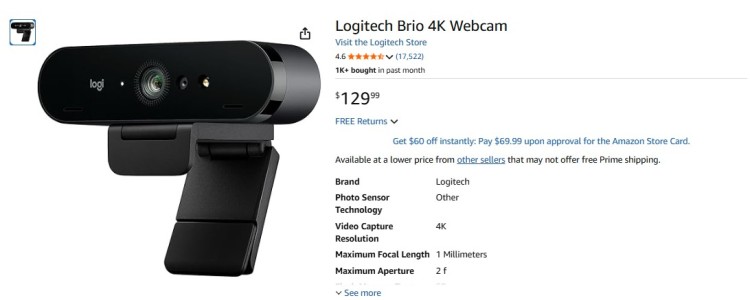
Best for: Mac users and professionals who need the best 4K video quality and advanced features.
The Logitech Brio is a powerhouse webcam that provides stunning 4K HDR video and integrates well with the Mac ecosystem. It’s the perfect webcam for your podcast if you want to future-proof your content and deliver the highest visual quality to your audience.
Key features:
- Video quality: The Brio is one of the few webcams that can stream and record in true 4K Ultra HD. It also supports 1080p at 30/60 fps and 720p at 30/60/90 fps for ultra-smooth slow-motion playback.
- Lighting: The inclusion of High Dynamic Range (HDR) via RightLight 3 technology means it excels at balancing difficult lighting, like a bright window behind you.
- Versatility: You can choose between a tight 65-degree shot for a head-and-shoulders frame, a balanced 78-degree view, or a wide 90-degree angle to show more of your background or include a guest.
- Advanced features: The Brio is equipped with an infrared sensor, making it compatible with Windows Hello for secure facial recognition login.
- Zoom: The 5x HD zoom (in 1080p) allows you to crop your shot without significant quality loss.
Pros:
- Incredible 4K video quality
- Excellent performance in both bright and low-light conditions
- Versatile field of view options
Cons:
- Higher price point
- Requires a USB 3.0 port for 4K video
Price: $129.99
4. OBSBOT Meet 2: Best 4K webcam for podcasting
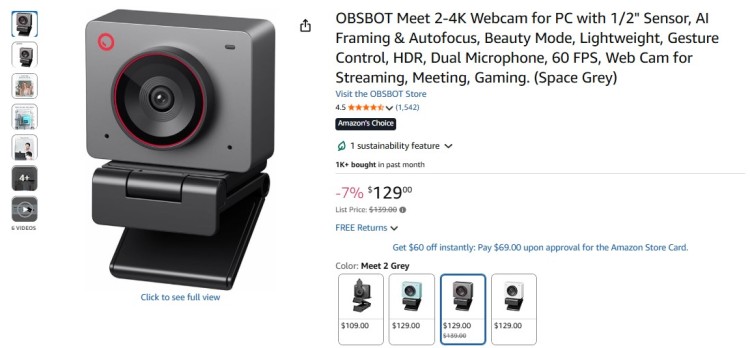
Best for: Dynamic hosts and remote workers who need a webcam that’s smart and versatile.
The OBSBOT Meet 2 is one of the best 4K webcams available, packed with AI-powered features. It’s a great webcam for anyone who moves around during their recordings, as its AI tracking will always keep you in the frame.
Key features:
- AI-powered framing: It can automatically track a person, keeping them centered in the shot. It also has a “Group Mode” that adjusts the frame to include everyone who enters the scene.
- Image quality: The large 1/2″ CMOS sensor and 4K resolution deliver a crisp, vibrant image. It performs very well in various lighting scenarios, and the autofocus is fast and reliable.
- Portability and design: The Meet 2 is surprisingly small and lightweight for its capabilities. It attaches magnetically to its monitor mount, making it easy to grab and position.
Pros:
- Stunning 4K video quality
- Intelligent AI features are extremely useful for solo creators
- Excellent audio capture from the built-in microphone
Cons:
- Higher price point
- May get hot with prolonged use
Price: $129
5. OBSBOT Tiny 4K Webcam
Best for: Vloggers and interactive podcasters who need a podcast equipment video cam with hands-free control.
The OBSBOT Tiny 4K is another fantastic AI-powered webcam. Its ability to pan, tilt, and zoom automatically makes it feel like you have your own personal camera operator.
Key features:
- Robotic gimbal: Unlike the digital zoom of other AI cameras, the Tiny 4K is mounted on a two-axis gimbal. This allows it to physically pan and tilt to follow you smoothly.
- Gesture control: You can make a gesture to select or deselect a tracking target and another to zoom in or out. This hands-free operation is ideal for solo creators in the middle of a recording.
- Video options: It delivers sharp 4K video at 30 fps and also offers a buttery-smooth 1080p at 60 fps option, which is great for streamers. The image quality from its 1/2.8″ Sony sensor is excellent, with good color reproduction and low-light performance.
Pros:
- Smooth and accurate AI tracking
- Excellent video quality in various resolutions and frame rates
- Compact and portable design
Cons:
- The AI features have a slight learning curve
Price: $104.88
6. Logitech C270: Cheap camera for video podcast
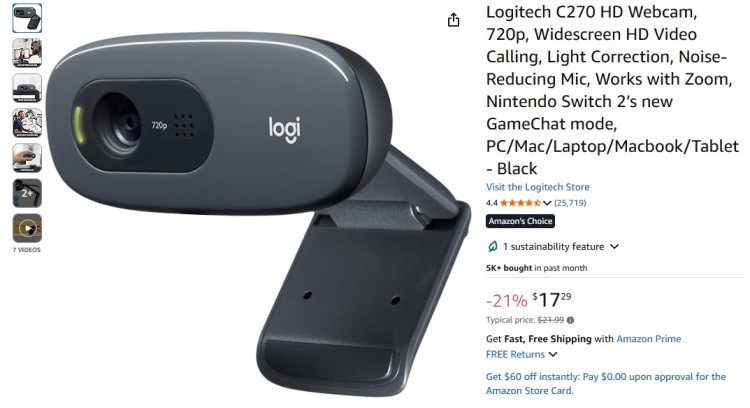
Best for: Podcasters on a very tight budget who still want reliable HD performance.
The Logitech C270 is a no-frills webcam that delivers where it counts. It provides crisp 720p HD video and is incredibly easy to set up, so it’s a perfect entry-level webcam.
Key features:
- Lighting: It uses Logitech’s RightLight technology to make automatic adjustments, which helps compensate for less-than-ideal lighting.
- Focus: The fixed focus means you don’t have to worry about autofocus issues, as long as you stay within a reasonable distance of the camera.
- Simplicity: There’s no software to install. Just plug it into a USB port, and it’s ready to go. The universal clip is also versatile, fitting securely on most laptops and monitors.
Pros:
- Very affordable
- Simple plug-and-play setup
- Decent video and audio quality for the price
Cons:
- Only 720p resolution
- Struggles in low-light conditions
Price: $17.29
7. NexiGo Full HD Webcam
Best for: Mobile podcasters and creators who need a portable solution.
The NexiGo Full HD Webcam stands out with its built-in rechargeable battery. This feature makes it a fantastic webcam for recording a podcast episode on the go, without needing to be tied to a power outlet.
Key features:
- Battery: The internal battery is the main feature here, offering up to two hours of recording time on a charge.
- Portability: You can place the camera anywhere, untethered from your computer.
- Video: It records in standard 1080p at 30 fps. The 110-degree wide-angle lens is also great for capturing more of your environment.
- Audio: The built-in microphone is serviceable but, like most integrated mics, tends to pick up ambient noise.
- Design: It includes a standard tripod socket in its base and a lens cover.
Pros:
- Completely portable with the onboard battery
- Good 1080p video quality
- Affordable price
Cons:
- Build quality is not as robust as premium models
Price: $26.99
8. NexiGo N930AF HD Webcam: Webcam with built in microphone
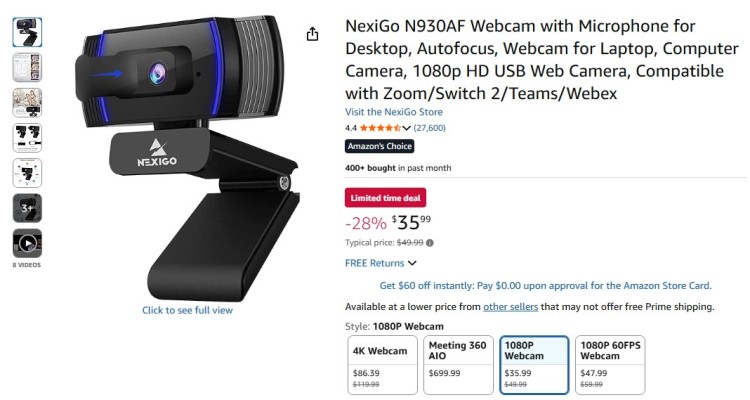
Best for: Budget-conscious creators who need a simple, all-in-one solution.
While an external microphone is always recommended for the best audio for your podcast, some webcams come with surprisingly good built-in mics.
The NexiGo N930AF offers solid 1080p video and a decent built-in microphone at a very low price. It’s a great budget pick if you need a webcam that can handle both audio and video out of the box.
Key features:
- All-in-one value: For a very low price, you get 1080p resolution, autofocus, and a noise-canceling microphone.
- Performance: The 1080p video is sharp, and the autofocus works reasonably well, adjusting to movements without too much delay.
- Lighting: The automatic low-light correction helps maintain a usable image even when the lighting isn’t perfect.
- Audio quality: The built-in noise-canceling microphone does a fair job of isolating your voice from ambient sounds like keyboard clicks or fan hum.
Pros:
- Excellent value for the price
- Good 1080p video quality
- The built-in mic is adequate for basic use
Cons:
- The microphone picks up some background noise
- Build quality feels cheaper than more expensive models
Price: $35.99
9. Razer Kiyo: Webcam with good quality
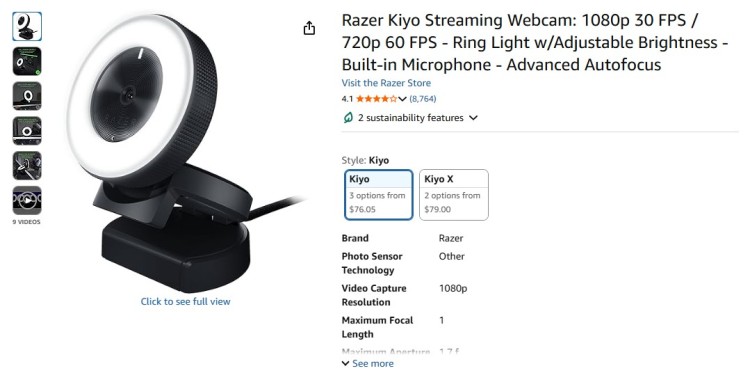
Best for: Streamers and podcasters who record in less-than-ideal lighting conditions.
The Razer Kiyo is famous for its built-in ring light, which provides even, flattering lighting for your face. This feature is important in podcasting if you don’t have a dedicated lighting setup.
Key features:
- The ring light: The multi-step LED ring light surrounding the lens provides a soft, diffused light source that minimizes harsh shadows on your face. You can adjust the brightness by twisting the outer ring.
- Video performance: The Kiyo can stream at 1080p/30 fps or 720p/60 fps. The autofocus is also fast and reliable, a hallmark of Razer’s gaming-focused products.
- Design: The camera is compact and features a versatile mount that can clip to a monitor or fold into a base to sit on a desk. It also has a standard tripod mount.
Pros:
- The integrated ring light is a game-changer for lighting
- Good video quality with smooth motion at 60 fps in 720p
- Compact and easy to mount
Cons:
- The ring light can create reflections in glasses
- The built-in microphone is not the best
Price: $98
10. Streamplify Cam
Best for: Streamers looking for a high-quality webcam with a stylish design.
The Streamplify Cam offers full 1080p HD video at 60 fps, providing smooth and detailed footage. Its glass lens with smart autofocus makes sure your video is always sharp.
Key features:
- Smooth video: The key selling point of the Streamplify Cam is its ability to deliver 1080p video at 60 frames per second.
- Lens quality: It features an all-glass lens, which generally provides a sharper and clearer image than the plastic lenses found in many budget webcams.
- Video performance: The autofocus is responsive, and the camera also features automatic light enhancement to brighten up your image.
- Bonus accessories: The Streamplify Cam comes with a compact tripod and privacy cover in the box.
Pros:
- Smooth video at 60 fps
- Stylish design with a fabric finish
- Includes a useful tripod and privacy cover
Cons:
- The software could be stronger
- The mount may not be secure on all monitors
Price: $101.71
11. Microsoft Modern Webcam: Webcam for vlog
Best for: Remote podcasters and vloggers who need a compact and portable webcam.
The Microsoft Modern Webcam is designed for portability. It’s small, lightweight, and delivers quality 1080p video. It’s an excellent choice for recording video conference calls or vlogs on the go.
Key features:
- High-quality video: This webcam delivers a 1080p image with HDR and “True Look” technology, which includes auto exposure, auto white balance, and facial retouching.
- Portability: It’s incredibly small and light, making it easy to toss in a bag.
- Privacy: It has an integrated privacy shutter, which has an LED indicator light so you know for sure when the camera is off.
- Mounting: The mounting system is versatile, clipping easily to thin laptops or thicker monitors. It also includes a standard 1/4″ tripod thread in its base, giving you more creative mounting options.
- Microsoft Teams: Being certified for Microsoft Teams lets you seamlessly integrate it for professional calls.
Pros:
- Extremely compact and portable
- Good 1080p video quality with HDR
- The privacy shutter is a great feature
Cons:
- No 4K option
- Not-so good performance in low light
Price: $49.95
What Is the Best Camera for Video Recording?
The “best” camera really depends on what you’re trying to achieve with your vodcast. There’s no one-size-fits-all answer, as each podcaster has different needs, budgets, and technical skills.
My first webcam was the Logitech C920. Back then, I needed it for my first virtual summit, the LinkedIn Success Summit, and the very first interviews I did with guest speakers. It got me through 400+ interviews and podcast appearances on other people’s shows.
I still have it, but with more demands for video, I’ve now upgraded to a 4K camera.
That said, here are some top picks for different podcasting situations to help you make your choice.
What is the best camera for a podcast?
If I had to pick one best overall webcam from this list for general podcasting, it would be the Logitech C920S Pro.
- Strikes the perfect balance between quality, ease of use, and affordability.
- Delivers excellent 1080p HD video.
- Has a decent built-in microphone for backup.
- Its plug-and-play nature makes it incredibly simple to get started.
For most new and intermediate podcasters, the Logitech C920S offers everything you need to create a professional-looking video podcast without a steep learning curve or a hefty price tag.
Which is the best webcam for computer?
For laptop users or those who need a portable webcam for their computer, the Microsoft Modern Webcam is an outstanding choice.
- Its compact design makes it easy to pack and set up anywhere.
- Despite its small size, it delivers high-quality 1080p video with HDR.
- Its versatile mounting system, including a tripod thread, gives you flexibility for framing your shot.
It’s the perfect companion for the podcaster on the move.
What is the best webcam for a desktop computer?
For a desktop setup where portability is less of a concern, the Elgato Facecam is a top contender for the best webcam for a desktop computer.
- Built for creators looking for high-quality, uncompressed video.
- You can take full advantage of its powerful software and Sony sensor to produce professional-level streams and recordings.
- The lack of a microphone is a non-issue in a desktop setup where a dedicated external microphone is typically used to get the best audio.
What webcam should I use for streaming?
For live streaming, the Razer Kiyo stands out as the best webcam.
- Its built-in ring light makes sure you are perfectly lit even in suboptimal environments.
- The ability to stream at 60 fps (in 720p) results in smooth, fluid motion ideal for live broadcasts.
- Many streaming platforms and audiences appreciate the higher frame rate.
How to Choose the Best Webcam for Your Podcast
Choosing the best webcam for your podcast is an important step to make sure your video content looks professional and engaging.
But with so many options out there, it’s easy to feel overwhelmed. This guide will walk you through the steps to pick the perfect webcam for your podcast setup.
1. Assess your podcasting needs
Begin by evaluating the style and format of your podcast.
Are you a solo host speaking directly to the camera, or do you have multiple hosts or guests joining remotely via Zoom or Riverside.FM?
- Solo hosts: A high-resolution webcam with reliable autofocus is ideal.
- Multi-person setups: Choose a webcam with a wider field of view (FOV) to capture more of the room or multiple people comfortably.
If you want to make shopping easier, choose a podcast equipment bundle for the complete package.
2. Set a budget
Decide on a budget before you hit the stores. Here’s the typical range of costs:
- Basic webcams (under $100): Adequate video and audio quality, but no 4K capabilities
- Professional webcams ($200+): 4K video recording and possibly AI features for framing
3. Test before you buy
If possible, test your shortlisted webcams using the manufacturer’s preview software to evaluate video quality and ease of use.
Other than that, follow these tips to be sure:
- Gather real-world feedback: Check user reviews and podcasting forums like Reddit’s r/podcasting.
- Purchasing from flexible retailers: Buy from Amazon or B&H Photo, which helps you try the product risk-free with their return policies.
- Check compatibility: Confirm that your chosen webcam is fully compatible with your computer, especially if you’re using a MacBook Pro M3 or a Windows system.
4. Fix your podcasting setup
Add your new webcam to your podcasting setup and get ready to record.
- Fix your framing: Mount your webcam on a sturdy tripod and position it at eye level.
- Brighten your space: Pair it with good lighting to avoid shadows and create a polished look.
- Film a test video: Record a sample and adjust angles and lighting until you achieve your desired look.
- Capture quality audio: Complement your webcam with a high-quality external mic that matches your sharp visuals.
Getting the right video podcast setup is a key step in learning how to start a video podcast. You can even find a podcast equipment bundle with a camera to simplify the process.
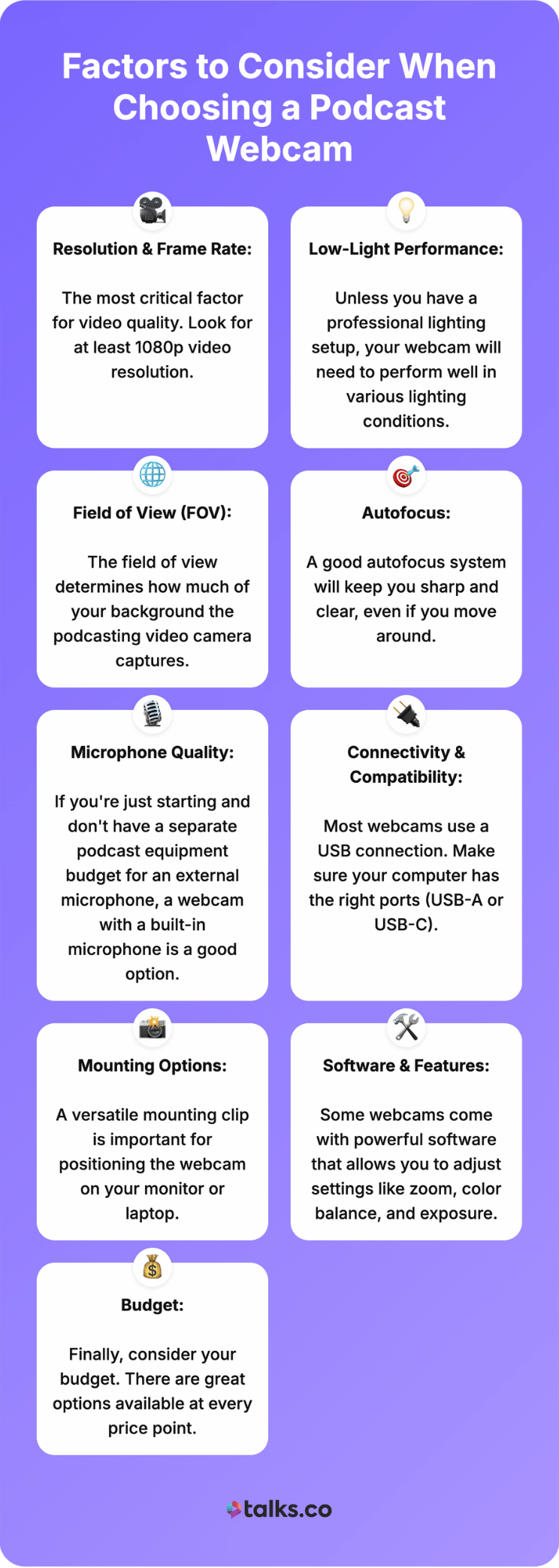
Factors to Consider When Choosing a Podcast Webcam
Whether you’re looking for gifts for podcasters or building your own podcast starter kit, knowing what equipment is needed for a podcast and how much podcast equipment costs will guide your decisions.
Here are the most important factors to keep in mind when you choose a webcam for your podcast recording sessions.
- Resolution and frame rate: This is the most critical factor for video quality. Look for at least 1080p video resolution. A frame rate of 30 fps is standard, but 60 fps will give you much smoother video. A 4K webcam provides the highest quality but requires more bandwidth and storage for the larger video files.
- Low-light performance: Unless you have a professional lighting setup, your webcam will need to perform well in various lighting conditions. Look for webcams with larger sensors, wider apertures (lower f-stop number), and features like auto light correction or HDR. A webcam with good quality in low light is essential.
- Field of view (FOV): The field of view determines how much of your background the podcasting video camera captures. A narrower FOV (around 65-78 degrees) is great for solo podcasters, while a wider FOV (90 degrees or more) is better for interviews or group podcasts.
- Autofocus: A good autofocus system will keep you sharp and clear, even if you move around. Cheaper webcams may have fixed focus, which is fine if you stay in one spot, but autofocus adds a layer of professionalism.
- Microphone quality: If you’re just starting and don’t have a separate podcast equipment budget for an external microphone, a webcam with a built-in microphone is a good option. Look for models with dual mics and noise-canceling features to ensure good audio.
- Connectivity and compatibility: Most webcams use a USB connection. Make sure your computer has the right ports (USB-A or USB-C). Also, check if the webcam is compatible with your operating system (Windows, macOS) and your chosen recording software.
- Mounting options: A versatile mounting clip is important for positioning the webcam on your monitor or laptop. A tripod mount offers even more flexibility for creative camera angles.
- Software and features: Some webcams come with powerful software that allows you to adjust settings like zoom, color balance, and exposure. Features like AI tracking or a built-in ring light can also significantly enhance your podcast production.
- Budget: Finally, consider your budget. There are great options available at every price point. You can find a great webcam for a cheap podcast setup or invest in the best 4k model if you have the resources.
For more on podcast equipment for beginners, we have got you covered with this list.
No Small Choice
Now that you have the best webcam for podcast recording, it’s time to get your voice out there. That is where Talks comes in.
Talks connects podcast hosts like you with passionate experts looking to share their insights and stories.
With an intuitive platform, booking the guests you need is hassle free. No cold emails. No endless scavenger hunt on social media.
Want in? It’s as easy as creating a FREE Creator Profile to make quick and meaningful matches.
Find the perfect guest and record unforgettable interviews.
Register for a FREE Talks Creator Profile Today.